The incident. An analyst counts students who haven't finished onboarding with WHERE onboarding_step != 'done'. The dashboard says 12,000. The real number is 31,000: 19,000 students have onboarding_step set to NULL because they never started, and NULL != 'done' is not true. The query silently dropped them.
You already know: tables, keys and why databases exist (Databases); Python lists and dicts.
1. Tables, rows and keys
The question. What is a table, and why does every table need a key?
Start from nothing. A table is a set of rows with the same columns, each column having a type. A primary key uniquely identifies each row (a student ID); a foreign key points at another table's primary key (an enrolment's student_id). Rows have no inherent order: a table is a set, so any order you see is accidental unless you ask for one with ORDER BY. SQL is declarative: you say what you want, and the database's planner decides how to get it.
import sqlite3

db = sqlite3.connect(":memory:")
db.executescript("""
CREATE TABLE students (id INTEGER PRIMARY KEY, name TEXT NOT NULL, country TEXT, onboarding_step TEXT, joined DATE);
INSERT INTO students VALUES
  (1, 'Asha', 'IN', 'done', '2026-01-04'), (2, 'Ben', 'GB', 'profile', '2026-02-11'),
  (3, 'Chen', 'CN', NULL, '2026-02-20'),   (4, 'Dana', NULL, 'done', '2026-03-01'),
  (5, 'Eli', 'US', NULL, '2026-03-15'),    (6, 'Fatima', 'NG', 'courses', '2026-03-16');
""")
try:
    db.execute("INSERT INTO students VALUES (1, 'Duplicate', 'US', NULL, '2026-04-01')")
except sqlite3.IntegrityError as e:
    print("primary key protects identity:", e)
print(db.execute("SELECT COUNT(*) FROM students").fetchone()[0], "students")
The duplicate ID is refused (UNIQUE constraint failed: students.id), and the table still holds 6 students.
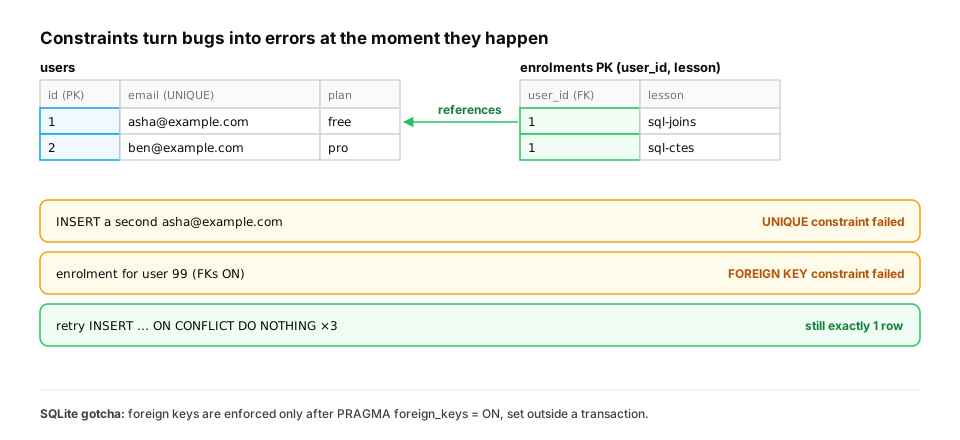
A real-world example: let constraints catch what application code misses. Application checks like "does this email already exist?" race each other. Two sign-up requests arrive in the same millisecond, both check, both see nothing, and both insert. A UNIQUE constraint can't race, because the database checks it inside the write itself. The same goes for foreign keys (no enrolment for a user who doesn't exist) and for idempotent inserts that are safe to retry:
import sqlite3

db = sqlite3.connect(":memory:")
db.executescript("""
CREATE TABLE users (id INTEGER PRIMARY KEY, email TEXT NOT NULL UNIQUE, plan TEXT NOT NULL DEFAULT 'free');
CREATE TABLE enrolments (user_id INTEGER NOT NULL REFERENCES users(id), lesson TEXT NOT NULL,
                         PRIMARY KEY (user_id, lesson));
INSERT INTO users (email) VALUES ('asha@example.com');
""")

try:
    db.execute("INSERT INTO users (email) VALUES ('asha@example.com')")      # a double-submitted sign-up form
except sqlite3.IntegrityError as e:
    print("UNIQUE:", e)

db.execute("INSERT INTO enrolments VALUES (99, 'sql-joins')")               # user 99 doesn't exist...
print("orphan accepted with foreign keys OFF:", db.execute("SELECT COUNT(*) FROM enrolments").fetchone()[0])

db.execute("PRAGMA foreign_keys = ON")                                      # inside the open transaction: silently ignored
print("pragma took effect:", db.execute("PRAGMA foreign_keys").fetchone()[0] == 1)
db.commit()                                                                 # end the transaction first...
db.execute("PRAGMA foreign_keys = ON")                                      # ...then SQLite enforces FKs
print("pragma took effect:", db.execute("PRAGMA foreign_keys").fetchone()[0] == 1)
try:
    db.execute("INSERT INTO enrolments VALUES (98, 'sql-ctes')")
except sqlite3.IntegrityError as e:
    print("with foreign_keys ON:", e)

upsert = """INSERT INTO enrolments VALUES (1, 'sql-joins')
            ON CONFLICT (user_id, lesson) DO NOTHING"""                     # safe to retry: idempotent
for _ in range(3):
    db.execute(upsert)
print("enrolments for user 1 after 3 retries:", db.execute("SELECT COUNT(*) FROM enrolments WHERE user_id = 1").fetchone()[0])
- The duplicate sign-up fails with
UNIQUE constraint failed: users.email. - With foreign keys off, which is SQLite's default, an enrolment for non-existent user 99 is accepted (
1orphan row). Worse, the firstPRAGMA foreign_keys = ONsilently does nothing (False), because Python'ssqlite3had already opened a transaction for the insert, and SQLite ignores that pragma inside a transaction. After a commit it takes effect (True), and user 98's enrolment is refused:FOREIGN KEY constraint failed. - The
ON CONFLICT … DO NOTHINGinsert runs three times and leaves exactly1row. A retried job, or a client that sends the same request twice, can't create duplicates.
In production. PostgreSQL and MySQL (InnoDB) enforce foreign keys by default. SQLite's opt-in behaviour catches people who prototype on SQLite and assume their data is clean. Upserts (
ON CONFLICTin PostgreSQL and SQLite,MERGEin several warehouses) are how event ingestion, feature backfills and webhook handlers stay idempotent when the same message arrives more than once, which at-least-once message delivery guarantees will happen eventually.
From production
A sign-up handler does if not db.execute('SELECT 1 FROM users WHERE email = ?', (e,)).fetchone(): db.execute('INSERT INTO users (email) VALUES (?)', (e,)). Support finds a handful of duplicate accounts every week.
What's the robust fix?
Show the answer
A. Add a UNIQUE constraint on email and handle the integrity error (or use INSERT … ON CONFLICT), so the database rejects the second concurrent insert — Check-then-insert races: two concurrent requests both pass the check. A unique constraint is enforced atomically inside the write. (Normalising case is a good extra step, but it doesn't fix the race.)
2. SELECT, WHERE and ORDER BY
The question. How do you ask for exactly the rows and columns you need?
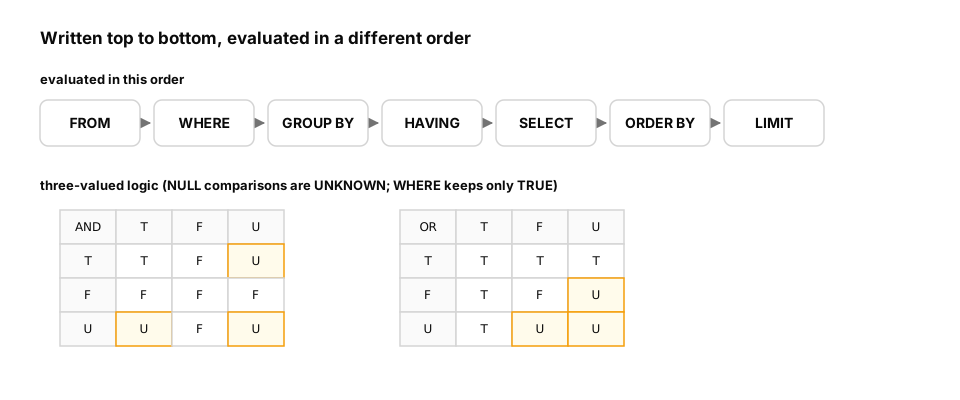
Start from nothing. SELECT picks columns (and computes expressions), FROM names the table, WHERE filters rows, ORDER BY sorts, LIMIT truncates. Queries are written in that order but evaluated logically as FROM → WHERE → SELECT → ORDER BY → LIMIT, which is why a column alias defined in SELECT can be used in ORDER BY but not in WHERE.
import sqlite3

db = sqlite3.connect(":memory:")
db.executescript("""
CREATE TABLE students (id INTEGER PRIMARY KEY, name TEXT, country TEXT, onboarding_step TEXT, joined DATE);
INSERT INTO students VALUES (1,'Asha','IN','done','2026-01-04'),(2,'Ben','GB','profile','2026-02-11'),
 (3,'Chen','CN',NULL,'2026-02-20'),(4,'Dana',NULL,'done','2026-03-01'),(5,'Eli','US',NULL,'2026-03-15'),(6,'Fatima','NG','courses','2026-03-16');
""")
q = """
SELECT name, joined, julianday('2026-04-01') - julianday(joined) AS days_since_join
FROM students
WHERE joined >= '2026-02-15'
ORDER BY days_since_join DESC
LIMIT 3
"""
for row in db.execute(q):
    print(row)
try:
    db.execute("SELECT name, joined AS j FROM students WHERE j > '2026-03-01'").fetchall()
    print("alias in WHERE accepted (SQLite is lenient here; most databases reject it)")
except sqlite3.OperationalError as e:
    print("alias in WHERE rejected:", e)
ISO dates (YYYY-MM-DD) compare correctly as strings, which is one reason to store dates in that format. Note that SQLite tolerates a SELECT alias inside WHERE as an extension; PostgreSQL and most other databases reject it, so don't rely on it.
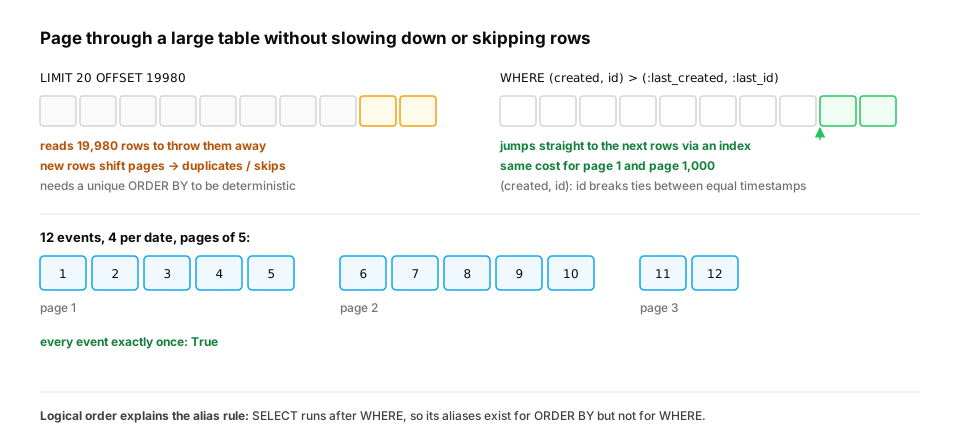
A real-world example: paging through results. Every admin screen, API endpoint and export job pages through rows. The first version is usually ORDER BY created LIMIT 20 OFFSET 40. It has two production problems. The database must read and discard every row before the offset, so deep pages get slower and slower. And when the sort key isn't unique (many rows share a timestamp) or new rows arrive between requests, rows shift between pages, and users see duplicates or miss items. Keyset pagination remembers the last row's sort key and asks for the rows after it:
import sqlite3

db = sqlite3.connect(":memory:")
db.execute("CREATE TABLE events (id INTEGER PRIMARY KEY, created TEXT)")
db.executemany("INSERT INTO events VALUES (?, ?)",
               [(i, f"2026-03-{1 + i // 4:02d}") for i in range(1, 13)])     # 4 events share each date

def keyset_page(after=None, size=5):
    if after is None:
        q, args = "SELECT created, id FROM events ORDER BY created, id LIMIT ?", (size,)
    else:
        q = "SELECT created, id FROM events WHERE (created, id) > (?, ?) ORDER BY created, id LIMIT ?"
        args = (*after, size)
    return db.execute(q, args).fetchall()

page, seen = keyset_page(), []
while page:
    seen += [i for _, i in page]
    print([i for _, i in page])
    page = keyset_page(after=page[-1])                                      # continue after the last row seen
print("every event exactly once:", sorted(seen) == list(range(1, 13)))
The pages come back as [1, 2, 3, 4, 5], [6, 7, 8, 9, 10] and [11, 12], and every event appears exactly once (True), even though four events share each date. Two details make it work. The sort key (created, id) is unique because id breaks ties. And the row-value comparison (created, id) > (?, ?) means "after this exact row", which an index on (created, id) can jump to directly.
In production. This is why many public APIs return a
next_cursor(an encoded last-seen key) instead of a page number, and why database guides recommend keyset or "seek" pagination for large tables. KeepOFFSETfor small, admin-only lists. Whichever you use, make theORDER BYunique, or the order of tied rows is up to the database.
Quick check
Why can't you rely on the order of rows returned by SELECT * FROM students without ORDER BY?
Show the answer
D. A table is an unordered set; the order depends on storage and the chosen plan, and can change after inserts, updates or index changes — Without ORDER BY the database may return rows in whatever order is cheapest. It often looks stable in testing and then changes in production.
3. NULL and three-valued logic
The question. Why did onboarding_step != 'done' miss 19,000 students?
Start from nothing. NULL means "unknown" (or "missing"), not empty string or zero. Any comparison with NULL yields UNKNOWN, not TRUE or FALSE, and WHERE keeps only rows where the condition is TRUE. So NULL != 'done' is UNKNOWN and the row is dropped; even NULL = NULL is UNKNOWN. Use IS NULL / IS NOT NULL, or COALESCE(col, default) to substitute a value. Logic follows three-valued rules: UNKNOWN AND FALSE is FALSE, UNKNOWN OR TRUE is TRUE, everything else involving UNKNOWN stays UNKNOWN. The same trap appears in NOT IN (subquery) when the subquery contains a NULL: the whole predicate becomes UNKNOWN and returns nothing.
import sqlite3

db = sqlite3.connect(":memory:")
db.executescript("""
CREATE TABLE students (id INTEGER PRIMARY KEY, name TEXT, country TEXT, onboarding_step TEXT);
INSERT INTO students VALUES (1,'Asha','IN','done'),(2,'Ben','GB','profile'),(3,'Chen','CN',NULL),
 (4,'Dana',NULL,'done'),(5,'Eli','US',NULL),(6,'Fatima','NG','courses');
CREATE TABLE blocked_countries (code TEXT);
INSERT INTO blocked_countries VALUES ('XX'), (NULL);
""")
count = lambda q: db.execute(q).fetchone()[0]
print("!= 'done':                    ", count("SELECT COUNT(*) FROM students WHERE onboarding_step != 'done'"))
print("IS NULL OR != 'done':         ", count("SELECT COUNT(*) FROM students WHERE onboarding_step IS NULL OR onboarding_step != 'done'"))
print("COALESCE(...,'none') != 'done':", count("SELECT COUNT(*) FROM students WHERE COALESCE(onboarding_step, 'none') != 'done'"))
print("NULL = NULL is", db.execute("SELECT NULL = NULL").fetchone()[0], "(None means UNKNOWN)")
print("NOT IN with a NULL in the list:", count("SELECT COUNT(*) FROM students WHERE country NOT IN (SELECT code FROM blocked_countries)"))
print("NOT EXISTS instead:            ", count("""SELECT COUNT(*) FROM students s
    WHERE NOT EXISTS (SELECT 1 FROM blocked_countries b WHERE b.code = s.country)"""))
The naive filter finds 2 of the 4 unfinished students. NOT IN against a list containing a NULL returns zero rows, a famous bug; NOT EXISTS behaves as intended (it returns all 6, including Dana, whose own country is NULL). Rule of thumb: every nullable column in a WHERE clause deserves a deliberate decision about what NULL should mean.
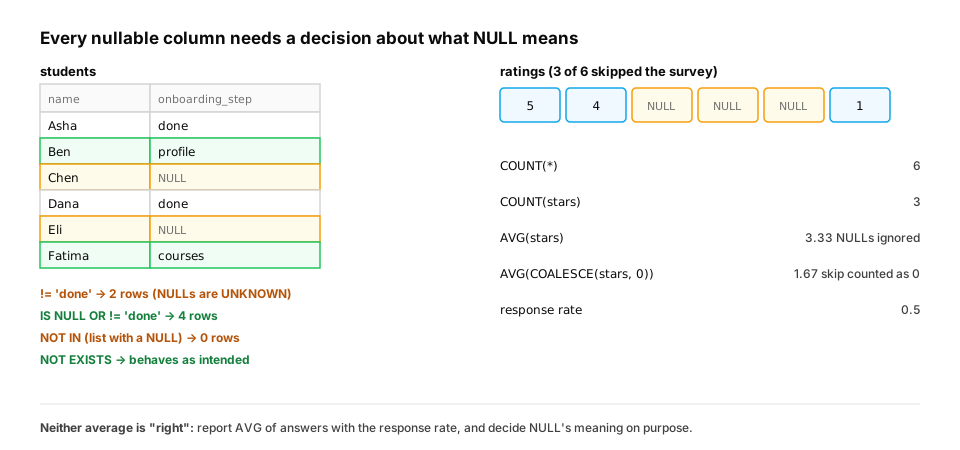
NULL in aggregates: the same question, in a metric. Aggregate functions skip NULLs: COUNT(col), AVG, SUM, MIN and MAX all ignore them, while COUNT(*) counts rows. That's usually what you want, but it silently changes what a metric means:
import sqlite3

db = sqlite3.connect(":memory:")
db.executescript("""
CREATE TABLE ratings (lesson TEXT, stars INTEGER);         -- stars is NULL when the user skipped the survey
INSERT INTO ratings VALUES ('sql-joins', 5), ('sql-joins', 4), ('sql-joins', NULL), ('sql-joins', NULL),
                           ('sql-joins', NULL), ('sql-joins', 1);
""")
row = db.execute("""
SELECT COUNT(*), COUNT(stars), AVG(stars), AVG(COALESCE(stars, 0)),
       ROUND(1.0 * COUNT(stars) / COUNT(*), 2)
FROM ratings""").fetchone()
print("rows:", row[0], "| answered:", row[1], "| AVG(stars):", round(row[2], 2),
      "| AVG treating skip as 0:", round(row[3], 2), "| response rate:", row[4])
There are 6 rows but only 3 answers. AVG(stars) is 3.33, the average among people who answered. Treating a skip as zero stars gives 1.67, a very different story from the same data. Neither number is wrong on its own. Each answers a different question, which is why a rating should always be reported with its response rate (0.5 here). The 1.0 * forces decimal division: in SQLite and PostgreSQL, integer divided by integer truncates, so 3 / 6 would be 0.
In production. Missing values drive real ML bugs. A feature query that uses
AVG(rating)per user gives the model no signal about how many ratings exist. A model trained onCOALESCE(x, 0)learns that "unknown" means zero. A common practice in feature pipelines is to keep the imputed value and an explicitx_is_missingflag column, so the model can tell "zero" from "unknown" (SQL for ML, later in this path).
From production
A query SELECT * FROM orders WHERE coupon_code <> 'STAFF' is meant to exclude staff orders.
What happens to orders with no coupon (coupon_code IS NULL)?
Show the answer
C. They are excluded, because NULL <> 'STAFF' is UNKNOWN and WHERE keeps only TRUE rows — Comparisons with NULL are UNKNOWN. To keep them, write coupon_code IS NULL OR coupon_code <> 'STAFF' or use COALESCE.
Check yourself
- What do primary and foreign keys guarantee?
- In what logical order is a SELECT query evaluated?
- Why does
WHERE x != 'a'drop rows where x is NULL? - Why is
NOT IN (subquery)dangerous, and what's the safe alternative? - Why does a UNIQUE constraint prevent duplicate sign-ups that an application-level "check, then insert" lets through?
- What two problems does keyset pagination fix compared with
LIMIT … OFFSET?
Answers
- A primary key identifies each row uniquely; a foreign key references an existing row in another table.
- FROM → WHERE → GROUP BY → HAVING → SELECT → ORDER BY → LIMIT.
- The comparison yields UNKNOWN, and WHERE keeps only TRUE rows.
- If the subquery returns any NULL, the predicate is UNKNOWN for every row and nothing is returned. Use NOT EXISTS (or filter NULLs out of the subquery).
- The database checks the constraint atomically as part of the write, so two concurrent inserts can't both succeed. Two separate checks can both pass before either insert happens.
- Deep pages no longer scan and discard all earlier rows, and rows don't shift between pages when new rows arrive or sort values tie (given a unique sort key).
Exercise
Write queries against the students table to return: (a) students who joined in March 2026 sorted by name, (b) students whose country is unknown, (c) a column status that shows 'not started' for NULL onboarding, 'finished' for 'done', and 'in progress' otherwise (use CASE), sorted so that 'not started' comes first.
Solution
import sqlite3

db = sqlite3.connect(":memory:")
db.executescript("""
CREATE TABLE students (id INTEGER PRIMARY KEY, name TEXT, country TEXT, onboarding_step TEXT, joined DATE);
INSERT INTO students VALUES (1,'Asha','IN','done','2026-01-04'),(2,'Ben','GB','profile','2026-02-11'),
 (3,'Chen','CN',NULL,'2026-02-20'),(4,'Dana',NULL,'done','2026-03-01'),(5,'Eli','US',NULL,'2026-03-15'),(6,'Fatima','NG','courses','2026-03-16');
""")
print(db.execute("SELECT name FROM students WHERE joined BETWEEN '2026-03-01' AND '2026-03-31' ORDER BY name").fetchall())
print(db.execute("SELECT name FROM students WHERE country IS NULL").fetchall())
q = """
SELECT name,
       CASE WHEN onboarding_step IS NULL THEN 'not started'
            WHEN onboarding_step = 'done' THEN 'finished'
            ELSE 'in progress' END AS status
FROM students
ORDER BY CASE WHEN onboarding_step IS NULL THEN 0 ELSE 1 END, name
"""
for row in db.execute(q):
    print(row)
The CASE expression handles NULL first, explicitly, which is the habit to build. Sorting by a CASE expression puts the 'not started' students at the top without needing an extra column.
This unlocks:
- Joins — combining students with enrolments and progress.
- Aggregation — counting and summarizing groups of rows.