The incident. At 3 a.m. an LLM provider has a 30-second blip. A team's job retries failed calls in a while True: loop with no pause and no limit. When the provider comes back, it sees 40,000 requests per second from one customer and blocks the account for the day. The bug wasn't the outage. It was a loop that didn't know when to stop.
You already know: names, values, types and truthiness (Values, names and types).
1. Decisions: if, elif, else
The question. How does a program choose between paths?
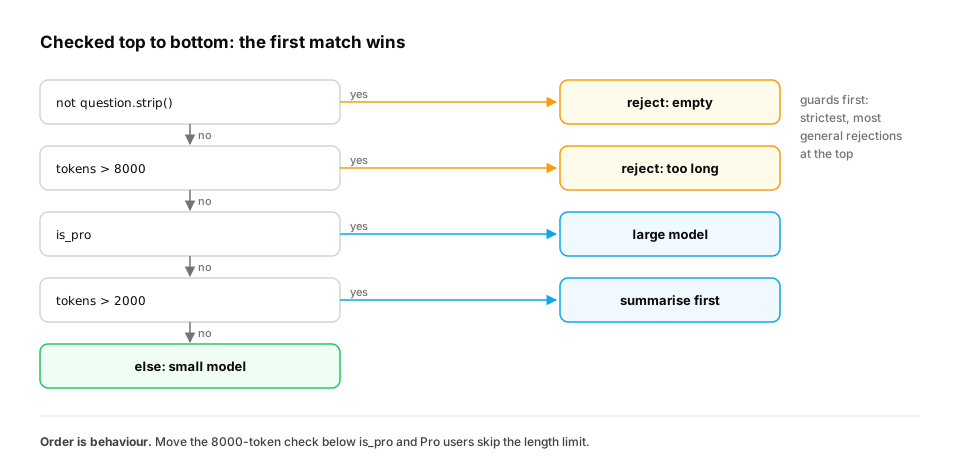
Start from nothing. if runs a block only when its condition is truthy. elif ("else if") tries the next condition, and else catches everything left. Python checks them top to bottom and stops at the first match, so order matters. A useful habit is to reject bad input first (guard clauses), so the main logic isn't buried in nesting:
requests = [
    ("   ", True, 10),
    ("explain attention", False, 9000),
    ("explain attention", True, 500),
    ("summarize this doc", False, 3000),
    ("hi", False, 5),
]
for question, is_pro, tokens in requests:     # each tuple is unpacked into three names
    if not question.strip():
        decision = "reject: empty question"
    elif tokens > 8000:
        decision = "reject: too long"
    elif is_pro:
        decision = "large model"
    elif tokens > 2000:
        decision = "summarize first, then small model"
    else:
        decision = "small model"
    print(f"{question!r:22} -> {decision}")
Each request gets exactly one decision. Swap the tokens > 8000 check below is_pro and Pro users could send 9,000-token prompts. Put the strictest, most general rejections first.
When the ladder grows: rules as data. Real routing logic keeps growing: per-customer limits, a model being retired, a region that must stay in the EU. A 15-branch if/elif is hard to review, and the order bug above gets easier to make. A common next step keeps the same "first match wins" behaviour but turns the rules into a list you can read, test and log:
ROUTES = [                                          # (rule name, test, decision): first match wins
    ("empty",     lambda r: not r["q"].strip(),        "reject: empty question"),
    ("too long",  lambda r: r["tokens"] > 8000,        "reject: too long"),
    ("pro",       lambda r: r["pro"],                  "large model"),
    ("long",      lambda r: r["tokens"] > 2000,        "summarize first, then small model"),
]

def route(request):
    for name, test, decision in ROUTES:
        if test(request):
            return decision, name
    return "small model", "default"

for r in [{"q": "hi", "pro": False, "tokens": 5},
          {"q": "explain attention", "pro": True, "tokens": 9000},
          {"q": "summarize", "pro": False, "tokens": 3000}]:
    print(route(r))
This prints ('small model', 'default'), ('reject: too long', 'too long') and ('summarize first, then small model', 'long'). The second request is Pro but still rejected, because "too long" comes first in the list. The function also returns which rule fired. Logging that name is how you answer "why did this user get the small model?" a week later. (lambda is a one-line function; the Functions lesson covers it.)
In production. Feature-flag systems, API gateways and fraud engines all work this way: an ordered list of conditions, evaluated top to bottom, with the matching rule recorded for auditing. Wherever order matters, a test pins it down: "a 9,000-token Pro request must be rejected".
From production
A new rule elif is_enterprise: decision = 'large model' is added at the very top of the ladder, above the empty-question and too-long checks.
What changes for enterprise users?
Show the answer
C. Their empty and over-long requests now skip validation and go straight to the large model — Checks run top to bottom and stop at the first match. Putting a privilege rule above validation means validation never runs for those users. Keep rejections first, then routing. (And yes, the first branch must be if, not elif.)
2. for loops: walking over anything iterable
The question. How do you repeat work for every item?
Start from nothing. A for loop takes one item at a time from anything iterable: lists, strings, dicts, files, ranges. Three helpers remove almost every index bug:
range(start, stop, step)counts, and stop is excluded.enumerate(items, start=1)gives you a counter alongside each item.zip(a, b)walks two sequences in step.
lessons = ["Values", "Control flow", "Functions"]
minutes = [12, 15, 18]

for number, (title, m) in enumerate(zip(lessons, minutes), start=1):
    print(f"{number}. {title:<13} {m} min")

total = 0
for m in minutes:
    total += m
print("total", total, "| same as sum():", sum(minutes))

print(list(range(5)), list(range(10, 0, -3)))
for name, score in {"Asha": 92, "Ravi": 78}.items():
    print(name, score)
range(5) gives [0, 1, 2, 3, 4]: five numbers, starting at 0, never reaching 5. range(10, 0, -3) counts down: [10, 7, 4, 1].
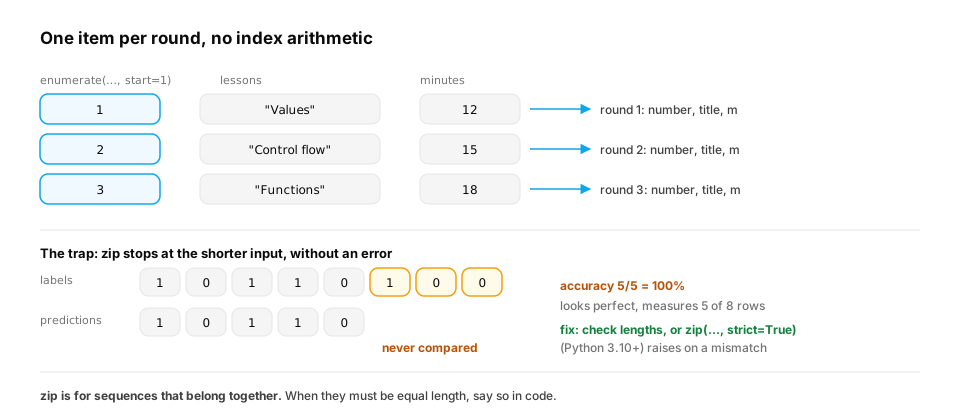
A real-world example: zip stops at the shortest input. zip doesn't complain when its inputs have different lengths. It stops as soon as the shortest one runs out. That's convenient for streams, and dangerous for data that must line up row by row, such as model predictions and their labels:
labels      = [1, 0, 1, 1, 0, 1, 0, 0]
predictions = [1, 0, 1, 1, 0]                 # a bug upstream dropped the last 3 predictions

correct = sum(p == y for p, y in zip(predictions, labels))
print(f"accuracy {correct}/{len(predictions)} = {correct / len(predictions):.0%}")   # looks perfect

if len(predictions) != len(labels):
    print(f"length mismatch: {len(predictions)} predictions vs {len(labels)} labels")
The evaluation reports accuracy 5/5 = 100%, while 3 of the 8 labelled rows were never scored. Only the explicit check gives it away: length mismatch: 5 predictions vs 8 labels. From Python 3.10, zip(predictions, labels, strict=True) raises ValueError on a length mismatch. Use it wherever the inputs must line up.
In production. Evaluation harnesses, data loaders and feature pipelines constantly pair parallel lists: inputs with labels, IDs with embeddings, prompts with responses. A length assertion before the loop is one of the cheapest guards in ML code. It turns a silently wrong metric into a loud failure (ML evaluation, in the Machine Learning path).
From production
A job processes a batch in chunks: for start in range(0, len(rows) - 1, 100): process(rows[start:start + 100]). There are 1,000 rows.
Which rows are processed?
Show the answer
D. All 1,000 rows — range(0, 999, 100) gives 0, 100, …, 900, and rows[900:1000] covers the last chunk, so all 1,000 rows are processed. The - 1 is unnecessary but harmless here. Chunking with range(0, len(rows), size) and slicing is the standard pattern, because slices never run past the end.
3. while loops: repeat until something is true
The question. What if you don't know in advance how many times to loop?
Start from nothing. while condition: repeats as long as the condition holds. break leaves the loop immediately, and continue skips to the next round. Every while loop needs a guaranteed way out. Here is the 3 a.m. bug fixed: a retry loop with a limit and exponential backoff (wait twice as long after each failure):
import random

random.seed(3)
attempt, delay = 0, 0.5
while True:
    attempt += 1
    ok = random.random() > 0.6          # a flaky API that fails about 60% of the time
    if ok:
        print(f"attempt {attempt}: ok")
        break
    if attempt == 5:
        print(f"attempt {attempt}: failed -> giving up, alert a human")
        break
    print(f"attempt {attempt}: failed -> wait {delay:.1f}s")
    delay *= 2                          # 0.5s, 1s, 2s, 4s: back off so the server can recover
In this run, three attempts fail with waits of 0.5s, 1s and 2s, and the fourth succeeds. Real code also adds a little randomness (jitter) to each wait, so thousands of clients don't retry in sync (Networking lesson).
Key idea. A
while True:loop is fine, as long as you can point at the line that ends it, and that line can't be skipped.
Why jitter matters: many clients, one outage. One client backing off is polite. But in the 3 a.m. incident, every client failed at the same moment. If they all wait exactly 0.5 s, 1 s, 2 s and 4 s, they all come back at the same instants, and the recovering server gets hit by a wall of retries four times. Full jitter makes each client wait a random time between 0 and the cap instead:
import random
from collections import Counter

def retry_times(jitter, clients=1000, attempts=4, base=0.5, seed=0):
    """When does each client send each retry? All clients failed at t=0, together."""
    rng = random.Random(seed)
    times = []
    for _ in range(clients):
        t = 0.0
        for k in range(attempts):
            cap = base * 2 ** k                          # 0.5, 1, 2, 4 seconds
            t += rng.uniform(0, cap) if jitter else cap   # "full jitter": wait a random time up to cap
            times.append(t)
    return times

for jitter in (False, True):
    per_100ms = Counter(int(t * 10) for t in retry_times(jitter))
    print(f"jitter={jitter!s:5}  peak load: {max(per_100ms.values()):4} retries in one 100 ms window")
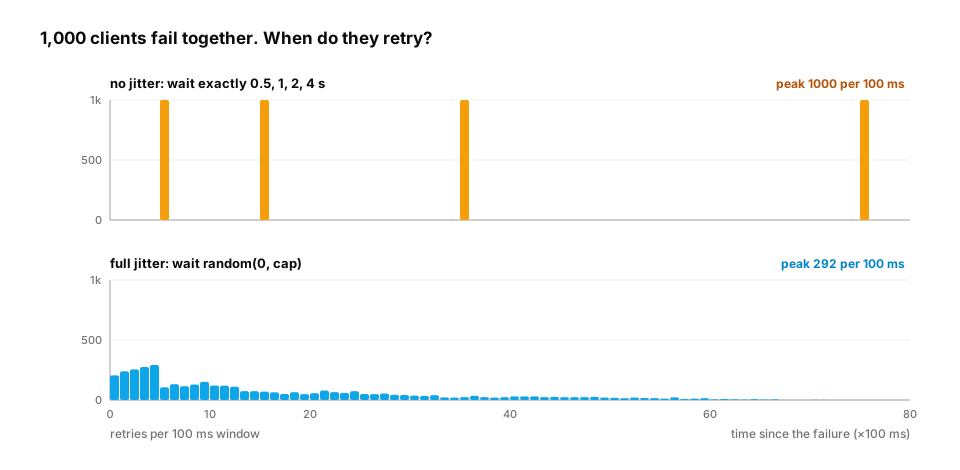
Without jitter, the peak is 1000 retries in a single 100 ms window: every client at once, four times over. With full jitter, the same 4,000 retries peak at 292 per window. Nearly half of them (1,900) still arrive in the first second, but spread across ten windows instead of stacked into one. That's a smaller, smoother load that a recovering service can absorb.
In production.
- AWS's Architecture Blog post "Exponential Backoff And Jitter" (Marc Brooker, 2015) compared these strategies in simulation, and AWS SDKs ship backoff with jitter built in.
- Client libraries for LLM APIs retry rate-limit (HTTP 429) and server errors with exponential backoff and a capped number of attempts. The Anthropic and OpenAI Python SDKs both expose a
max_retriessetting.- When the server sends a
Retry-Afterheader, honour it instead of guessing.- You'll build a production-grade retry wrapper as a decorator in Decorators and context managers.
From production
During an outage, a worker runs while not response_ok: response_ok = call_api().
What two things should be added before this ships?
Show the answer
B. A maximum number of attempts and a growing pause between attempts — Without a limit, the loop can run forever; without backoff, it hammers a struggling server and can get you rate-limited or banned. Cap the attempts and wait longer after each failure (with jitter).
4. for … else and match
The question. How do you say "I searched everything and didn't find it" cleanly?
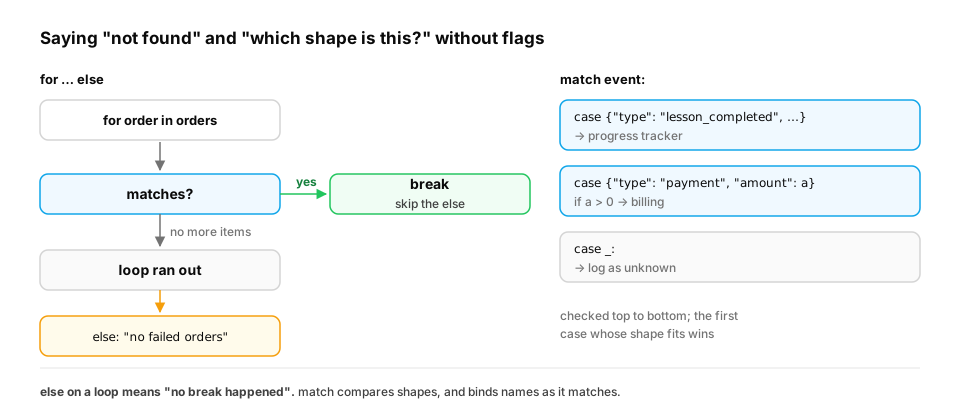
Start from nothing. A loop's else block runs only if the loop finished without break. It is perfect for searches:
orders = [{"id": 1, "status": "paid"}, {"id": 2, "status": "refunded"}, {"id": 3, "status": "paid"}]
for order in orders:
    if order["status"] == "failed":
        print("found a failed order:", order["id"])
        break
else:
    print("no failed orders")           # runs only because the loop never hit break
Python 3.10 added match, which picks a branch by the shape of a value. It shines for routing events or messages:
event = {"type": "lesson_completed", "user": "asha", "lesson": "py-values-and-names"}

match event:
    case {"type": "lesson_completed", "user": user, "lesson": lesson}:
        print(f"{user} finished {lesson}")
    case {"type": "payment", "amount": amount} if amount > 0:
        print(f"payment of {amount}")
    case _:
        print("unknown event")
(This block is marked as not run because match needs Python 3.10+. The site's code checker runs Python 3.9.)
Where you'll meet this. Webhooks are the everyday use of shape-based routing. Payment providers, GitHub and chat platforms send your server a JSON event with a type field, and your code must route each type to the right handler. Stripe, for example, sends events such as payment_intent.succeeded and charge.refunded. Two habits matter more than the syntax:
- Always have a default branch (
case _:or a finalelse) that logs unknown event types instead of crashing. Providers add new event types over time, and your handler will see them before you've read the changelog. - Validate the shape before you trust it. A
casethat destructures{"amount": amount}only matches if the key exists, which is safer thanevent["amount"]raisingKeyErrordeep in your billing code.
The same pattern routes LLM output. When a model returns a tool call such as {"type": "tool_use", "name": "search", "input": {...}}, your agent loop matches on the type and name to decide what to run next (Agents path).
Quick check
When does the else block of a for loop run?
Show the answer
A. Only when the loop finished without hitting break — for…else runs the else when the loop ran to completion without break. An empty list also counts (no break happened). It makes 'searched and didn't find' explicit without an extra flag variable.
Check yourself
- In what order are
if/elifconditions checked, and what happens after the first true one? - What does
range(2, 10, 3)produce? - Name two things every retry loop needs.
- What does
continuedo, and how is it different frombreak? - Why does
zip(predictions, labels)give a misleading accuracy when the lists have different lengths, and how do you guard against it? - Why do thousands of clients retrying with identical backoff delays still overload a recovering server, and what fixes it?
Answers
- Top to bottom; Python runs the first block whose condition is truthy and skips the rest.
2, 5, 8(stop is excluded).- A maximum number of attempts and a growing delay between attempts (plus jitter in real systems).
continueskips the rest of this round and moves to the next;breakleaves the loop entirely.zipstops at the shorter list without an error, so the unmatched rows are never scored. Assert equal lengths first, or usezip(..., strict=True)on Python 3.10+.- They failed together, so identical delays bring them back together, as synchronized spikes. Randomize each wait (jitter), cap the attempts, and honour
Retry-Afterwhen the server sends it.
Exercise
An API returns results in pages. Each response has a list of items and a next cursor (None on the last page). Some pages fail a few times before succeeding. Collect every item, retrying each page at most 3 times, and make sure the loop can never run forever (cap the number of pages at 100).
Solution
PAGES = {None: (["a", "b", "c"], "p2"), "p2": (["d", "e"], "p3"), "p3": (["f"], None)}
FAILURES_LEFT = {"p2": 2, "p3": 0}       # page p2 fails twice before it works

items, cursor, pages_read = [], None, 0
while True:
    if pages_read == 100:                # hard stop: a broken cursor can't loop forever
        raise RuntimeError("too many pages")
    for attempt in range(1, 4):          # attempts 1, 2, 3
        if FAILURES_LEFT.get(cursor, 0) > 0:
            FAILURES_LEFT[cursor] -= 1
            print(f"page {cursor}: attempt {attempt} failed")
            continue
        page_items, next_cursor = PAGES[cursor]
        break
    else:
        raise RuntimeError(f"page {cursor} failed 3 times")
    items.extend(page_items)
    pages_read += 1
    if next_cursor is None:
        break
    cursor = next_cursor

print(items, "from", pages_read, "pages")
The inner for … else either breaks out with a page or raises after three failures. The outer loop ends when the cursor runs out, and the 100-page cap guarantees it ends even if the API keeps returning a cursor by mistake.
This unlocks:
- Functions — packaging logic like the retry loop so you can reuse it.
- Iterators and generators — what
forreally does under the hood, and how to loop over data too big for memory.