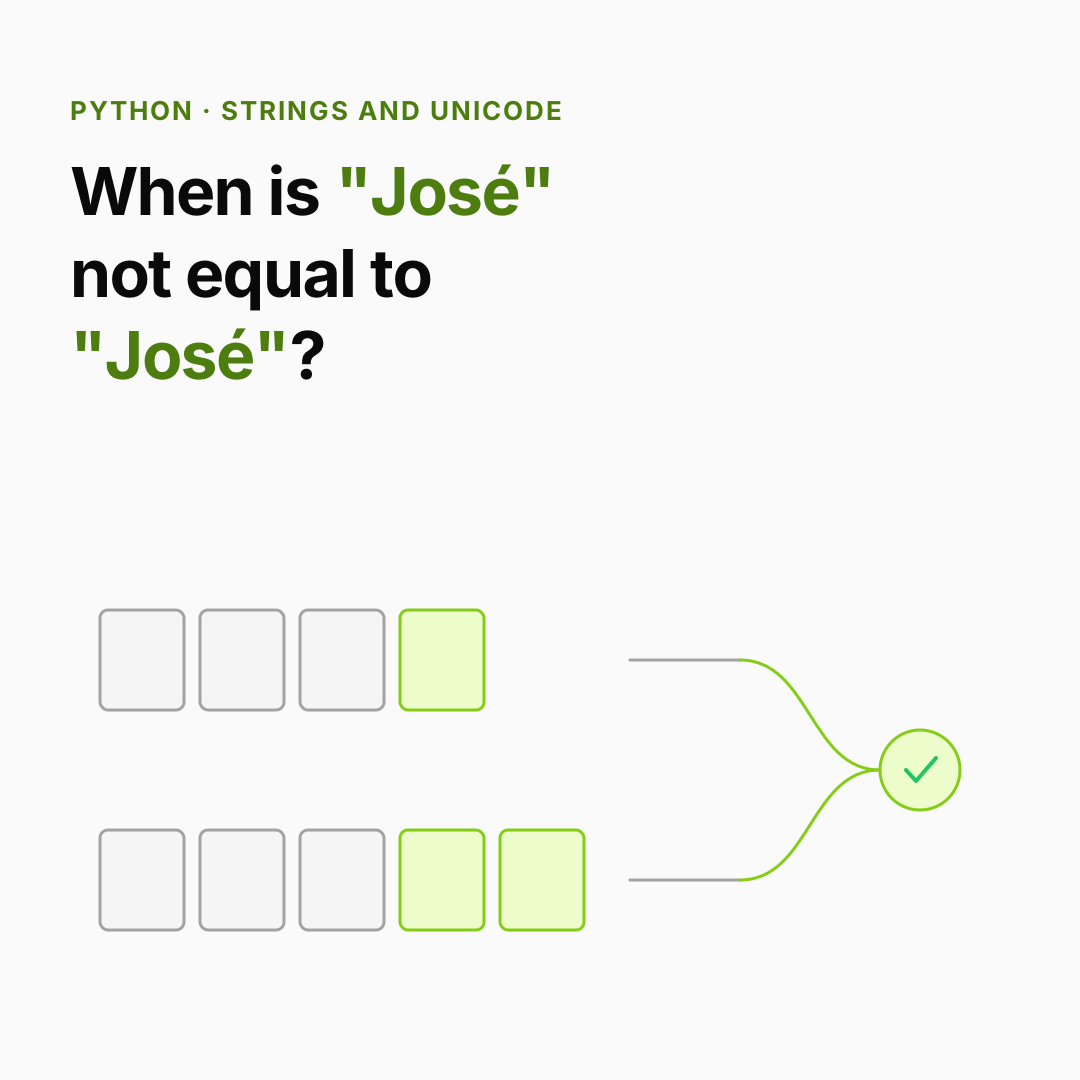
The incident. A user signs up as José. Later they can't log in: "user not found". The database has the name; the login form sends the name; they look identical. But one was typed on a Mac and one on Android, and the é is stored two different ways. To Python, they are different strings.
You already know: strings are immutable (Values, names and types); dict keys must match exactly (Dicts and sets).
1. Text vs bytes
The question. What is a string, really, and why do we need bytes too?
Start from nothing. A Python str is a sequence of code points: numbers that Unicode assigns to characters (A is 65, é is 233, 🙂 is 128578). Files, networks and databases don't store code points; they store bytes. An encoding turns one into the other. UTF-8 is the standard: 1 byte for ASCII, 2–4 bytes for everything else.
for text in ["A", "é", "न", "🙂"]:
    data = text.encode("utf-8")
    print(f"{text!r}: code point {ord(text)}, {len(data)} byte(s): {data}")

message = "Hi 🙂 नमस्ते"
print(len(message), "characters,", len(message.encode("utf-8")), "bytes")

raw = "café".encode("utf-8")
print(raw.decode("utf-8"))
print(raw.decode("latin-1"))     # decoding with the WRONG encoding: mojibake
The last line prints café: the classic garbage you see when one system writes UTF-8 and another reads it as Latin-1. Rule: decode bytes at the edge of your program, work with str inside, encode on the way out, and always say utf-8.
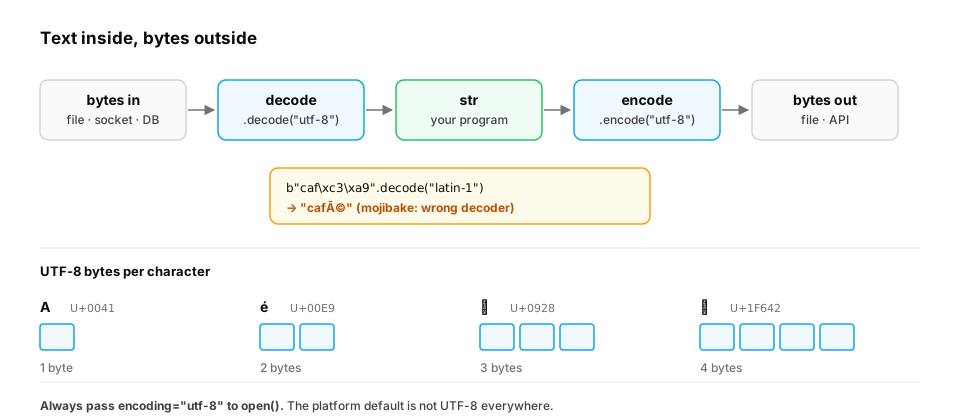
Where the edge is in real code: files. open() decodes for you, using an encoding. If you don't name one, Python uses the platform's default, which has historically been a legacy code page on Windows rather than UTF-8. So a script that works on a Mac can corrupt or crash on the same file on a Windows build machine. Always name the encoding, and decide what should happen to bytes that don't decode:
import tempfile, os

path = os.path.join(tempfile.mkdtemp(), "feedback.txt")
with open(path, "w", encoding="utf-8") as f:          # always name the encoding
    f.write("Great lesson 👍 — merci, très clair\n")

with open(path, encoding="utf-8") as f:
    print(f.read().strip())

with open(path, encoding="ascii", errors="replace") as f:   # a reader that guessed wrong
    print(f.read().strip())

try:
    with open(path, encoding="ascii") as f:
        f.read()
except UnicodeDecodeError as e:
    print("UnicodeDecodeError at byte", e.start, ":", e.reason)
- Read back as UTF-8, the text is intact.
- Read with the wrong encoding and
errors="replace", every non-ASCII byte becomes�(Great lesson ���� ��� merci, tr��s clair). The data is silently lost, and if this text were training data, the model would learn the garbage. - The strict default fails loudly:
UnicodeDecodeError at byte 13, which is where the 👍 starts. Loud failure is usually what you want in a pipeline.
In production.
- Byte limits: API limits are often in bytes, not characters. A 1,000-character Hindi message is about 3,000 bytes in UTF-8. Validate with
len(text.encode())when the limit is in bytes.- The UTF-8 default: PEP 686 makes UTF-8 the default encoding for
open()from Python 3.15. Code that has to run on older versions should still passencoding="utf-8"explicitly, and linters can enforce it.- HTTP: libraries such as
requestsexpose both.content(raw bytes) and.text(bytes decoded using the response's declared charset). When a page's declared charset is wrong,.textis where mojibake creeps in.
From production
A message queue rejects payloads over 256 KB. The producer checks if len(message) < 256_000 before sending. Messages in Japanese keep getting rejected.
Why?
Show the answer
D. len() counts characters, but the limit is bytes; Japanese characters take 3 bytes each in UTF-8 — A 200,000-character Japanese message is about 600 KB of UTF-8. Measure what the limit measures: len(message.encode('utf-8')).
2. Same look, different string: normalization
The question. How can two strings look identical but not be equal?
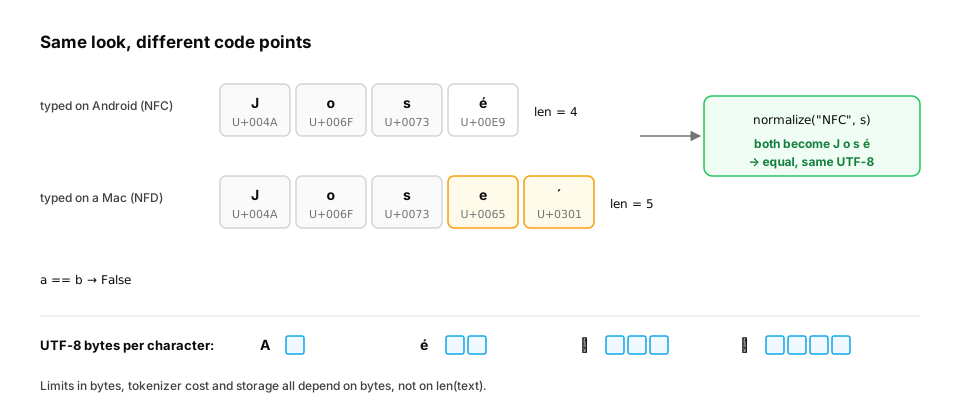
Start from nothing. Unicode often has two ways to write the same character. é can be one code point (U+00E9) or two: e plus a combining accent (U+0301). Both render the same. Normalization converts text to one standard form: NFC (composed, the usual choice for storage) or NFD (decomposed).
import unicodedata

a = "José"            # é as one code point
b = "José"           # e + combining accent
print(a, b, a == b, len(a), len(b))

nfc = lambda s: unicodedata.normalize("NFC", s)
print(nfc(a) == nfc(b))

print("Straße".lower(), "Straße".casefold())
print("STRASSE".casefold() == "Straße".casefold())
This prints José José False 4 5, then True. For case-insensitive matching, casefold() is stronger than lower(): it turns German ß into ss, so the last line is True.
Key idea. Before you compare, dedupe or use text as a key (usernames, emails, search terms, training data), normalise it:
unicodedata.normalize("NFC", s).casefold().strip().
From production
A dedup step for an LLM fine-tuning set uses set(texts). Afterwards, reviewers still find many 'identical' pairs that differ only in accents typed on different keyboards and in capitalisation.
What should the dedup key be?
Show the answer
D. unicodedata.normalize('NFC', t).casefold() (plus whitespace cleanup) — Raw strings differ in code points even when they look the same. Normalising to NFC and casefolding makes visually identical text compare equal. hash(t) has the same problem as the raw text.
3. Building strings efficiently
The question. Why is building a big string with += in a loop a bad habit?
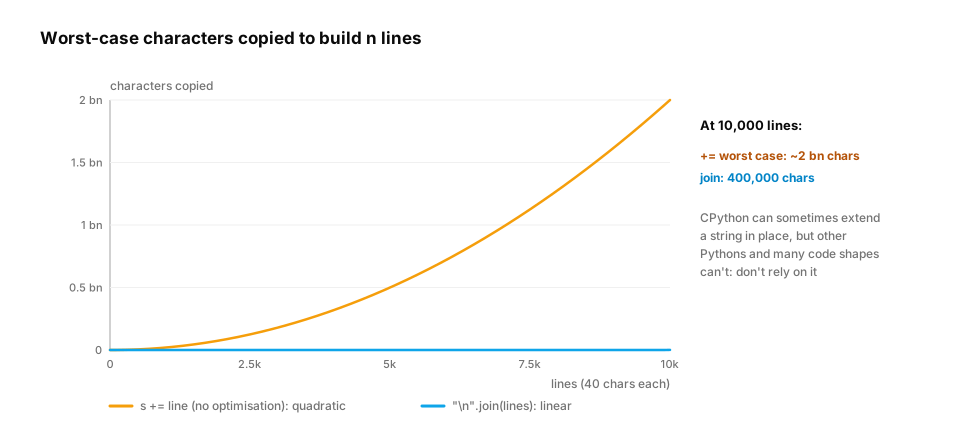
Start from nothing. Strings are immutable, so s += piece creates a new string each time and may copy everything so far. CPython sometimes optimises this, but you can't rely on it. The reliable pattern is: collect the pieces in a list and "".join(pieces) once at the end, which copies each character exactly once.
rows = [("Values", 12), ("Control flow", 15), ("Functions", 18)]

lines = []
for title, minutes in rows:
    lines.append(f"| {title:<12} | {minutes:>3} min |")
table = "\n".join(lines)
print(table)

csv_line = " , Asha ,  asha@example.com ,  42 "
fields = [f.strip() for f in csv_line.split(",")]
print(fields)
print("asha@example.com".partition("@"))
print("report_2026.csv".removesuffix(".csv"), "v1.2.3".split(".", 1))
Useful string methods: split / join, strip, partition (split once into three parts), startswith / endswith, replace, and removeprefix / removesuffix (Python 3.9+).
A real-world example: prompt templates and braces. Prompts are strings built from templates, and LLM prompts love JSON examples, which are full of { and }. str.format treats every brace as a placeholder, so a template that includes a JSON example breaks:
template = 'Answer as JSON like {"answer": "...", "sources": []}. Question: {question}'
try:
    template.format(question="What is attention?")
except (KeyError, ValueError) as e:
    print(type(e).__name__, e)

safe = 'Answer as JSON like {{"answer": "...", "sources": []}}. Question: {question}'
print(safe.format(question="What is attention?"))

question = "What is {attention}?"                     # user text with braces
print(f'Answer as JSON like {{"answer": "..."}}. Question: {question}')   # f-strings never re-parse values
- The first template raises
KeyError '"answer"':.formatread{"answer"...}as a placeholder named"answer". - Doubling the literal braces (
{{and}}) fixes it: they print as single braces. - Values inserted into an f-string are never parsed again. The user's
{attention}appears literally, so user text can't inject new placeholders.
In production. Teams that build many prompts usually switch to a template engine (Jinja2 is common) or a small helper that inserts values safely, and they unit-test the rendered prompt. That catches braces, missing variables, and accidental whitespace changes that would invalidate a prompt cache (Context engineering). When you assemble large text such as retrieved documents, a report or a JSONL file, collect pieces in a list and join once.
From production
A prompt template stored in a config file contains an example tool call: {"tool": "search", "query": "..."}. The service calls template.format(user_question=q) and crashes on every request after a config change.
What's the most likely cause and fix?
Show the answer
C. .format treats the JSON braces as placeholders; escape them as {{ and }} (or use a template engine) — str.format parses every {...} as a field. Literal braces must be doubled. This often appears after someone adds a JSON example to a prompt. A test that renders every template would catch it before deploy.
4. Text becomes numbers: the link to tokenizers
The question. How does an LLM read a string?
Start from nothing. Models don't see characters; they see tokens: integer ids for chunks of text. Modern tokenizers (byte-pair encoding) start from UTF-8 bytes, then merge frequent byte sequences into single tokens. That is why English is cheap and many other languages cost more tokens for the same meaning: their characters take more bytes, and fewer of their sequences got merged.
words = ["hello", "नमस्ते", "こんにちは", "🙂🙂"]
for w in words:
    print(f"{w:>8}: {len(w)} chars -> {len(w.encode('utf-8'))} UTF-8 bytes")
hello is 5 bytes; नमस्ते is 6 characters but 18 bytes; the two emoji are 8 bytes. A byte-level tokenizer starts from those bytes, so bytes per character is a rough early signal of token cost.
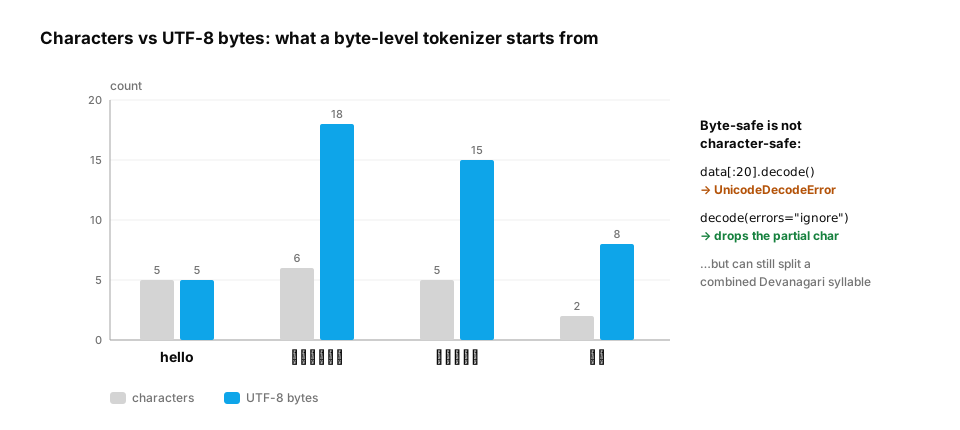
A real-world example: truncating to a byte budget. Logs, database columns, message queues and some API fields cap sizes in bytes. Cutting the encoded bytes at the limit can land in the middle of a multi-byte character:
text = "Summary: नमस्ते दुनिया 🙂 done"
data = text.encode("utf-8")
limit = 20                                            # an API field that allows 20 bytes

try:
    data[:limit].decode("utf-8")                      # cut in the middle of a 3-byte character
except UnicodeDecodeError as e:
    print("naive cut fails:", e.reason)

safe = data[:limit].decode("utf-8", errors="ignore")  # drop the partial character at the end
print(repr(safe), len(safe), "chars", len(safe.encode("utf-8")), "bytes")
The naive cut fails with unexpected end of data. With errors="ignore", the partial character is dropped and the result fits: 'Summary: नमस', 12 characters in 18 bytes. Notice what got cut, though. नमस्ते is written with combining marks, and the cut left नमस, which a Hindi reader sees as a different, broken word. Byte-safe isn't the same as grapheme-safe (a grapheme is what a reader perceives as one character). For user-visible truncation, cut at word boundaries, or use a library that understands grapheme clusters.
In production. Token counts, not characters, set LLM limits and prices. OpenAI's tokenizer guidance gives roughly 4 characters per token for common English text, and other languages are often less efficient. Before setting per-language prices or context limits, measure tokens with the model's own tokenizer on real samples of each language. Context windows,
max_tokensand per-token billing all count tokens. The Tokenizers lesson (NLP foundations) shows how BPE merges bytes into tokens.
From production
Your product's per-request token cost is 2.5× higher for Hindi users than English users asking equivalent questions.
What's the most likely explanation?
Show the answer
A. Byte-level tokenizers work on UTF-8, where Devanagari takes 3 bytes per character and fewer of its sequences are merged into single tokens — Tokenizers trained mostly on English merge English byte sequences aggressively. Devanagari starts at 3 bytes per character with fewer merges, so the same meaning becomes more tokens. Measure tokens per language before setting prices or limits.
Check yourself
- What is the difference between
strandbytes? - Why can
"José" == "José"be False? - When should you use
casefold()instead oflower()? - Why prefer
"".join(parts)over+=in a loop? - Why should every
open()call nameencoding="utf-8"? - Why does
template.format(...)fail when the template contains a JSON example, and how do you fix it?
Answers
stris a sequence of Unicode code points (text);bytesis raw 0–255 values. Encoding (UTF-8) converts str to bytes; decoding goes back.- One may use a precomposed
éand the othere+ a combining accent. Normalise both with NFC before comparing. - For case-insensitive comparison. casefold handles cases like
ß→ssthat lower() doesn't. - join copies each character once; repeated
+=can copy the growing string again and again. - Without it, Python uses the platform default, which isn't UTF-8 on every system or Python version. The same code can then read different text, or crash, on different machines.
.formattreats every{...}as a placeholder. Double literal braces ({{and}}), or use an f-string or template engine for templates that contain JSON.
Exercise
Write clean_username(raw) for a sign-up form. It should: normalise to NFC, trim whitespace, casefold, collapse internal runs of spaces to one, and reject names longer than 30 characters or 60 bytes. Test it so that " José Ali " typed both ways produces the same key.
Solution
import unicodedata

def clean_username(raw):
    text = unicodedata.normalize("NFC", raw)
    text = " ".join(text.split())          # trims ends and collapses inner whitespace
    key = text.casefold()
    if len(key) > 30 or len(key.encode("utf-8")) > 60:
        raise ValueError("username too long")
    return key

typed_on_mac = " José  Ali "
typed_on_android = "josé ali"
print(clean_username(typed_on_mac), clean_username(typed_on_android))
assert clean_username(typed_on_mac) == clean_username(typed_on_android)

try:
    clean_username("🙂" * 20)               # 20 characters, but 80 bytes
except ValueError as err:
    print("rejected:", err)
text.split() with no argument splits on any run of whitespace and drops empty pieces, so joining with one space both trims and collapses. The emoji name passes the character limit but fails the byte limit, which is exactly the case a database column sized in bytes would hit.
This unlocks:
- Iterators and generators — reading huge text files line by line without loading them.
- How Python really runs your code — how CPython stores strings compactly (1, 2 or 4 bytes per character).