The incident. A helper def build_prompt(question, history=[]) appends each question to history. In testing it works perfectly. In production, the chatbot starts answering users with fragments of other people's conversations. Nobody shared any state on purpose. The default value [] did it for them.
You already know: names point at objects, and mutable objects can be shared (Values, names and types); if, for and while (Control flow).
1. Defining functions and passing arguments
The question. How do you package a piece of logic so it can be reused?
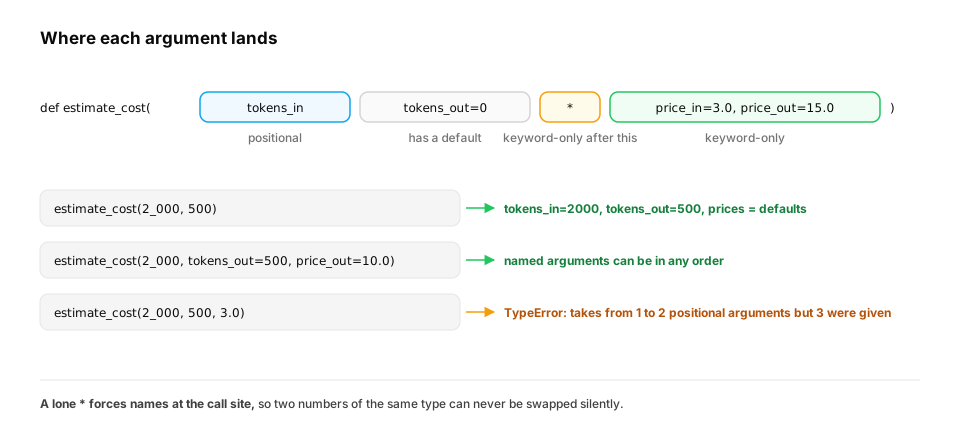
Start from nothing. def creates a function: a named block of code with parameters (inputs) and a return value. Python offers several kinds of parameters, and choosing well prevents real bugs:
- Positional: matched by order.
- Defaults:
tokens_out=0is used when the caller doesn't pass it. - Keyword-only: everything after a lone
*must be passed by name, so nobody can mix up two numbers.
def estimate_cost(tokens_in, tokens_out=0, *, price_in=3.0, price_out=15.0):
    """Dollar cost of one LLM call. Prices are per million tokens."""
    return (tokens_in * price_in + tokens_out * price_out) / 1_000_000

print(estimate_cost(2_000, 500))                          # 0.0135
print(estimate_cost(2_000, tokens_out=500, price_out=10.0))
print(round(estimate_cost(tokens_in=1_000_000), 2))       # 3.0
Calling estimate_cost(2_000, 500, 3.0) raises a TypeError: prices are keyword-only, so the call site always says which price is which. The triple-quoted line is a docstring: documentation that editors and help() show.
For "any number of arguments", *args collects extra positional values into a tuple and **kwargs collects extra named ones into a dict:
def log_event(name, *values, **fields):
    print(name, values, fields)

log_event("lesson_done", 1, 2, user="asha", minutes=12)
This prints lesson_done (1, 2) {'user': 'asha', 'minutes': 12}.
A real-world example: a thin wrapper around an SDK. Almost every AI codebase has a function like ask(prompt, **options). It fills in house defaults, lets callers override them, and forwards everything to the provider's client. ** works in both directions: in a signature it collects named arguments into a dict, and in a call it spreads a dict back into named arguments.
DEFAULTS = {"model": "small", "max_tokens": 256, "temperature": 0.7}

def fake_client_create(*, model, max_tokens, temperature, messages):   # stands in for an SDK call
    return f"{model} | max_tokens={max_tokens} | temperature={temperature} | {len(messages)} message(s)"

def ask(prompt, **overrides):
    unknown = set(overrides) - set(DEFAULTS)
    if unknown:                                   # catch typos like temprature= at the call site
        raise TypeError(f"unknown options: {sorted(unknown)}")
    options = {**DEFAULTS, **overrides}           # later dicts win
    return fake_client_create(messages=[{"role": "user", "content": prompt}], **options)

print(ask("hi"))
print(ask("hi", model="large", temperature=0))
try:
    ask("hi", temprature=0)
except TypeError as e:
    print("TypeError:", e)
ask("hi")uses the defaults:small | max_tokens=256 | temperature=0.7.ask("hi", model="large", temperature=0)overrides two of them, andmax_tokenskeeps its default.{**DEFAULTS, **overrides}merges two dicts, and the right-hand one wins on clashes.- The typo
temprature=0is caught:TypeError: unknown options: ['temprature']. Without that check,**kwargswould swallow the typo, and the call would quietly run at temperature 0.7.
In production. Keyword-only parameters are the norm in well-designed APIs. Python's own
sorted(iterable, *, key=None, reverse=False)makeskeyandreversekeyword-only. LLM client libraries such as the Anthropic and OpenAI Python SDKs take request parameters (model,max_tokens,messages, …) as keyword arguments, so call sites read like configuration. When you write wrappers, validate or type the options you forward.**kwargsis convenient precisely because it accepts anything, including mistakes.
From production
A billing helper is def charge(user_id, amount, discount). A teammate calls charge(user_id, 10, 499) meaning 10% discount on ₹499.
What is the most robust fix?
Show the answer
C. Make amount and discount keyword-only: def charge(user_id, *, amount, discount) — With keyword-only parameters, every call must say amount=... and discount=..., so two numbers can never be silently swapped. Comments and ordering don't stop the mistake; the signature does.
2. The mutable default argument trap
The question. Why did the chatbot leak conversations between users?
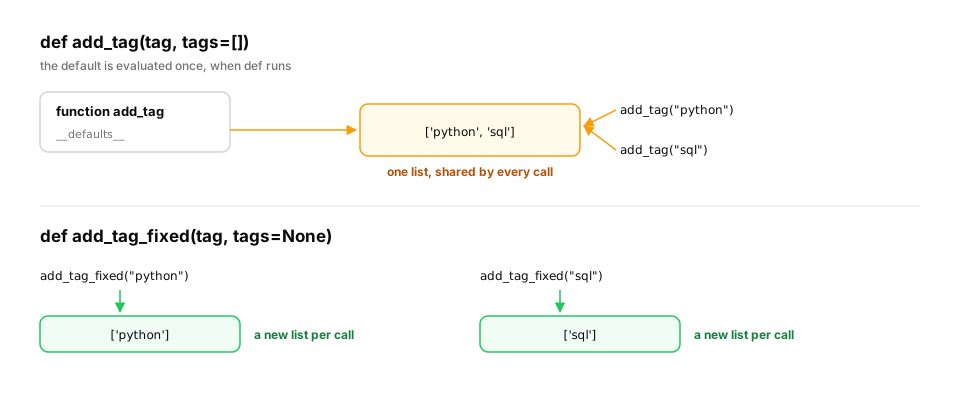
Start from nothing. A default value is created once, when def runs, not on every call. If that default is mutable (a list or dict), every call that relies on it shares the same object, exactly the aliasing from the first lesson:
def add_tag(tag, tags=[]):        # BUG: one list, created once, shared by every call
    tags.append(tag)
    return tags

print(add_tag("python"))
print(add_tag("sql"))             # surprise: the first call's tag is still there

def add_tag_fixed(tag, tags=None):
    if tags is None:
        tags = []                 # a fresh list on every call
    tags.append(tag)
    return tags

print(add_tag_fixed("python"), add_tag_fixed("sql"))
The buggy version prints ['python'] and then ['python', 'sql']. The fix prints ['python'] ['sql']. Rule: use None as the default and create the mutable object inside the function.
From production
def get_user_cache(user_id, cache={}): ... stores each user's data in cache and returns it. It runs in a web server that handles many users.
What happens?
Show the answer
A. All users share one dict for the life of the process, so data leaks and memory grows forever — The {} is created once when the function is defined. Every call without an explicit cache uses the same dict: shared across users and never freed. Use cache=None and create it inside, or use a proper, bounded cache.
3. Scope: where names live
The question. When a function uses a name, where does Python look for it?
Start from nothing. Python searches four places in order, called LEGB: Local (inside the function), Enclosing (outer functions), Global (the module), Built-in (len, print…). Assigning to a name inside a function makes it local, unless you declare global (for module names) or nonlocal (for an enclosing function's names).
model = "global-model"

def outer():
    model = "outer-model"
    def inner():
        return model              # not local here, so Python finds it in the enclosing function
    return inner()

print(outer(), model)

counter = 0
def bump():
    global counter                # without this, `counter += 1` would fail
    counter += 1

bump(); bump()
print(counter)
This prints outer-model global-model, then 2. Global state like counter is convenient and dangerous: in a server it's shared by every request and every thread. Prefer passing values in and returning them out.
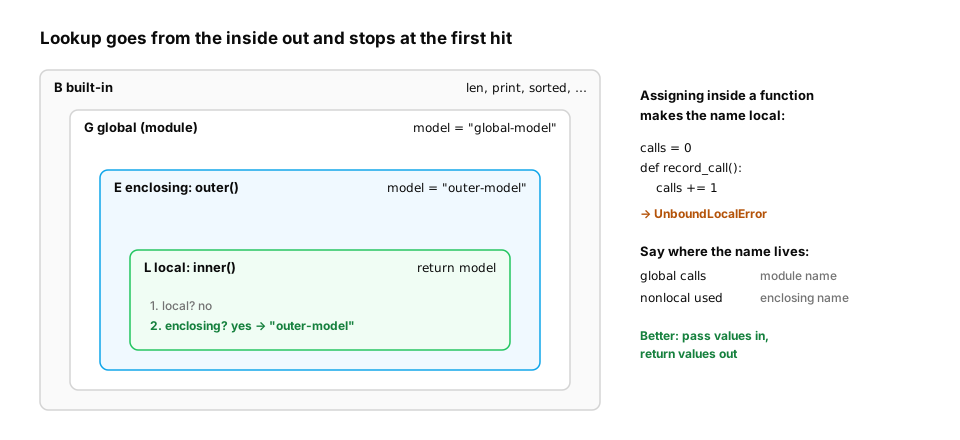
The error everyone hits once, and what closures are good for. The rule "assigning makes a name local" applies to the whole function, even to lines before the assignment. So calls += 1 (which reads calls, then assigns it) fails if calls is a module variable. The useful flip side is a closure: an inner function that keeps access to its enclosing function's variables after the outer function returns. That gives each instance its own private state, with no globals:
calls = 0
def record_call():
    try:
        calls += 1                    # assignment makes `calls` local, so the read fails
    except UnboundLocalError as e:
        print("UnboundLocalError:", e)
record_call()

def make_rate_limiter(max_calls):
    used = 0                          # lives in the enclosing scope, private to this limiter
    def allow():
        nonlocal used
        if used >= max_calls:
            return False
        used += 1
        return True
    return allow

free_tier, pro_tier = make_rate_limiter(2), make_rate_limiter(5)
print([free_tier() for _ in range(4)], sum(pro_tier() for _ in range(4)))
- The first call prints
UnboundLocalError: local variable 'calls' referenced before assignment. Python 3.11+ words it as "cannot access local variable 'calls' where it is not associated with a value", but it's the same rule. - Each limiter has its own
usedcounter.free_tierallows two calls, then refuses ([True, True, False, False]), whilepro_tierallowed all4. Neither can see or reset the other's count.
In production. Closures are how decorators keep state such as retry counts, timers and caches (Decorators and context managers), and how callbacks carry context into frameworks. Global mutable state is the opposite. A module-level
cache = {}orclient = Noneis shared by every request in a web server and every thread in a worker. It's the source of many "works on my machine, breaks under load" bugs. When you need shared state, make it explicit: pass it in, or wrap it in an object with clear ownership.
From production
A Flask app has request_count = 0 at module level and a handler that does request_count += 1 to expose a metric.
What happens on the first request?
Show the answer
C. UnboundLocalError: assigning inside the function makes request_count local, so reading it first fails — Any assignment to a name anywhere in a function makes that name local for the whole function, so += reads an unassigned local. global request_count fixes the error, but a shared counter in a multi-threaded server should really be a proper metrics client or a lock-protected object.
Functions are objects too, so you can pass them around. That is how sorted lets you choose what to sort by, and how pipelines are built:
lessons = [("Functions", 18), ("Values", 12), ("Control flow", 15)]
print(sorted(lessons, key=lambda pair: pair[1]))      # sort by minutes

def shout(text):
    return text.upper() + "!"

value = "  Hello Atlas "
for step in [str.strip, str.lower, shout]:            # a list of functions
    value = step(value)
print(value)
lambda pair: pair[1] is a tiny unnamed function. The pipeline prints HELLO ATLAS!.
4. Recursion and the call stack
The question. How can a function call itself, and what stops it?
Start from nothing. Each call gets a frame on the call stack, holding its local variables. When the function returns, its frame is removed. Recursion (a function calling itself) is natural for nested data like JSON: handle one level, then let the same function handle the nested parts. Python limits the stack depth (1,000 frames by default) to protect memory:
import sys

def count_keys(obj):
    """Count all keys in nested JSON-like data."""
    if isinstance(obj, dict):
        return len(obj) + sum(count_keys(v) for v in obj.values())
    if isinstance(obj, list):
        return sum(count_keys(v) for v in obj)
    return 0                                  # a plain value: the recursion stops here

doc = {"user": {"name": "Asha", "prefs": {"model": "small", "langs": ["en", "hi"]}},
       "events": [{"t": 1}, {"t": 2}]}
print(count_keys(doc))
print("recursion limit:", sys.getrecursionlimit())

def depth(n):
    return 0 if n == 0 else 1 + depth(n - 1)

try:
    depth(5000)
except RecursionError as err:
    print("RecursionError:", err)
count_keys finds 8 keys. Every recursive function needs a base case (here, a plain value) that stops the recursion. depth(5000) needs 5,000 frames, so Python raises RecursionError instead of crashing the process.
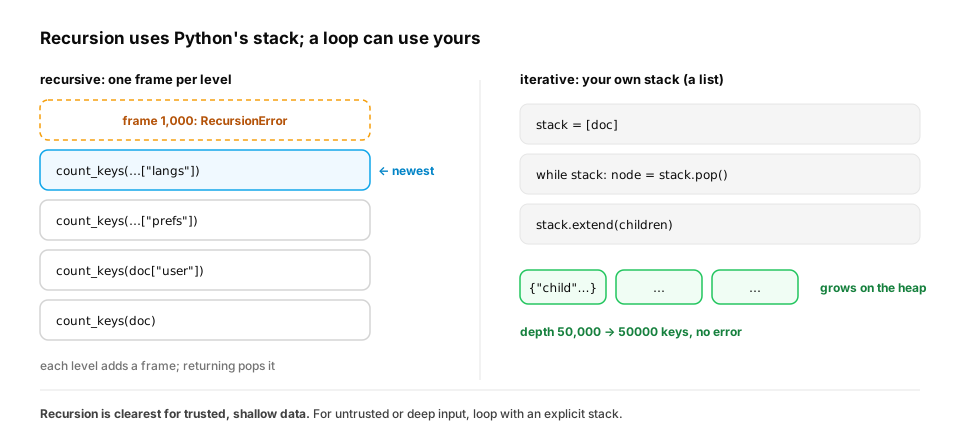
The fix: replace the call stack with your own. Any recursion can be turned into a loop. You keep the "work still to do" in a list (an explicit stack), push children onto it, and pop the next item each round. The list lives on the heap, which is limited only by memory:
def count_keys_iterative(obj):
    """Same answer as the recursive version, but with our own stack: no depth limit."""
    total, stack = 0, [obj]
    while stack:
        node = stack.pop()
        if isinstance(node, dict):
            total += len(node)
            stack.extend(node.values())
        elif isinstance(node, list):
            stack.extend(node)
    return total

doc = {"user": {"name": "Asha", "prefs": {"model": "small", "langs": ["en", "hi"]}},
       "events": [{"t": 1}, {"t": 2}]}
print(count_keys_iterative(doc))

deep = {}
node = deep
for _ in range(50_000):              # 50,000 levels: far past the recursion limit
    node["child"] = {}
    node = node["child"]
print(count_keys_iterative(deep))
It returns the same 8 for the sample document and handles the 50,000-level document without error (50000 keys, one per level). This is exactly the depth-first search you'll meet in Data structures and algorithms.
In production. User-supplied JSON can be nested thousands of levels deep, deliberately. Recursive code that walks it can be crashed on purpose. Two defences are standard: limit input size and depth at the edge, before parsing deeply, and walk untrusted structures iteratively. Raising the limit with
sys.setrecursionlimitis rarely the answer. Each Python frame also uses the C stack, and a high enough limit can crash the whole process instead of raising a clean error.
From production
An API endpoint recursively validates incoming JSON. An attacker sends a document nested 50,000 levels deep.
What happens, and what's the fix?
Show the answer
D. RecursionError (an unhandled 500), so the endpoint can be knocked over; limit input depth or validate iteratively with an explicit stack — Python's default recursion limit is about 1,000 frames. Deep input triggers RecursionError. Reject overly deep or large payloads, or walk the structure with a loop and an explicit stack.
Check yourself
- What does a lone
*in a parameter list do? - Why is
def f(items=[])a bug, and what's the fix? - In what order does Python look up a name (LEGB)?
- What does every recursive function need, and what happens without it?
- In
def ask(prompt, **overrides), what isoverrides, and what risk does accepting**kwargsbring? - What is a closure, and how does
make_rate_limitergive each tier its own counter without a global variable?
Answers
- Parameters after it are keyword-only: callers must pass them by name.
- The default list is created once and shared by all calls. Use
items=Noneand create the list inside. - Local, Enclosing, Global, Built-in.
- A base case that stops the recursion. Without it, the calls never end and Python raises RecursionError at the depth limit.
- A dict of all the extra named arguments. It accepts anything, including misspelled option names, so validate the keys (or type the options) before forwarding them.
- An inner function that keeps access to variables of the function that created it. Each call to
make_rate_limitercreates a newusedvariable, and the returnedallowupdates it withnonlocal, so every limiter has private state.
Exercise
Feature flags and configs often arrive nested: {"model": {"name": "small", "sampling": {"temperature": 0.7}}}. Write flatten(config) that returns dotted keys: {"model.name": "small", "model.sampling.temperature": 0.7}. Then write unflatten that reverses it, and check the round trip.
Solution
def flatten(config, prefix=""):
    out = {}
    for key, value in config.items():
        dotted = f"{prefix}.{key}" if prefix else key
        if isinstance(value, dict) and value:
            out.update(flatten(value, dotted))      # recurse into nested dicts
        else:
            out[dotted] = value
    return out

def unflatten(flat):
    out = {}
    for dotted, value in flat.items():
        node = out
        *parents, leaf = dotted.split(".")
        for part in parents:
            node = node.setdefault(part, {})         # walk down, creating dicts as needed
        node[leaf] = value
    return out

config = {"model": {"name": "small", "sampling": {"temperature": 0.7, "top_p": 0.9}}, "debug": False}
flat = flatten(config)
print(flat)
assert unflatten(flat) == config
print("round trip ok")
flatten recurses because the nesting depth is unknown. unflatten uses a loop instead: *parents, leaf = … unpacks all parts but the last into parents, and setdefault returns the existing dict or inserts a new one.
This unlocks:
- Lists and tuples — the sequences you've been passing around, and what they cost in memory.
- Decorators and context managers — functions that wrap other functions (retry, timing, caching).
- How Python really runs your code — what a call actually costs inside the interpreter.