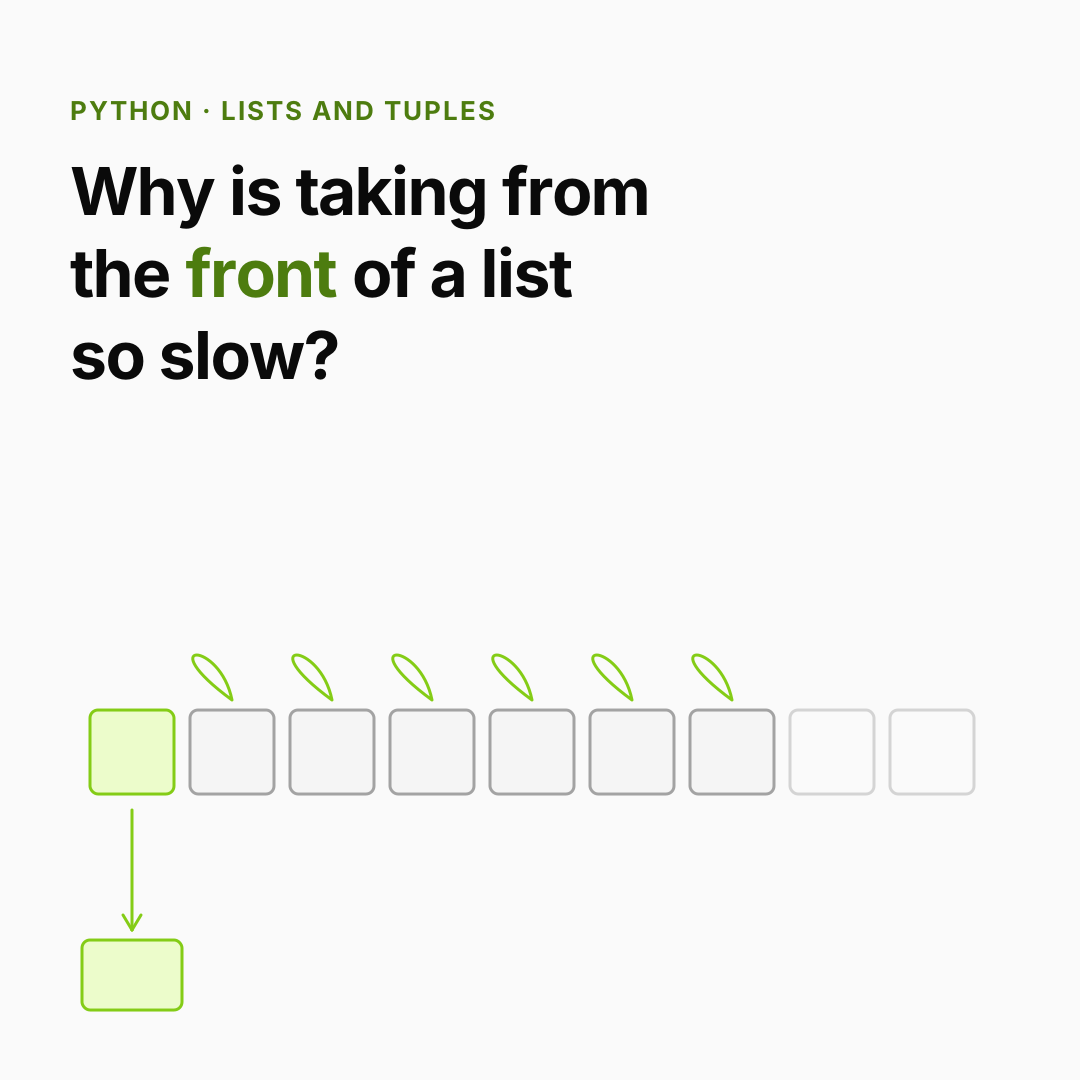
The incident. A request queue is a plain list. Workers take the oldest job with jobs.pop(0). With 100 jobs, nobody notices. During a traffic spike the queue reaches 500,000 jobs, and the CPU sits at 100% just taking items off the front. No model is slow. No database is slow. One list method is.
You already know: names point at objects, mutable vs immutable (Values, names and types); loops (Control flow); functions (Functions).
1. What a list really is
The question. Where do a list's items live, and why is append fast?
Start from nothing. A Python list is a dynamic array: one contiguous block of memory holding pointers to objects, not the objects themselves. Because the slots sit side by side, items[i] jumps straight to slot i: that's O(1), constant time, no matter how long the list is.
When the block is full, append allocates a bigger block (about 12% extra, plus a few slots) and moves the pointers over. That's rare, so append is amortized O(1). You can watch it happen:
import sys

items, last = [], sys.getsizeof([])
print(f"len 0: {last} bytes")
for i in range(20):
    items.append(i)
    size = sys.getsizeof(items)
    if size != last:                 # the list just grew its block
        print(f"len {len(items):2}: {size} bytes")
        last = size
The size only jumps at a few lengths (1, 5, 9 and 17 here): between jumps, appends reuse spare slots. The exact byte counts vary by Python version; the pattern doesn't.
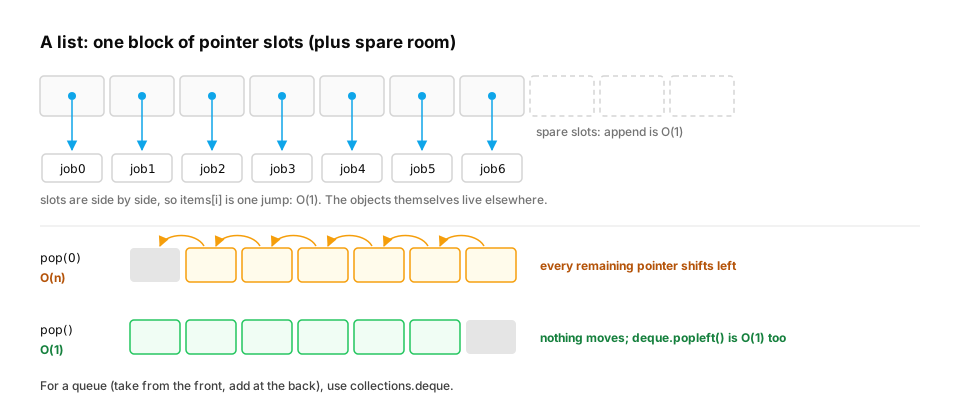
What "a list of pointers" costs in memory. Because a list holds pointers, a list of a million numbers is really two things: a million 8-byte pointers, and a million separate number objects, each with its own header. Compare that with array.array, which stores raw 8-byte doubles side by side:
import sys
from array import array

n = 1_000_000
as_list = [float(i) for i in range(n)]
pointers = sys.getsizeof(as_list)                       # the list's own block of pointers
objects = sum(sys.getsizeof(x) for x in as_list)        # every float is a separate object
packed = array("d", as_list)                            # raw 8-byte doubles, side by side

print(f"list pointers : {pointers / 1e6:5.1f} MB")
print(f"float objects : {objects / 1e6:5.1f} MB")
print(f"array('d')    : {sys.getsizeof(packed) / 1e6:5.1f} MB")
The list costs 8.4 MB of pointers plus 24.0 MB of float objects (24 bytes each), about 32 MB in total. The packed array holds the same numbers in 8.0 MB. That's a 4× difference before doing any maths, and walking the list also means chasing a pointer per item. This is the whole reason NumPy exists: its arrays store raw numbers contiguously, so the maths runs in C over a tight block of memory (NumPy and pandas, in Fast Python for AI).
In production. A list is the right tool for a collection of things: requests, documents, messages, records of mixed types. A list is the wrong tool for millions of numbers such as embeddings, pixel values or token IDs. For those, use NumPy arrays or PyTorch tensors. A common memory blow-up in data pipelines is building a Python list of floats from a large file "just to compute the mean".
From production
A service loads 10 million embedding values into a Python list of floats and its memory use jumps by over 300 MB.
Where does most of that memory go?
Show the answer
C. Every float is a separate 24-byte object, plus an 8-byte pointer to it, so each number costs about 32 bytes instead of 8 — A list stores pointers to boxed float objects. 10M × (24-byte float + 8-byte pointer) ≈ 320 MB. A NumPy float64 array stores the same values in 80 MB (float32: 40 MB).
2. The cost of each operation
The question. Which list operations are cheap, and which secretly loop?
Start from nothing. Anything at the end is cheap. Anything at the front or middle must shift every later pointer, which is O(n): twice the items, twice the time. Searching (x in items) also checks items one by one.
| Operation | Cost | Why |
|---|---|---|
items[i], items[i] = x |
O(1) | jump straight to slot i |
append(x), pop() |
O(1) amortized | work at the end |
insert(0, x), pop(0) |
O(n) | shift every other pointer |
x in items, items.index(x) |
O(n) | check one by one |
items[a:b] |
O(b − a) | copies that many pointers |
Here is the incident, measured. collections.deque is a double-ended queue built for cheap work at both ends:
from collections import deque
import time

def drain(queue, take):
    start = time.perf_counter()
    while queue:
        take(queue)
    return time.perf_counter() - start

n = 100_000
as_list = list(range(n))
as_deque = deque(range(n))
t_list = drain(as_list, lambda q: q.pop(0))
t_deque = drain(as_deque, lambda q: q.popleft())
print(f"list.pop(0):     {t_list:.3f}s")
print(f"deque.popleft(): {t_deque:.3f}s")
print("deque is faster:", t_deque < t_list)
On a laptop the list takes around a second and the deque a few milliseconds; the gap widens as n grows, because the list's total work grows with n², the deque's with n.
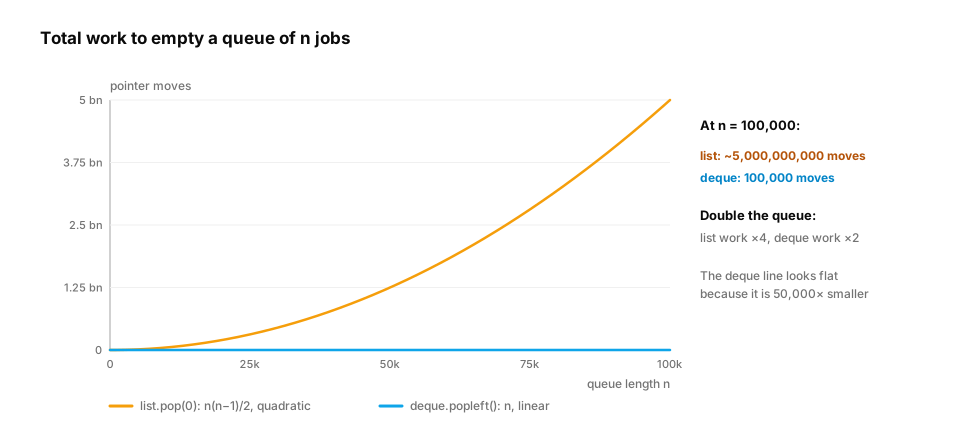
Why "it was fine in testing" is so common. With 100 jobs, the list does about 5,000 pointer moves to drain: nothing. With 100,000 jobs it does about 5 billion. The code didn't change; the input grew 1,000×, and the work grew 1,000,000×. That's the signature of an O(n²) bug. It hides in development data and appears under production load. When something is fast on small inputs and suddenly unusable on large ones, look for an O(n) operation inside a loop: pop(0), insert(0, …), x in some_list, or items.remove(x).
In production. Python's own
queue.Queue, the thread-safe queue used to hand work between threads, is implemented on top ofcollections.deque.deque(maxlen=k)is the standard way to keep "the last k" of something, such as recent latencies, recent log lines, or a sliding window of chat messages, with old items dropped automatically. The Python wiki's TimeComplexity page lists the cost of every list, deque, dict and set operation. It's worth bookmarking.
From production
A rate limiter keeps the timestamps of each user's recent requests in a list. On every request it removes timestamps older than 60 seconds with while ts and ts[0] < cutoff: ts.pop(0), then appends the new one.
Heavy users make thousands of requests a minute. What's the best change?
Show the answer
D. Use a collections.deque and popleft(): removing from the front becomes O(1) — Old timestamps leave from the front and new ones join at the back: that's a queue. list.pop(0) shifts every remaining item; deque.popleft() doesn't. remove() is O(n) too.
3. Slicing and copies: shallow vs deep
The question. When you copy a list, what actually gets copied?
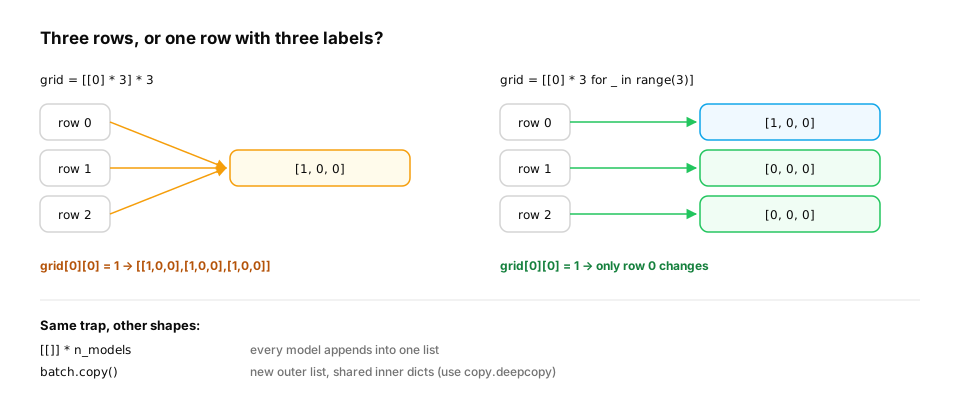
Start from nothing. Slicing items[start:stop:step] builds a new list of the selected pointers. items[:], list(items) and items.copy() all do this. They are shallow copies: the outer list is new, but the inner objects are shared. The most famous version of this bug is building a grid with *:
import copy

scores = [90, 72, 85, 64, 99]
print(scores[1:4], scores[-2:], scores[::-1], scores[::2])

grid = [[0] * 3] * 3            # BUG: three references to ONE inner list
grid[0][0] = 1
print(grid)

grid = [[0] * 3 for _ in range(3)]   # three separate inner lists
grid[0][0] = 1
print(grid)

batch = [{"id": 1, "tags": ["a"]}]
shallow = batch.copy()
deep = copy.deepcopy(batch)
batch[0]["tags"].append("b")
print(shallow[0]["tags"], deep[0]["tags"])
- Negative indices count from the end;
[::-1]reverses;[::2]takes every second item. [[0] * 3] * 3prints[[1, 0, 0], [1, 0, 0], [1, 0, 0]]: one inner list, three labels. The comprehension (next lessons) creates a fresh inner list each time.- The shallow copy shows
['a', 'b'], because it shares the inner dict. The deep copy keeps['a'].
Key idea.
*on a list repeats references, not objects. That's harmless for numbers and strings (immutable) and a bug for lists and dicts.
A real-world use of slicing: batching. Models and APIs work best on batches. A GPU processes 32 inputs nearly as fast as 1, and embedding APIs accept a list of texts per request. Slicing is the standard way to cut a list into batches:
def batches(items, size):
    """Split a list into consecutive batches; the last one may be shorter."""
    return [items[i:i + size] for i in range(0, len(items), size)]

prompts = [f"prompt-{i}" for i in range(10)]
for b in batches(prompts, 4):
    print(len(b), b[0], "...", b[-1])
Ten prompts in batches of 4 give sizes 4, 4 and 2. The last batch is shorter, and any code that assumes a fixed batch size (for example, reshaping into a (batch, …) array) must handle that. Slices never run past the end, so no index check is needed.
In production. Each slice copies its pointers. That's fine for batches, but
items[1:]inside a loop over a big list copies almost the whole list every round. For huge or streaming inputs,itertools.islicetakes items without building intermediate lists (Iteration). Note that NumPy and PyTorch slices are different: they are views that share memory with the original, so changing a slice changes the source array. Same syntax, opposite copy behaviour. Know which one you're holding.
From production
An evaluation script builds results = [[]] * len(models) and then appends each model's scores with results[i].append(score).
What does the final report show?
Show the answer
B. Every model shows every score: all entries are the same list — [[]] * n makes n references to one empty list, so every append lands in the same list. Use [[] for _ in models] to create a separate list per model.
4. Tuples: fixed records
The question. If lists can do everything, why do tuples exist?
Start from nothing. A tuple is an immutable sequence: once built, it can't change. That makes it:
- Safe to share — nobody can modify it behind your back.
- Hashable (if its items are), so it can be a dict key or set member:
(user_id, date). - A natural record: a fixed number of fields with fixed meaning, like
(lat, lon).
Unpacking pulls a tuple apart into names, and namedtuple gives fields readable names:
from collections import namedtuple

point = (12.97, 77.59)
lat, lon = point                          # unpacking
print(lat, lon)

first, *rest = [5, 3, 8, 1]               # star collects the leftovers
print(first, rest)

Hit = namedtuple("Hit", ["doc_id", "score"])
hits = [Hit("doc-7", 0.91), Hit("doc-2", 0.88), Hit("doc-9", 0.95)]
best = max(hits, key=lambda h: h.score)
print(best, best.doc_id)

cache = {("asha", "2026-11-14"): 42}     # a tuple as a dict key
print(cache[("asha", "2026-11-14")])
This prints 12.97 77.59, then 5 [3, 8, 1], then Hit(doc_id='doc-9', score=0.95) doc-9, then 42.
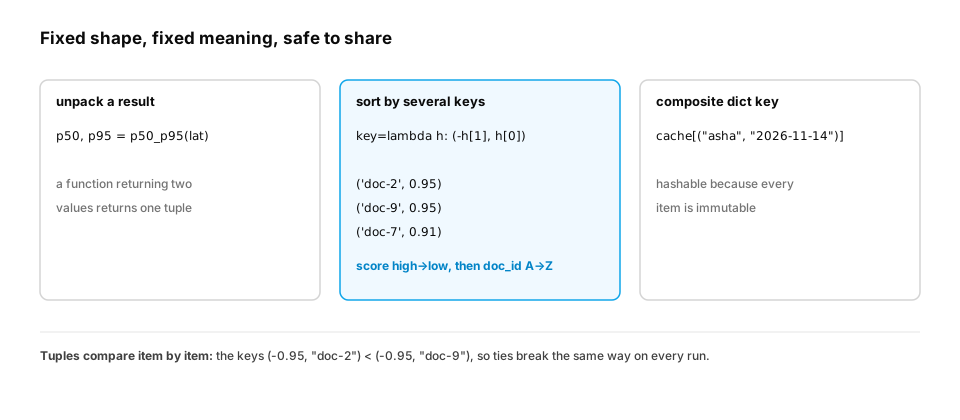
Tuples in everyday engineering: sort keys and multiple return values. Tuples compare item by item, like words in a dictionary. That makes them the standard way to sort by several criteria. It also gives you deterministic tie-breaking, which matters more than it sounds: a search ranking or eval report that reorders equal scores randomly between runs makes diffs, caches and regression tests flaky.
hits = [("doc-7", 0.91), ("doc-2", 0.95), ("doc-9", 0.95), ("doc-4", 0.88)]

# Rank by score (high first), break ties by doc_id so the order is the same on every run
ranked = sorted(hits, key=lambda h: (-h[1], h[0]))
print(ranked)

print((0.95, "doc-2") < (0.95, "doc-9"), (1, 99) < (2, 0))   # tuples compare item by item

def p50_p95(latencies):
    s = sorted(latencies)
    return s[len(s) // 2], s[int(len(s) * 0.95)]           # return two values = return a tuple

result = p50_p95([120, 80, 100, 300, 90, 110, 95, 105, 2000, 101])
p50, p95 = result
print(type(result).__name__, p50, p95)
- The two 0.95 hits come first, with
doc-2beforedoc-9, thendoc-7anddoc-4. Negating the score sorts high to low, while the doc_id still sorts A to Z. (1, 99) < (2, 0)isTrue: the first items decide, and later items only break ties.return a, breturns onetuple, which the caller unpacks: p50 is105and p95 is2000. With only 10 samples, "p95" is simply the slowest request. Percentiles need many samples before they mean anything, which the Profiling lesson returns to.
In production. For records with more than two or three fields, a
namedtupleor a frozendataclass(Classes and types) beats a bare tuple, becausehit.scorecan't be confused withhit[0]. Database drivers commonly return rows as tuples, and many libraries return small results as tuples. Unpacking them by name, likep50, p95 = …, keeps call sites readable.
Quick check
You need a dict key that combines user_id and model name. Which works?
Show the answer
D. (user_id, model) — A tuple of immutable values is hashable, so it can be a key. Lists and sets are mutable and can't. (A joined string also works but is easy to get wrong if values contain the separator.)
Check yourself
- Why is
items[i]O(1) in a list? - Why is
pop(0)slow on a long list, and what should you use instead? - What is wrong with
[[0] * 3] * 3? - Name two reasons to use a tuple instead of a list.
- Why does a Python list of a million floats use about 4× the memory of a NumPy or
array('d')array? - You sort search results by score alone, and equal-score results come back in a different order on different runs. How do you make the order deterministic?
Answers
- The list is a contiguous array of pointers, so Python computes slot i's address directly.
- Every remaining pointer has to shift one slot left: O(n) per pop. Use
collections.deque.popleft(). - It creates three references to the same inner list, so changing one row changes all of them.
- Immutability (safe to share), hashability (dict keys / set members), and a clear "fixed record" meaning.
- The list stores an 8-byte pointer per item, and each float is a separate 24-byte object. The array stores the raw 8-byte values side by side.
- Sort by a tuple key that adds a unique tie-breaker, such as
key=lambda h: (-h.score, h.doc_id).
Exercise
A dashboard shows the moving average of the last 5 latencies. New values arrive one at a time. Write a class or function that returns the current average after each value, doing O(1) work per value (no re-summing the whole window).
Solution
from collections import deque

def moving_average(values, window=5):
    recent, total, out = deque(), 0.0, []
    for v in values:
        recent.append(v)
        total += v
        if len(recent) > window:
            total -= recent.popleft()       # drop the oldest value: O(1)
        out.append(round(total / len(recent), 1))
    return out

latencies_ms = [120, 80, 100, 300, 90, 110, 95, 105]
print(moving_average(latencies_ms))
The running total is updated by adding the new value and subtracting the one that left, so each step does a constant amount of work. deque(maxlen=5) can also drop old values automatically, but then you need to read the dropped value before appending.
This unlocks:
- Dicts and sets — when you need "is this here?" in O(1) instead of O(n).
- Iterators and generators — processing sequences without building them all in memory.
- Data structures and algorithms for AI — heaps, queues and graphs built on these foundations.