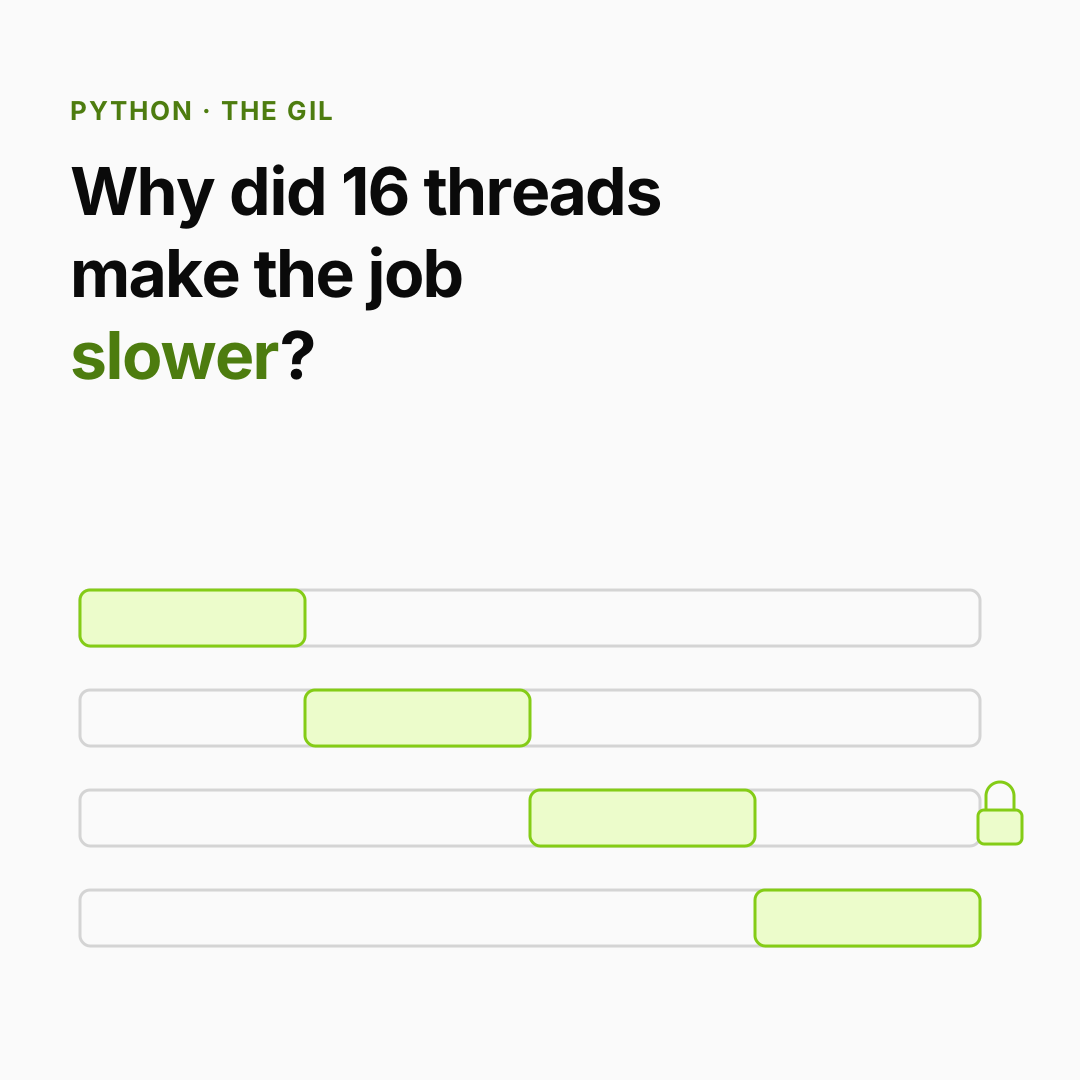
The incident. An engineer speeds up a tokenization job by moving it to 16 threads on a 16-core machine. It gets slower. Meanwhile a teammate moves 500 API calls to 16 threads and gets an almost 16× speedup. Same tool, opposite results. The difference is a single lock inside CPython called the GIL.
You already know: how CPython executes bytecode and manages objects with reference counts (How Python really runs your code).
1. What the GIL is, and why it exists
The question. Why can't Python threads run Python code on several cores at once?
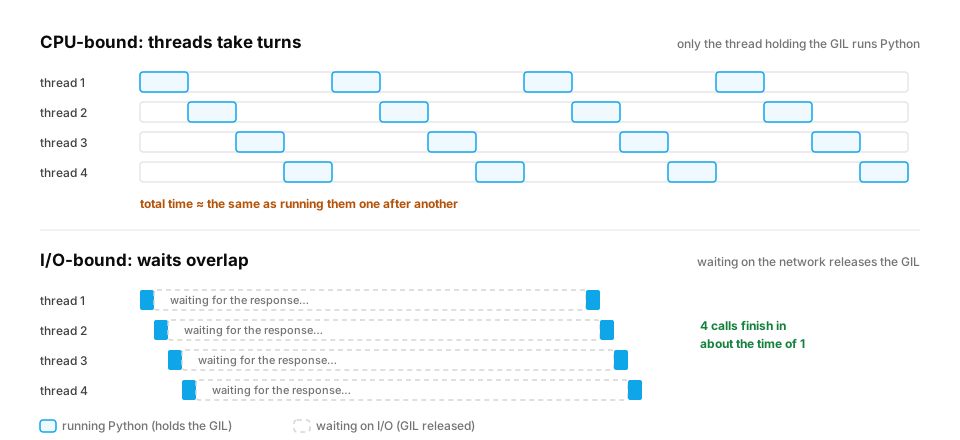
Start from nothing. A thread is an independent line of execution inside one process; threads share the same memory. CPython protects its internals (above all, every object's reference count) with one lock: the Global Interpreter Lock. A thread must hold the GIL to run Python bytecode, so only one thread executes Python code at a time, even on 64 cores.
Why keep it? It makes reference counting cheap and safe, keeps single-threaded code fast, and made C extensions easy to write. The crucial detail: a thread releases the GIL while it waits — on network I/O, disk I/O, time.sleep, and inside many C libraries (NumPy, PyTorch kernels, hashlib on large inputs). Waiting threads don't block each other.
In production. Python 3.13 ships an experimental free-threaded build (no GIL), and 3.14 makes it officially supported. Many libraries are still catching up, so in most production stacks today the rules in this lesson still apply.
How threads take turns. A thread that's computing doesn't keep the GIL forever. CPython asks it to hand over at regular intervals, so other threads get a turn:
import sys
print(f"GIL switch interval: {sys.getswitchinterval() * 1000:.0f} ms")
The default is 5 ms. With four CPU-bound threads, each one runs for slices of a few milliseconds and spends the rest of the time waiting for its next turn. The total work isn't divided across cores, it's interleaved on one, and the hand-offs add their own overhead. That's why the tokenizer in the incident got slower, not faster.
From production
A web service handles each request in its own thread. Most requests wait ~200 ms on a database, but one endpoint does 2 seconds of pure-Python JSON transformation.
What happens to other requests while that endpoint runs?
Show the answer
B. They slow down: the CPU-heavy thread competes for the GIL, so other threads only run Python code in the gaps when it's switched out — Threads waiting on the database are fine, because waiting releases the GIL. But whenever they need to run Python code, they must win the GIL from the busy thread at switch intervals, so their latency rises. Move heavy CPU work to a process pool or a background job queue.
2. Measuring it: CPU-bound vs I/O-bound
The question. How do you tell which kind of work you have, and what each kind needs?
Start from nothing. CPU-bound work keeps the processor busy computing (parsing, tokenizing in pure Python, feature math in loops). I/O-bound work mostly waits (HTTP calls, database queries, reading files). The concurrent.futures module gives threads and processes the same interface, so we can measure both:
import time
from concurrent.futures import ThreadPoolExecutor, ProcessPoolExecutor

def cpu_task(n):
    total = 0
    for i in range(n):          # pure Python arithmetic: holds the GIL the whole time
        total += i * i
    return total

def io_task(_):
    time.sleep(0.2)             # stands in for an HTTP call: releases the GIL while waiting
    return 1

def timed(label, fn):
    start = time.perf_counter()
    fn()
    elapsed = time.perf_counter() - start
    print(f"{label:<22} {elapsed:.2f}s")
    return elapsed

if __name__ == "__main__":      # required for process pools on macOS and Windows
    jobs = [2_000_000] * 4
    seq = timed("CPU, sequential", lambda: [cpu_task(n) for n in jobs])
    thr = timed("CPU, 4 threads", lambda: list(ThreadPoolExecutor(4).map(cpu_task, jobs)))
    with ProcessPoolExecutor(4) as pool:
        proc = timed("CPU, 4 processes", lambda: list(pool.map(cpu_task, jobs)))

    io_seq = timed("I/O, sequential", lambda: [io_task(i) for i in range(8)])
    io_thr = timed("I/O, 8 threads", lambda: list(ThreadPoolExecutor(8).map(io_task, range(8))))

    print("threads help CPU work:", thr < seq * 0.7)
    print("processes help CPU work:", proc < seq * 0.7)
    print("threads help I/O work:", io_thr < io_seq * 0.3)
The results:
- CPU + threads: about the same as sequential, sometimes slower (threads take turns holding the GIL, plus switching overhead).
- CPU + processes: much faster. Each process is a separate interpreter with its own GIL, so they truly run on separate cores.
- I/O + threads: 8 sleeps of 0.2 s finish in about 0.2 s instead of 1.6 s, because waiting releases the GIL.
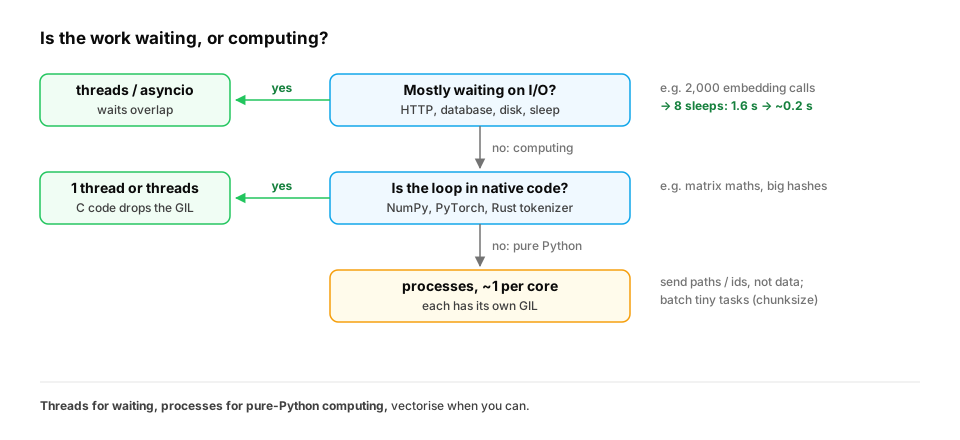
How to tell which one you have, in real code. Don't guess: measure where the time goes. Two quick checks:
- Watch CPU while it runs. If the process sits near 100% of one core, it's CPU-bound Python. If CPU is low while the job is slow, it's waiting on I/O.
- Profile it. A profile dominated by
socket,ssl,selector database driver calls means waiting. One dominated by your own functions or a pure-Python parser means computing. (Profiling, in Fast Python for AI.)
The same application usually has both kinds. A RAG ingestion job downloads documents (I/O), parses and chunks them (often pure-Python CPU), calls an embedding API (I/O), and writes to a vector store (I/O). Each stage gets its own tool, as in the exercise at the end of this lesson.
In production. Frameworks have encoded these choices for you. FastAPI and other async frameworks run I/O-bound handlers on one event loop and push blocking work to a thread pool. Celery, RQ and similar job queues run CPU-heavy tasks in worker processes. PyTorch's
DataLoader(num_workers=N)uses worker processes, so Python-side data decoding and augmentation run in parallel with training. Knowing the GIL is what lets you read those defaults and change them sensibly.
From production
A service sends 2,000 embedding requests to a hosted API, one after another. Each takes ~300 ms, almost all of it network wait. The job takes 10 minutes.
What's the right first fix?
Show the answer
C. Concurrent requests with a thread pool or asyncio (with a concurrency limit) — The work is I/O-bound: the GIL is released while waiting on the network, so threads or asyncio overlap the waits. Processes would also work but cost far more memory for no extra benefit. Cap concurrency so you respect the API's rate limit.
3. The cost of processes
The question. If processes beat the GIL, why not always use them?
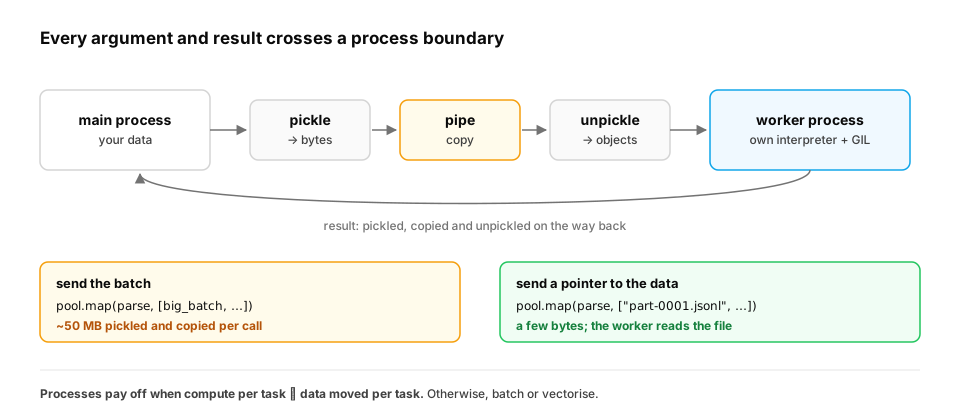
Start from nothing. Processes don't share memory. Everything you send to a worker, and everything it returns, is pickled (serialised), copied between processes, and unpickled. Each process also loads its own copy of Python and your libraries. So processes pay off only when each task does a lot of computation relative to the data it moves:
import pickle, time

big_batch = [{"id": i, "text": f"document {i}: " + "lorem ipsum " * 40} for i in range(100_000)]
start = time.perf_counter()
payload = pickle.dumps(big_batch)
pickle.loads(payload)
print(f"{len(payload) / 1e6:.1f} MB pickled and unpickled in {time.perf_counter() - start:.2f}s")
This batch is about 50 MB once pickled. Pickling is fast, but that 50 MB must also be copied to the worker and back, and the copy happens every time you ship this batch to a worker. Practical rules: send small inputs (file paths, ids, row ranges) and let workers load their own data; use chunksize in pool.map to batch many tiny tasks; return small results.
Two more process costs that bite in production. First, start-up. On macOS and Windows, worker processes are started fresh (the "spawn" method) and must import your modules again, including heavy ones like PyTorch, which can take seconds per worker. Create the pool once and reuse it; never create one per request. Second, memory. Each worker is a full Python process. If every worker loads the same 4 GB model, eight workers need 32 GB. For model inference, the usual answer is one process that owns the model and batches requests (the Inference path), not one model per worker.
In production. Data-loading workers in PyTorch, Gunicorn web workers and Celery workers are all separate processes. Teams size them by measuring memory per worker, not just by counting CPU cores. A common incident: a deploy raises worker count for throughput, and the machine starts swapping, or the out-of-memory killer starts killing workers, because each worker holds its own copy of a large model or cache.
| Work | Use | Why |
|---|---|---|
| Waiting on network / disk | threads or asyncio | the GIL is released while waiting |
| Pure-Python computation | processes | each has its own GIL |
| NumPy / PyTorch heavy math | often just one thread, or threads | the C code releases the GIL and is already parallel |
| Huge shared data, tiny tasks | rethink it: vectorise, or batch | process overhead dominates |
From production
A team parallelises a feature pipeline with ProcessPoolExecutor().map(score, rows), where rows is 5 million tiny dicts and score does three additions. It's 4× slower than a plain loop.
What went wrong?
Show the answer
C. Each tiny task is pickled and sent to a worker; the transfer costs far more than the three additions — Process pools pay serialisation and IPC per task. With trivial work per item, overhead dominates. Batch rows into big chunks (chunksize), or better, vectorise the computation with NumPy/pandas.
4. Threads still need locks
The question. If only one thread runs at a time, are threads safe?
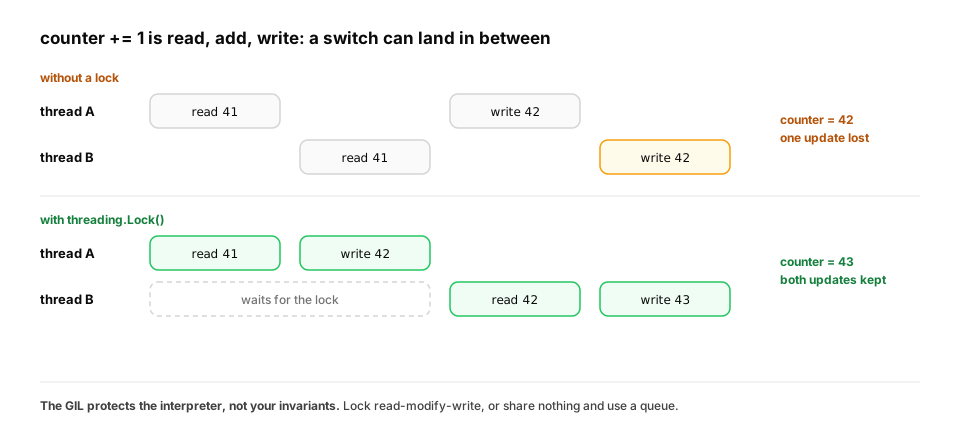
Start from nothing. No. The GIL protects CPython's internals, not your logic. A thread can be paused between any two bytecode instructions, and counter += 1 is several instructions (read, add, write). Two threads can read the same old value and both write old + 1, losing an update. Use a threading.Lock around read-modify-write on shared state:
import threading

class Counter:
    def __init__(self):
        self.value = 0
        self.lock = threading.Lock()

    def add(self, n):
        for _ in range(n):
            with self.lock:              # only one thread inside this block at a time
                self.value += 1

c = Counter()
threads = [threading.Thread(target=c.add, args=(100_000,)) for _ in range(4)]
for t in threads:
    t.start()
for t in threads:
    t.join()
print(c.value)
With the lock, the result is always 400000. Without it, you may get a smaller number on some runs and some Python versions: a race condition, the hardest kind of bug to reproduce. Even better than locks: avoid shared mutable state, and pass results back through return values or a queue.Queue.
The pattern that avoids most locks: a work queue. Instead of threads sharing a counter or a results list, give them a queue.Queue of jobs and another for results. Queue does its own locking, so your code has no shared mutable state to protect:
import queue, threading, time

jobs, results = queue.Queue(), queue.Queue()
for doc_id in range(12):
    jobs.put(doc_id)

def worker(name):
    while True:
        try:
            doc_id = jobs.get_nowait()      # Queue does its own locking
        except queue.Empty:
            return
        time.sleep(0.05)                    # stands in for an embedding API call
        results.put((doc_id, name))

start = time.perf_counter()
threads = [threading.Thread(target=worker, args=(f"w{i}",)) for i in range(4)]
for t in threads:
    t.start()
for t in threads:
    t.join()

done = sorted(results.get() for _ in range(results.qsize()))
print(len(done), "documents embedded in", f"{time.perf_counter() - start:.2f}s")
print("each document exactly once:", [d for d, _ in done] == list(range(12)))
Four workers process 12 documents of 50 ms each in about 0.16s: three rounds of overlapped waits, instead of 0.6 s one after another. Every document is handled exactly once (True), with no lock in sight. The four workers also act as a concurrency limit: at most 4 calls are in flight, which keeps you under a provider's rate limit. This producer–consumer shape is how crawlers, ingestion jobs and batch-embedding scripts are usually built (asyncio's version is in Async Python for LLM workloads).
In production. Typical race conditions in Python services: two threads lazily creating "the" shared client at once, read-modify-write on a module-level dict used as a cache, and appending to a shared list while another thread iterates over it. The fixes, in order of preference: don't share (pass data through queues or return values), share immutable data, or lock the smallest possible critical section.
Quick check
Which statement about the GIL is correct?
Show the answer
C. The GIL lets only one thread run Python bytecode at a time, but your read-modify-write logic still needs locks — The GIL protects the interpreter's internals, not your data invariants. A thread switch can happen in the middle of x += 1. I/O releases the GIL, and each process has its own.
Check yourself
- What does the GIL prevent, and what does it protect?
- Why do threads speed up I/O-bound work but not CPU-bound pure-Python work?
- What is the hidden cost of a process pool?
- Why can
counter += 1from several threads lose updates? - Why might raising the number of worker processes make a model-serving machine run out of memory?
- How does a
queue.Queueof jobs both avoid locks in your code and limit concurrency?
Answers
- It prevents more than one thread from executing Python bytecode at once; it protects CPython's internal state such as reference counts.
- Waiting (network, disk, sleep) releases the GIL, so waits overlap. Pure-Python computation needs the GIL the whole time, so threads just take turns.
- Pickling and copying data to and from workers, plus each process's own memory and start-up.
- It's a read, an add and a write; a thread switch between them lets two threads write the same stale value + 1.
- Each process is a separate interpreter with its own memory, so every worker that loads the model holds another full copy.
- The queue handles locking internally, so workers share no mutable state of yours. The number of worker threads caps how many jobs are in flight at once.
Exercise
You need to (a) download 200 PDFs from URLs, then (b) extract text from each with a pure-Python parser that takes ~1 s of CPU per file. Sketch the design: which pool for each step, how many workers, and what you send to each worker.
Solution
- Downloads (I/O-bound): a
ThreadPoolExecutor(or asyncio) with ~16–32 workers, limited by the server's politeness and rate limits. Each worker writes the file to disk and returns the path. - Parsing (CPU-bound): a
ProcessPoolExecutorwith about one worker per CPU core. Send each worker the file path (a few bytes), not the PDF bytes; the worker reads the file itself and returns the extracted text or writes it to disk. - Overlap them: submit each finished download to the process pool as it completes, so parsing starts before all downloads finish.
- Guard the entry point with
if __name__ == "__main__":so worker processes can import the module safely.
This unlocks:
- Async Python for LLM workloads — thousands of concurrent API calls on one thread.
- C++ and systems memory — what real shared-memory parallelism looks like without a GIL.