
The incident. A team ships a feature that lets each user tweak an AI tutor's settings. Within an hour, support tickets arrive: "Why are my answers 4,000 tokens long? I never changed that." One user had raised their limit, and every user got it. The code that caused it was one innocent-looking line: settings = DEFAULTS.
By the end of this lesson you'll know exactly why that line leaks, and you'll never write it by accident again.
You already know: nothing yet. This is the first lesson of the Python path. If you have typed print("hello") once, you're ready.
1. A variable is a name, not a box
The question. When you write x = 5, what actually happens?
Start from nothing. Most people picture a box called x with 5 inside. Python works differently:
- Python creates an object: a value that lives somewhere in memory (here, the integer 5).
- It binds the name
xto that object, like sticking a label on it.
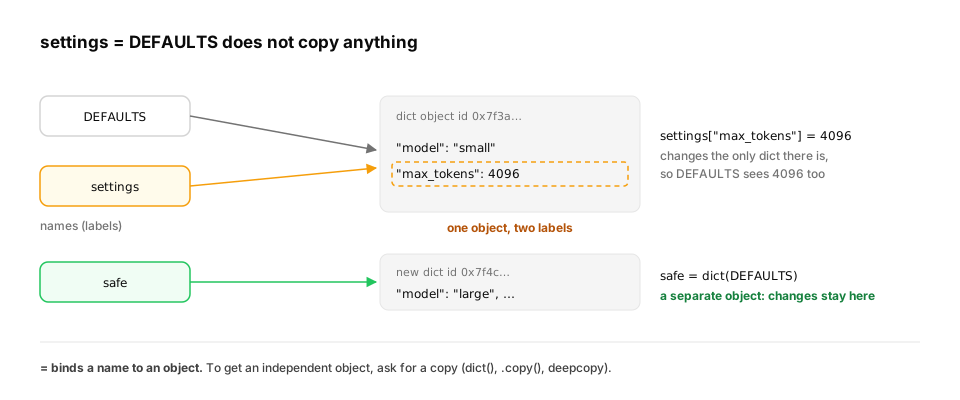
So a variable is a label pointing at an object. Two labels can point at the same object, and that's exactly what bit the team above:
DEFAULTS = {"model": "small", "max_tokens": 256}

settings = DEFAULTS              # NOT a copy: a second label on the same dict
settings["max_tokens"] = 4096
print(DEFAULTS["max_tokens"])    # the "defaults" changed too
print(settings is DEFAULTS, id(settings) == id(DEFAULTS))

safe = dict(DEFAULTS)            # a new dict with the same contents
safe["model"] = "large"
print(DEFAULTS["model"], safe["model"])
The output is 4096, then True True, then small large.
isasks "are these the same object?";==asks "do they have equal values?".id()shows an object's identity.dict(DEFAULTS)(orDEFAULTS.copy()) creates a new object, so changing it leaves the original alone.
Key idea.
=never copies. It binds a name to an object. If you want a copy, ask for one.
The same bug, one level deeper: function arguments are names too. Passing a list or dict into a function does not copy it. The parameter becomes one more label on the caller's object. Here is a chat backend that adds a system prompt before every model call:
def add_system_prompt(messages):
    messages.insert(0, {"role": "system", "content": "Be concise."})   # mutates the caller's list
    return messages

history = [{"role": "user", "content": "hi"}]
for _ in range(3):                      # three requests reuse the same history
    payload = add_system_prompt(history)
print(len(history), [m["role"] for m in history])

def add_system_prompt_fixed(messages):
    return [{"role": "system", "content": "Be concise."}] + messages     # builds a new list

history = [{"role": "user", "content": "hi"}]
for _ in range(3):
    payload = add_system_prompt_fixed(history)
print(len(history), len(payload), payload is history)

import copy
base = {"model": "small", "stop": ["\n\n"]}
shallow = dict(base)
shallow["stop"].append("END")           # the inner list is still shared
print(base["stop"])
deep = copy.deepcopy(base)
deep["stop"].append("STOP")
print(base["stop"], deep["stop"])
The first version prints 4 ['system', 'system', 'system', 'user']. After three requests the conversation carries three system prompts, and every later request pays for the extra tokens. The fixed version leaves history at 1 message, sends 2 (1 2 False), and payload is a different object.
The last four lines show the trap people hit next. dict(base) is a shallow copy: it creates a new outer dict, but the "stop" list inside is still the same object, so base["stop"] becomes ['\n\n', 'END']. copy.deepcopy copies the nested list too, so adding "STOP" leaves base alone.
In production. This aliasing shows up again in every library you'll use later:
- pandas:
df2 = dfis a second name for the same table. Usedf.copy()when you mean a copy.- NumPy: slicing an array (
a[:10]) returns a view that shares memory with the original.- PyTorch:
tensor.view()shares storage, and in-place operations (methods ending in_, likeadd_) change every name that points at the tensor.The question is always the same: "do I have my own object, or a label on someone else's?" (NumPy views: Fast Python for AI; tensor storage: PyTorch engineering.)
From production
A request handler does cfg = BASE_CONFIG and then cfg['user_id'] = request.user_id for every request.
What goes wrong under real traffic?
Show the answer
A. Every request writes into the one shared BASE_CONFIG, so users overwrite each other's user_id — cfg = BASE_CONFIG binds a second name to the same dict. Every request mutates the shared object. Copy it per request: cfg = dict(BASE_CONFIG) (or deepcopy if it's nested).
2. Numbers: exact integers, approximate floats
The question. Why does 0.1 + 0.2 == 0.3 print False, and when does it matter?
Start from nothing. Python has two everyday number types:
- int: whole numbers, exact and unlimited. Python grows the storage as needed, so they never overflow.
- float: decimals stored in binary with about 15–17 significant digits. Most decimal fractions (like 0.1) can't be stored exactly in binary, so tiny rounding errors appear.
import math
from decimal import Decimal

print(2 ** 100)                        # ints never overflow
print(0.1 + 0.2 == 0.3, 0.1 + 0.2)     # floats are approximate
print(math.isclose(0.1 + 0.2, 0.3))    # compare floats with a tolerance
print(Decimal("0.10") + Decimal("0.20"))   # exact decimal arithmetic, for money
print(7 / 2, 7 // 2, -7 // 2, 7 % 3)   # true division, floor division, remainder
2 ** 100prints all 31 digits: 1267650600228229401496703205376.0.1 + 0.2is really0.30000000000000004. Never compare floats with==; usemath.isclose.- For money, use
Decimal(or store cents as ints). Float rounding errors in billing are real bugs. //is floor division:-7 // 2is-4, not-3. It rounds towards minus infinity.
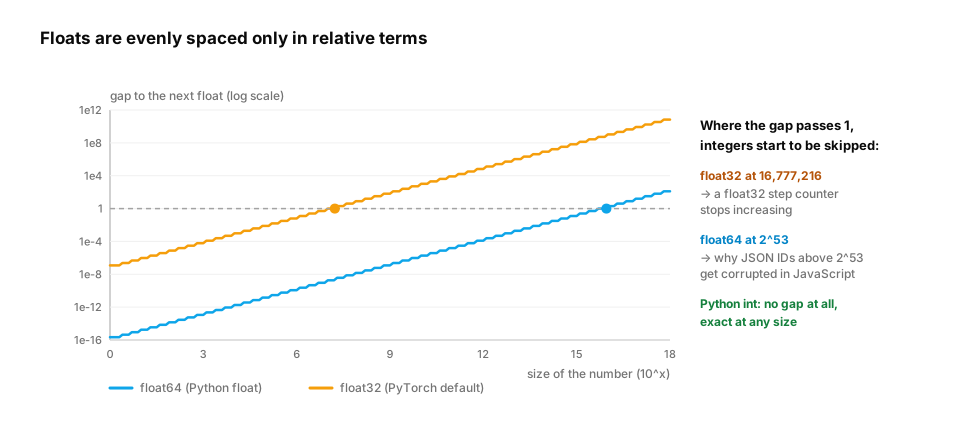
Why floats behave this way. A float stores a fixed number of significant binary digits plus an exponent, like scientific notation in base 2. Python's float is a 64-bit double with 53 significant bits. PyTorch's default float32 has 24. So the gap between two neighbouring floats grows with the size of the number. Near 1 the gap is tiny. Near 16 million, a float32 can no longer represent every whole number:
import math, struct

def as_float32(x):
    """Round-trip x through 4-byte float32, the default dtype of PyTorch tensors."""
    return struct.unpack("f", struct.pack("f", x))[0]

print(as_float32(16_777_216.0), as_float32(16_777_217.0))   # 2**24 and 2**24 + 1
step = as_float32(16_777_216.0)
print(as_float32(step + 1) == step)                         # +1 is lost in float32

print(float(2**53) == float(2**53 + 1))                     # float64 runs out at 2**53
print(2**53 + 1)                                            # int stays exact

tenths = [0.1] * 10
print(sum(tenths), sum(tenths) == 1.0, math.fsum(tenths))   # errors add up; fsum compensates

price_cents, qty = 1999, 3                                  # money as integer cents
print(price_cents * qty, f"${price_cents * qty / 100:.2f}")
16777216.0 16777216.0: in float32, 16,777,217 rounds to 16,777,216. Adding 1 to a float32 counter at that size changes nothing (True). A step or token counter stored as float32 would silently stop counting.- Float64 hits the same wall at 2^53:
float(2**53) == float(2**53 + 1)isTrue, while the int9007199254740993stays exact. - Adding
0.1ten times gives0.9999999999999999, not 1. Each addition rounds a little, and the errors add up.math.fsumtracks the lost bits and returns1.0. - Integer cents are exact:
5997, displayed as$59.97.
In production.
- Money: Stripe's API takes amounts as integers in the smallest currency unit, so $10.00 is sent as
1000. That's the integer-cents rule above, as a public API contract.- Large IDs: JavaScript numbers are float64, so
Number.MAX_SAFE_INTEGERis 2^53 − 1. Twitter's API returns tweet IDs both as numbers and as strings (id_str) because the IDs exceed that limit and JavaScript clients would corrupt them.- ML training: most numbers are float32 or bfloat16. That's why two runs of the "same" training can differ slightly, why loss values are compared with tolerances, and why mixed-precision training keeps some values in higher precision. You'll meet this again in the Deep Learning and Inference paths.
From production
A training script keeps global_step in a float32 tensor so it can be logged alongside the loss. Around step 16.8 million, the learning-rate schedule stops changing and the logs show the same step number over and over.
What is the most likely cause?
Show the answer
A. float32 can't represent every integer above 2^24, so step + 1 rounds back to the same value — float32 has 24 significant bits. Above 16,777,216, adding 1 rounds back to the same value, so the counter freezes. Keep counters as Python ints (or int64 tensors) and convert only for display.
3. Truthiness and None
The question. What does if items: actually check?
Start from nothing. Every object can be tested for truth. Empty or zero things are falsy; almost everything else is truthy. None means "no value" and is also falsy.
for value in [0, 0.0, "", [], {}, None, "0", [0], -1]:
    print(repr(value).ljust(6), bool(value))
print(True + True, isinstance(True, int))   # bools are a kind of int
The first six print False. "0" (a non-empty string), [0] (a list with one item) and -1 are True. The last line prints 2 True.
Watch out.
if not limit:treats a limit of0the same as "no limit set". When 0 is a meaningful value, test explicitly:if limit is None:. Useis None, never== None.
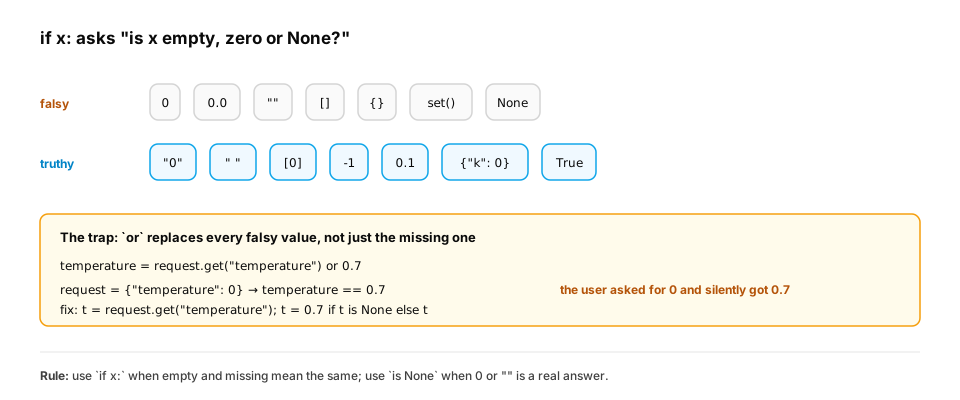
A real-world example: the or default. x or default is a popular shortcut for "use x, or the default if x is missing". But or returns the right-hand side whenever the left side is falsy, not only when it's missing. LLM APIs accept temperature=0 for deterministic-style output, and 0 is falsy:
def pick_temperature_buggy(request):
    return request.get("temperature") or 0.7

def pick_temperature(request):
    t = request.get("temperature")
    return 0.7 if t is None else t

for req in [{}, {"temperature": 0}, {"temperature": 1.0}]:
    print(req, pick_temperature_buggy(req), pick_temperature(req))
For a missing value both versions give 0.7, and for 1.0 both give 1.0. For {'temperature': 0}, the buggy version returns 0.7 and the fixed one returns 0. Nothing crashes. A user asked for the most predictable output and silently got a creative one. This class of bug survives code review because the happy path works.
In production. The same trap appears with
max_tokens=0,top_k=0, an empty-stringstop, a price of0.0or a retry count of0. A rule many teams adopt is that config readers compare againstNoneexplicitly, and usex or defaultonly for strings where empty really means "not set". Later you'll hit a cousin of this:if array:on a NumPy array with more than one element raisesValueError: The truth value of an array with more than one element is ambiguous. Use.any(),.all()orlen(array)instead.
From production
A rate limiter reads max_requests = config.get('max_requests') and then does if not max_requests: max_requests = 100. An admin sets max_requests to 0 to pause a misbehaving client.
What actually happens?
Show the answer
C. 0 is falsy, so the code replaces it with 100 and the client keeps sending requests — not 0 is True, so 0 is treated like 'missing'. Test for the missing case explicitly: if max_requests is None:.
4. Mutable and immutable objects
The question. Why can you change a list in place, but not a string?
Start from nothing. Some objects can be changed after creation (mutable): lists, dicts, sets. Others can't (immutable): ints, floats, strings, tuples, booleans, None. Operations on immutable objects always produce a new object.
s = "atlas"
t = s.upper()            # a new string; s is untouched
print(s, t)

nums = [3, 1, 2]
nums.sort()              # the same list, changed in place
print(nums)

name, tokens = "Asha", 1234
print(f"{name} used {tokens:,} tokens ({tokens / 4096:.1%} of the window)")
This prints atlas ATLAS, then [1, 2, 3], then Asha used 1,234 tokens (30.1% of the window). The last line uses an f-string: anything inside {} is evaluated, and the part after : formats it (, adds thousands separators, .1% shows a percentage).
Mutability is why the leak in the incident was possible: dicts are mutable and shared. It's also why only immutable values can be dict keys (lesson: Dicts and sets).
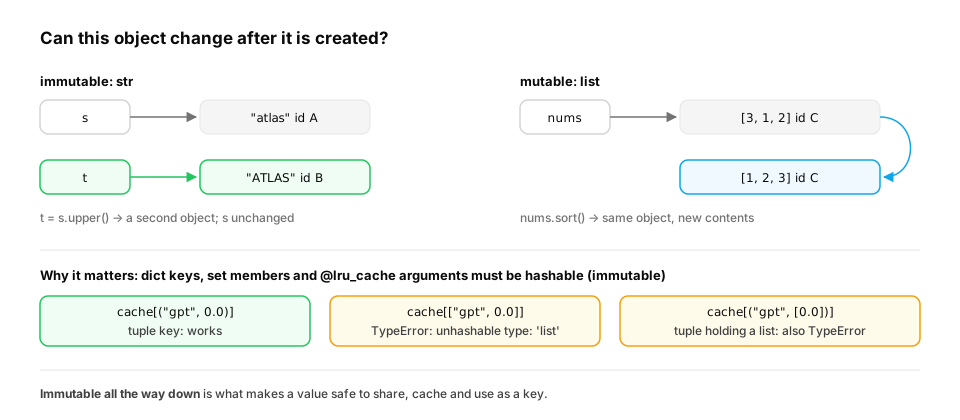
A real-world example: caching needs immutable keys. A cache remembers answers by their inputs. If an input could change after it was stored, the cache would hand back a stale answer for an input that no longer exists. So Python only lets hashable (immutable) values be dict keys, set members or arguments to functools.lru_cache:
from functools import lru_cache

@lru_cache(maxsize=1024)
def price_per_token(model, tier):
    print("  computing", model, tier)
    return {"small": 0.5, "large": 3.0}[model] * (0.8 if tier == "batch" else 1.0)

print(price_per_token("large", "batch"))
print(price_per_token("large", "batch"))          # served from the cache: no "computing" line
print(price_per_token.cache_info())

try:
    price_per_token(["large"], "batch")           # a list argument can't be hashed
except TypeError as e:
    print("TypeError:", e)

key = ("large", frozenset({"batch", "eu"}))       # immutable all the way down
print(hash(key) == hash(("large", frozenset({"eu", "batch"}))))
computing large batchis printed only once. The second call is a cache hit, andcache_info()confirmshits=1, misses=1.- The result is
2.4000000000000004, not 2.4. That's section 2 again: 3.0 × 0.8 isn't exactly representable in binary. - Passing a list raises
TypeError: unhashable type: 'list'. frozensetis the immutable set. Two frozensets with the same members hash equal regardless of order (True), which makes them good keys for "a set of options".
In production. Immutable values are also what makes data safe to share between threads and to send to worker processes without defensive copies. That's why config objects in real codebases are often frozen dataclasses or tuples (Classes and types). It's also why
@lru_cacheon a method that takes a dict argument fails at the first call, not in testing weeks later.
Quick check
Which of these can you safely use as a dictionary key?
Show the answer
D. ("user", 42) — Dict keys must be hashable, which in practice means immutable. A tuple of immutable items is fine; lists, dicts and sets can change, so they can't be keys.
Check yourself
- After
a = [1, 2]; b = a; b.append(3), what isa, and why? - Why is
0.1 + 0.2 == 0.3false, and what should you write instead? - Give two values that are falsy and one surprising value that is truthy.
- What is the difference between
isand==? - A function receives a list, appends to it and returns it. Why might the caller be surprised, and what are two ways to avoid it?
- Why do payment APIs ask for amounts in integer cents instead of a float number of dollars?
Answers
[1, 2, 3].b = abinds a second name to the same list, so appending throughbchanges the one shared object.- 0.1 and 0.2 can't be represented exactly in binary floating point, so the sum is 0.30000000000000004. Use
math.isclose(a, b)(orDecimalfor money). - Falsy:
0,"",[],None. Surprisingly truthy:"0"or[0](non-empty containers). ischecks identity (the same object);==checks equal values.- The parameter is another name for the caller's list, so the append changes the caller's data. Either build and return a new list (
[x] + items,items + [x]), or copy at the start (items = list(items)), and document which one the function does. - Integers are exact. Most decimal amounts, like 0.10, can't be stored exactly as floats, and small errors add up across many transactions.
Exercise
Write safe_merge(defaults, overrides) that returns a new settings dict: values from overrides win, nested dicts are merged key by key, and defaults is never changed, even if the caller later modifies the result.
Solution
import copy

def safe_merge(defaults, overrides):
    result = copy.deepcopy(defaults)          # a fully independent copy, nested values included
    for key, value in overrides.items():
        if isinstance(value, dict) and isinstance(result.get(key), dict):
            result[key] = safe_merge(result[key], value)   # merge nested dicts key by key
        else:
            result[key] = copy.deepcopy(value)
    return result

DEFAULTS = {"model": "small", "sampling": {"temperature": 0.7, "top_p": 0.9}, "stop": ["\n\n"]}
cfg = safe_merge(DEFAULTS, {"sampling": {"temperature": 0.0}, "stop": ["END"]})
print(cfg)

cfg["stop"].append("STOP")
cfg["sampling"]["top_p"] = 0.5
assert DEFAULTS == {"model": "small", "sampling": {"temperature": 0.7, "top_p": 0.9}, "stop": ["\n\n"]}
print("defaults untouched")
copy.deepcopy copies nested objects too. A plain dict(defaults) is a shallow copy: the outer dict is new, but nested dicts and lists are still shared, so cfg["sampling"]["top_p"] = 0.5 would have leaked back into DEFAULTS. (The function calls itself for nested dicts; that's recursion, which the Functions lesson explains.)
This unlocks:
- Control flow — making decisions and repeating work with what you now know about truthiness.
- Functions — and the famous "mutable default argument" bug, which is this lesson's leak in disguise.
- Lists and tuples — what a sequence looks like in memory, and shallow vs deep copies.