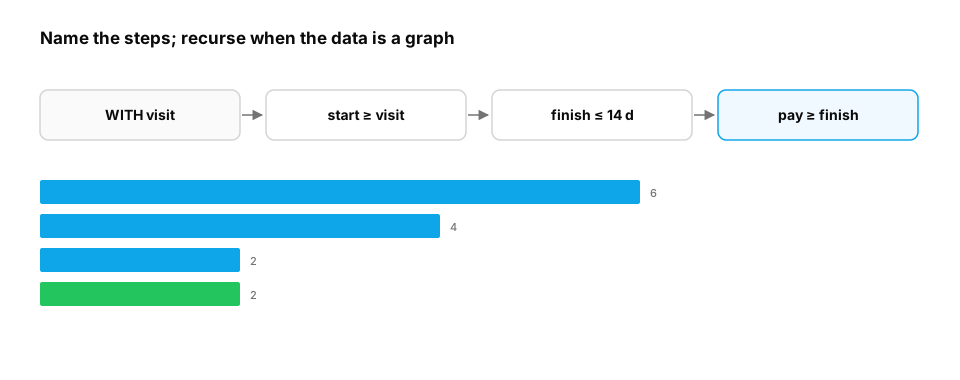
The incident. A 140-line query with five nested subqueries computes the signup funnel. A bug in the third level goes unnoticed for a month because nobody can read it. Rewritten as five named CTEs, each step can be run and checked on its own, and the bug takes ten minutes to find.
You already know: joins, aggregation and window functions (previous lessons); recursion and graphs (Python functions, Data structures).
1. CTEs: queries as named steps
The question. How do you keep a complex query readable and testable?
Start from nothing. A common table expression (WITH name AS (SELECT ...)) names an intermediate result that later steps can use, like variables in a program. Write complex logic as a pipeline of small CTEs, each with one job and a clear grain, and select from any step while debugging. Most modern planners inline CTEs like subqueries (no performance penalty); some materialize them, which can help or hurt, so check the plan for heavy queries.
Here is that workflow on a small revenue report. Each step has one job, and a tiny helper lets you run the pipeline up to any step:
import sqlite3

db = sqlite3.connect(":memory:")
db.executescript("""
CREATE TABLE orders (id INT, user_id INT, amount REAL, status TEXT, created TEXT);
INSERT INTO orders VALUES (1,1,30,'paid','2026-03-01'),(2,1,30,'refunded','2026-03-02'),(3,2,50,'paid','2026-03-02'),
 (4,3,20,'paid','2026-03-05'),(5,3,20,'paid','2026-03-05'),(6,4,99,'failed','2026-03-06');
""")
steps = {
    "paid":      "SELECT * FROM orders WHERE status = 'paid'",
    "per_user":  "SELECT user_id, COUNT(*) AS n_orders, SUM(amount) AS revenue FROM paid GROUP BY user_id",
    "segmented": "SELECT *, CASE WHEN revenue >= 40 THEN 'high' ELSE 'low' END AS segment FROM per_user",
}
ctes = ",\n".join(f"{name} AS ({sql})" for name, sql in steps.items())

def run(final_select):
    return db.execute(f"WITH {ctes}\n{final_select}").fetchall()

for name in steps:                                   # debug: inspect every step's row count
    print(f"{name:<10} rows: {run(f'SELECT COUNT(*) FROM {name}')[0][0]}")
print(run("SELECT segment, COUNT(*), SUM(revenue) FROM segmented GROUP BY segment ORDER BY segment"))

per_user_grain = run("SELECT COUNT(*) = COUNT(DISTINCT user_id) FROM per_user")[0][0]
assert per_user_grain == 1, "per_user must have one row per user"
print("grain check passed: one row per user")
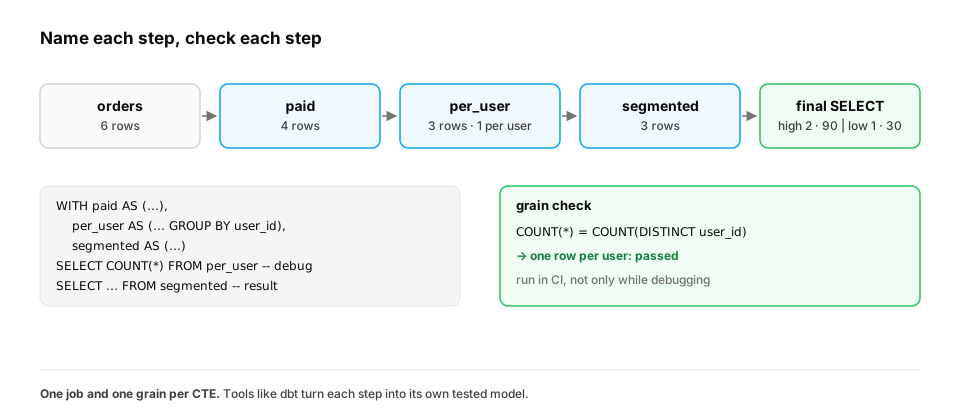
The row counts tell the story at a glance: 6 orders become 4 paid ones, which collapse to 3 users. The final split is [('high', 2, 90.0), ('low', 1, 30.0)]. The assertion turns the expected grain into a check that fails loudly if a later edit breaks it. Look at user 3's two identical 20.00 orders on the same day, too: a step-by-step pipeline is where you'd notice a possible duplicate charge and decide whether to deduplicate.
In production. This is how analytics engineering is organised at scale. dbt projects are essentially CTE pipelines split into files: each "model" is one named step, and each model can carry tests (
unique,not_null, row-count expectations). The same idea in an ML feature pipeline is to keep one step per transformation (filter, aggregate, join labels), with its grain written down and tested, so a wrong number can be traced to the step that introduced it.
From production
A 200-line metrics query returns a total 8% higher than finance's number. It's written as one SELECT with four nested subqueries.
What's the most effective way to find the bug?
Show the answer
A. Refactor into named CTEs, then select COUNT(*) and key uniqueness from each step to find the first step where the grain or totals go wrong — Named steps can be run and checked one by one. The first step whose row count or key uniqueness breaks expectations is where the inflation enters, typically a fan-out join. DISTINCT would just hide it.
2. Funnels
The question. Of students who visited a course page, how many started, finished, and paid, in order?
Start from nothing. A funnel counts users reaching each step, requiring the steps to happen in order (and often within a time limit). With one CTE per step, each joined to the previous step with a time condition, the logic stays visible.
import sqlite3

db = sqlite3.connect(":memory:")
db.execute("CREATE TABLE events (student INT, event TEXT, ts TEXT)")
rows = [(1, "visit", "2026-03-01"), (1, "start", "2026-03-01"), (1, "finish", "2026-03-04"), (1, "pay", "2026-03-05"),
        (2, "visit", "2026-03-01"), (2, "start", "2026-03-02"),
        (3, "visit", "2026-03-02"), (3, "start", "2026-03-03"), (3, "finish", "2026-03-20"),
        (4, "visit", "2026-03-03"),
        (5, "start", "2026-03-01"), (5, "visit", "2026-03-02"),           # started before visiting: doesn't count in order
        (6, "visit", "2026-03-04"), (6, "start", "2026-03-04"), (6, "finish", "2026-03-06"), (6, "pay", "2026-03-06")]
db.executemany("INSERT INTO events VALUES (?, ?, ?)", rows)
q = """
WITH visit AS (SELECT student, MIN(ts) AS t FROM events WHERE event = 'visit' GROUP BY student),
start AS (SELECT v.student, MIN(e.ts) AS t FROM visit v JOIN events e
          ON e.student = v.student AND e.event = 'start' AND e.ts >= v.t GROUP BY v.student),
finish AS (SELECT s.student, MIN(e.ts) AS t FROM start s JOIN events e
           ON e.student = s.student AND e.event = 'finish' AND e.ts >= s.t AND e.ts <= date(s.t, '+14 days') GROUP BY s.student),
pay AS (SELECT f.student, MIN(e.ts) AS t FROM finish f JOIN events e
        ON e.student = f.student AND e.event = 'pay' AND e.ts >= f.t GROUP BY f.student)
SELECT 'visit', COUNT(*) FROM visit UNION ALL SELECT 'start', COUNT(*) FROM start
UNION ALL SELECT 'finish within 14 days', COUNT(*) FROM finish UNION ALL SELECT 'pay', COUNT(*) FROM pay
"""
prev = None
for step, n in db.execute(q):
    conv = f"  ({n / prev:.0%} of previous step)" if prev else ""
    print(f"{step:<24} {n}{conv}")
    prev = n
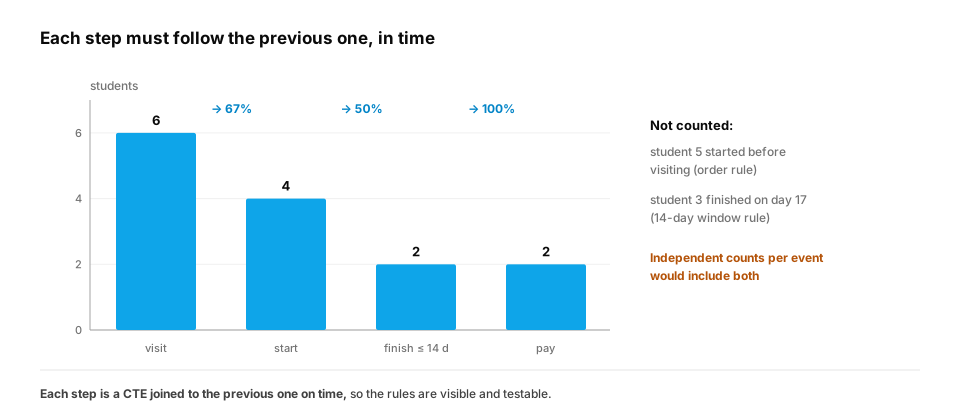
Student 5 started before visiting and student 3 finished after the 14-day window, so neither counts at those steps. Encoding the ordering and time rules per step is what distinguishes a real funnel from a set of independent counts.
The output reads visit 6, start 4 (67% of previous step), finish within 14 days 2 (50%), pay 2 (100%).
In production. Funnels drive product decisions (where do users drop off?), so their definitions get argued over: which event counts as "start", how long the window is, whether a user can re-enter. Writing each step as its own CTE puts each rule in one visible place. Product analytics tools compute funnels the same way under the hood, and the SQL version is what you reach for when the tool's built-in definition doesn't match your question.
Quick check
Why compute a funnel step-by-step with joins on time, rather than just counting distinct students per event type?
Show the answer
C. Independent counts ignore order and timing, so a student who paid without finishing, or started before visiting, would inflate later steps; step-wise joins require each step to follow the previous one — A funnel measures progression. Each step must be conditioned on the previous step having happened first (and within the window), which independent counts can't express.
3. Recursive CTEs: hierarchies and graphs
The question. Which lessons must a student complete, directly or indirectly, before 'attention'?
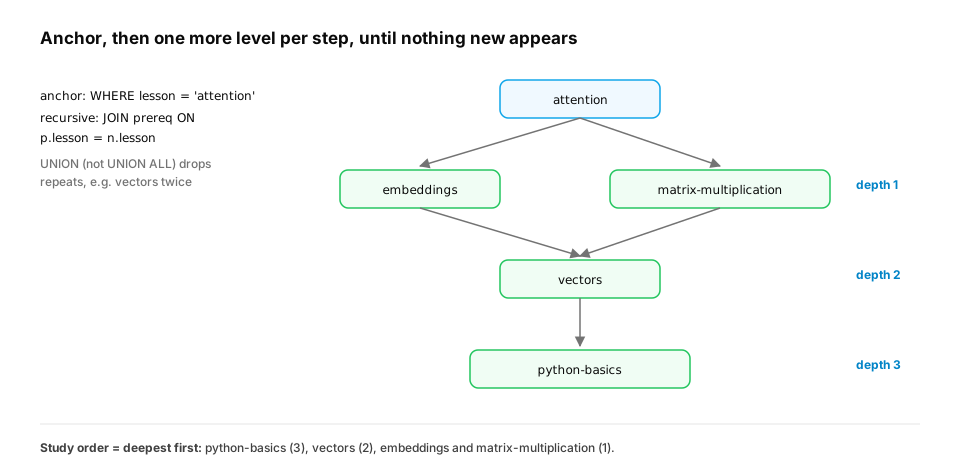
Start from nothing. A recursive CTE has an anchor (starting rows) and a recursive part that joins the CTE to a table to produce the next level, repeating until no new rows appear. It walks hierarchies (org charts, category trees) and graphs (prerequisites, dependencies). Use UNION (not UNION ALL) or track depth and visited paths to stop on cycles.
import sqlite3

db = sqlite3.connect(":memory:")
db.execute("CREATE TABLE prereq (lesson TEXT, requires TEXT)")
db.executemany("INSERT INTO prereq VALUES (?, ?)", [
    ("attention", "embeddings"), ("attention", "matrix-multiplication"), ("embeddings", "vectors"),
    ("matrix-multiplication", "vectors"), ("vectors", "python-basics"), ("transformer", "attention"),
])
q = """
WITH RECURSIVE needed(lesson, depth) AS (
    SELECT requires, 1 FROM prereq WHERE lesson = 'attention'          -- anchor: direct prerequisites
    UNION
    SELECT p.requires, n.depth + 1 FROM needed n JOIN prereq p ON p.lesson = n.lesson   -- one more level
)
SELECT lesson, MAX(depth) AS levels_below FROM needed GROUP BY lesson ORDER BY levels_below DESC, lesson
"""
for row in db.execute(q):
    print(row)
The query finds all four prerequisites of attention, including python-basics three levels down, and taking the maximum depth gives a valid study order (deepest first). Recursive CTEs also generate series (the calendar in the Aggregation lesson) and walk any parent–child data without application code.
In production. Recursive queries answer hierarchy questions where the data lives: everyone who reports (directly or indirectly) to a manager, every folder a permission inherits into, every downstream table affected by a schema change (data lineage), or every component of a bill of materials. Two safety habits are standard. Always carry a depth limit or a visited path, so bad data with a cycle can't run forever (the exercise below does this). And index the join column (
prereq.lessonhere), because the recursive step runs one join per level.
From production
A permissions service uses a recursive CTE to find all folders under a root folder. After a bad migration makes one folder its own grandparent, the query never finishes and pins the database CPU.
What should the recursive query have included?
Show the answer
D. A cycle guard: track depth (stop past a sane maximum) and/or the visited path, and stop when a folder repeats — Cyclic data makes the recursion produce rows forever (UNION ALL makes it worse, since even exact repeats aren't removed). A depth cap or visited-path check bounds the work and lets you detect and report the bad edge.
Check yourself
- What are CTEs for, and how do they help debugging?
- How do you enforce order and time windows in a funnel?
- What are the anchor and recursive parts of a recursive CTE?
- How do you prevent a recursive CTE from looping forever on a cyclic graph?
- How does splitting a query into CTEs help you find where a total went wrong?
- Why does a funnel need joins on time between steps rather than independent counts?
Answers
- Naming intermediate steps so a query reads as a pipeline; each step can be selected and checked independently.
- Compute each step as a CTE joined to the previous one with conditions like
e.ts >= previous.tande.ts <= previous.t + window. - Anchor: the starting rows; recursive part: a query joining the CTE to a table to produce the next rows, repeated until nothing new appears.
- Use UNION to discard duplicate rows, or track a depth limit or the visited path and stop when a node repeats.
- You can count rows and check key uniqueness at each step; the first step where they break expectations is where the bug entered.
- Independent counts ignore order and timing, so users who skipped or reversed steps would be counted. Each step must follow the previous one within its window.
Exercise
Extend the prerequisite graph with a cycle (python-basics requires transformer, an error in the data). Write a recursive query that finds every cycle-causing path by carrying the visited path as a string and stopping when a lesson repeats, and print the cycle it detects.
Solution
import sqlite3

db = sqlite3.connect(":memory:")
db.execute("CREATE TABLE prereq (lesson TEXT, requires TEXT)")
db.executemany("INSERT INTO prereq VALUES (?, ?)", [
    ("attention", "embeddings"), ("embeddings", "vectors"), ("vectors", "python-basics"),
    ("transformer", "attention"), ("python-basics", "transformer"),            # the bad edge
])
q = """
WITH RECURSIVE walk(start, current, path, is_cycle) AS (
    SELECT lesson, requires, lesson || ' -> ' || requires, lesson = requires FROM prereq
    UNION ALL
    SELECT w.start, p.requires, w.path || ' -> ' || p.requires,
           instr(w.path, p.requires) > 0
    FROM walk w JOIN prereq p ON p.lesson = w.current
    WHERE NOT w.is_cycle AND length(w.path) < 500
)
SELECT path FROM walk WHERE is_cycle AND start = current ORDER BY length(path) LIMIT 1
"""
print("cycle found:", db.execute(q).fetchone()[0])
Carrying the path lets each step check whether the next lesson has already been visited; rows that close a loop are marked and not expanded further, so the query terminates. Here it reports the five-lesson loop that the bad edge created, which a data-quality check on the prerequisite table should block before it reaches the product.
This unlocks:
- Query plans — understanding what the database does with all of this.
- SQL for ML — feature and experiment pipelines built from CTEs.