
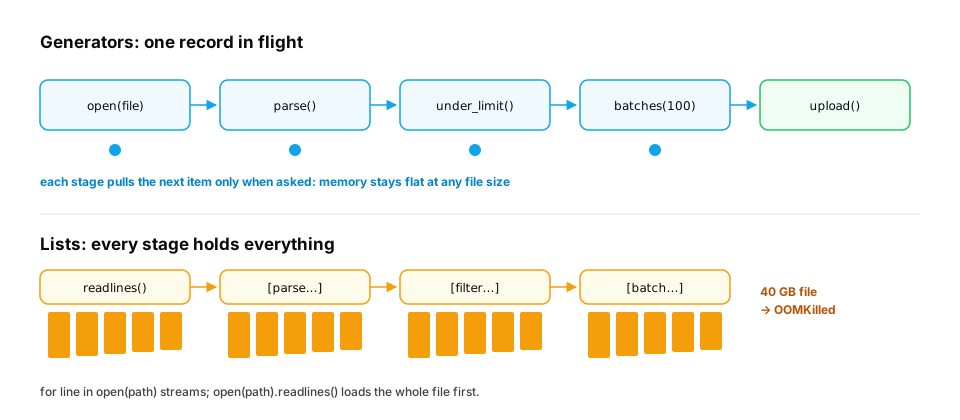
The incident. A preprocessing script starts with lines = open("chats.jsonl").readlines(). On the 200 MB sample it works. On the real 40 GB file, the container is killed with OOMKilled (out of memory) after six minutes, before processing a single record. The fix changes three lines and the script then runs in about 50 MB of RAM, however large the file.
You already know: for loops (Control flow), functions (Functions), lists and their memory (Lists and tuples).
1. Comprehensions: loops that build collections
The question. What's the idiomatic way to build a list from another list?
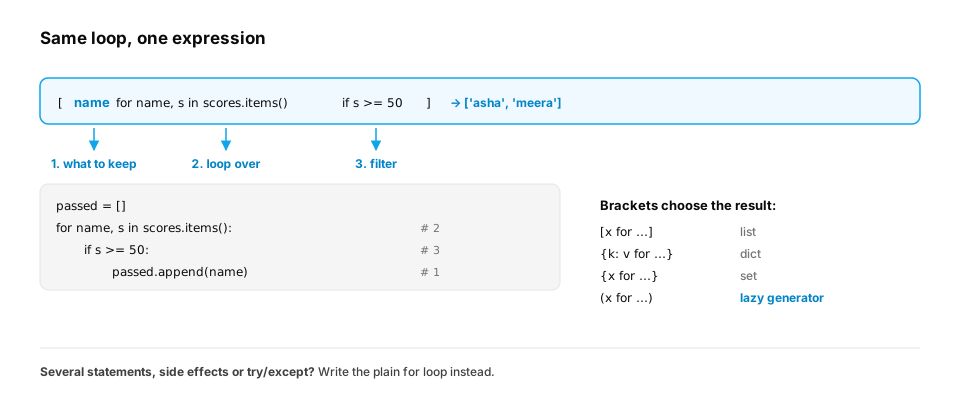
Start from nothing. A comprehension puts a transform and an optional filter into one expression: [expression for item in iterable if condition]. The same syntax builds dicts and sets.
scores = {"asha": 92, "ravi": 48, "meera": 77, "john": 35}

passed = [name for name, s in scores.items() if s >= 50]
grades = {name: ("pass" if s >= 50 else "retry") for name, s in scores.items()}
initials = {name[0].upper() for name in scores}
pairs = [(a, b) for a in "xy" for b in (1, 2)]          # nested: outer loop first

print(passed)
print(grades)
print(sorted(initials), pairs)
This prints ['asha', 'meera'], the grades dict, then ['A', 'J', 'M', 'R'] [('x', 1), ('x', 2), ('y', 1), ('y', 2)].
Key idea. Comprehensions are for building a collection. If the body needs several statements, side effects or error handling, a plain
forloop is clearer. Readability beats cleverness.
A real-world trap: functions built in a loop. Comprehensions are often used to build callables: one handler per model, one validator per field, one callback per button. A lambda inside a comprehension doesn't capture the loop variable's value. It looks the name up when it's called, after the loop has finished:
models = ["small", "medium", "large"]

handlers = [lambda prompt: f"{m} answers {prompt!r}" for m in models]   # BUG: m looked up at call time
print([h("hi") for h in handlers])

handlers = [lambda prompt, m=m: f"{m} answers {prompt!r}" for m in models]  # bind now with a default
print([h("hi") for h in handlers])
All three buggy handlers say large answers 'hi': by the time they run, m is the last model. Binding the value as a default argument (m=m) captures it at creation time, so the fixed version routes to small, medium and large. functools.partial(fn, m) does the same thing more explicitly. This is the closure behaviour from Functions, showing up in a comprehension.
In production. Comprehensions are the everyday tool for reshaping data in AI code: pulling
[m["content"] for m in messages if m["role"] == "user"]out of a chat history, building{doc["id"]: doc for doc in docs}lookup tables, and collecting{label for _, label in dataset}. Reviewers tend to push back when they nest more than two levels deep or hide side effects (like API calls) inside. At that point a named loop or function documents intent better.
From production
A team registers one route handler per model with routes = {m: (lambda req: run(m, req)) for m in MODELS}. In production, every route calls the last model in MODELS.
Why, and what's a fix?
Show the answer
A. The lambda looks up m when called, after the comprehension finished, so all see the last value; bind it with lambda req, m=m: run(m, req) or functools.partial — Closures capture variables, not values. Every lambda shares the comprehension's m, which ends as the last model. A default argument or partial binds the current value at creation.
2. Iterators: what for really does
The question. How does for work on lists, files, dicts and ranges alike?
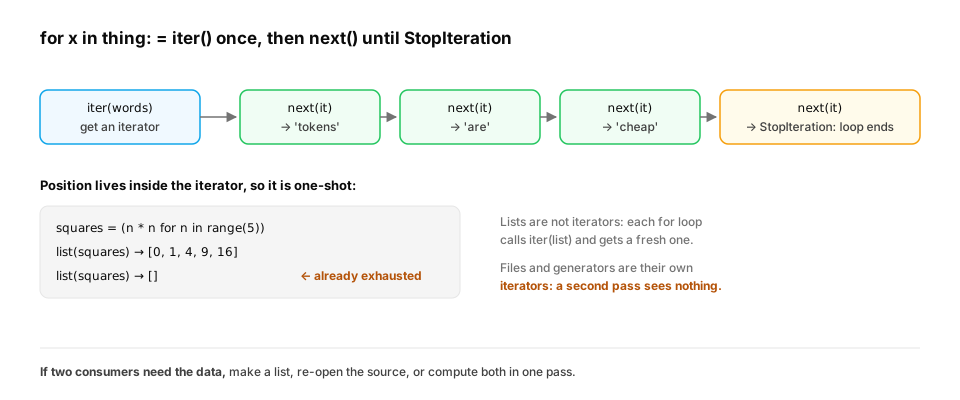
Start from nothing. for x in thing first calls iter(thing) to get an iterator, then calls next() on it repeatedly until it raises StopIteration. An iterator produces one item at a time and remembers its position. It is one-shot: once used up, it stays empty.
words = ["tokens", "are", "cheap"]
it = iter(words)
print(next(it), next(it), next(it))
try:
    next(it)
except StopIteration:
    print("exhausted")

squares = (n * n for n in range(5))      # a generator expression: () instead of []
print(list(squares))
print(list(squares))                     # second pass: already used up
This prints tokens are cheap, exhausted, then [0, 1, 4, 9, 16] and []. That empty second list is a common real bug: passing a generator to two functions, where the second sees nothing.
A real-world example: reading a huge binary file in chunks. iter() has a second form, iter(callable, sentinel): it calls the function again and again until it returns the sentinel value. That's the idiomatic way to stream a binary file in fixed-size chunks, for example to checksum a multi-gigabyte model checkpoint without loading it into memory:
import hashlib, os, tempfile

path = os.path.join(tempfile.mkdtemp(), "model.bin")
with open(path, "wb") as f:
    f.write(os.urandom(5_000_000))                  # a 5 MB stand-in for a checkpoint

digest = hashlib.sha256()
chunks = 0
with open(path, "rb") as f:
    for chunk in iter(lambda: f.read(1 << 20), b""):  # call f.read(1 MiB) until it returns b""
        digest.update(chunk)
        chunks += 1
print(chunks, "chunks of at most 1 MiB")

with open(path, "rb") as f:
    whole = hashlib.sha256(f.read()).hexdigest()
print("same digest as reading it all at once:", whole == digest.hexdigest())
The 5 MB file is read in 5 chunks (four full 1 MiB chunks plus a remainder), and the digest matches reading it all at once (True). The streaming version uses the same 1 MiB of memory whether the file is 5 MB or 50 GB.
In production. Model hubs publish SHA-256 checksums so downloads can be verified, and this loop is how you verify them. The same chunked pattern streams uploads to object storage and reads large Parquet or Arrow files batch by batch. Database cursors and HTTP streaming responses are iterators too, which is why
for row in cursor:andfor chunk in response.iter_content(...)work on results far larger than memory.
Quick check
Which of these can you safely loop over twice and get the same items both times?
Show the answer
C. A list — A list isn't an iterator. Each for calls iter() on it and gets a fresh iterator. Generators, open files and map objects are their own iterators: the second pass starts where the first ended, at the end.
3. Generators: functions that pause
The question. How do you produce a stream of values without building them all first?
Start from nothing. A function containing yield is a generator function. Calling it doesn't run the body; it returns a generator. Each next() runs the body until the next yield, hands that value out, and pauses there with all local variables intact. Memory use stays constant no matter how many values it yields.
import sys

def read_records(lines):
    for line in lines:                  # a file object also yields one line at a time
        line = line.strip()
        if line:
            yield line

big_list = [n for n in range(1_000_000)]
big_gen = (n for n in range(1_000_000))
print(f"list: {sys.getsizeof(big_list):,} bytes, generator: {sys.getsizeof(big_gen)} bytes")

fake_file = ["a\n", "\n", "b\n", "c\n"]
for record in read_records(fake_file):
    print(record, end=" ")
print()
The list of a million ints needs about 8 MB just for its pointers (plus the int objects themselves); the generator is about 100 bytes. With a real file, for line in open(path): reads one line at a time, which is the incident's fix.
From production
A job does rows = [json.loads(l) for l in open('events.jsonl')] and then for r in rows: send(r). The file grows from 1 GB to 60 GB and the job starts getting OOMKilled.
What's the minimal fix?
Show the answer
C. Use a generator expression: rows = (json.loads(l) for l in open(...)), so one record is in memory at a time — The list comprehension parses the entire file into memory before sending anything. The generator version parses one line, sends it, and moves on, so memory stays flat as the file grows.
4. Lazy pipelines with itertools
The question. How do you chain several processing steps without building intermediate lists?
Start from nothing. Each generator can consume another, forming a pipeline: nothing is computed until the final consumer asks for the next item. itertools provides ready-made lazy building blocks: islice (take the first n), chain (concatenate streams), groupby (group consecutive items), batched (3.12+; here we write our own):
import json
from itertools import islice, chain

raw_lines = [
    '{"user": "asha", "tokens": 120}',
    'not json',
    '{"user": "ravi", "tokens": 4000}',
    '{"user": "meera", "tokens": 300}',
    '{"user": "john", "tokens": 90}',
    '{"user": "zoya", "tokens": 150}',
]

def parse(lines):
    for line in lines:
        try:
            yield json.loads(line)
        except json.JSONDecodeError:
            continue                     # skip bad lines (in real code: count and log them)

def under_limit(records, limit):
    return (r for r in records if r["tokens"] <= limit)

def batches(items, size):
    it = iter(items)
    while batch := list(islice(it, size)):   # := assigns and tests in one step
        yield batch

pipeline = batches(under_limit(parse(raw_lines), 1000), size=2)
for batch in pipeline:
    print([r["user"] for r in batch])

print(list(chain([1, 2], (3, 4), range(5, 7))))
The pipeline prints ['asha', 'meera'], ['john', 'zoya']: the bad line and Ravi's 4,000-token record are dropped, and only one batch is ever in memory. The same batches function is what you'd use to send records to an embedding API 100 at a time.
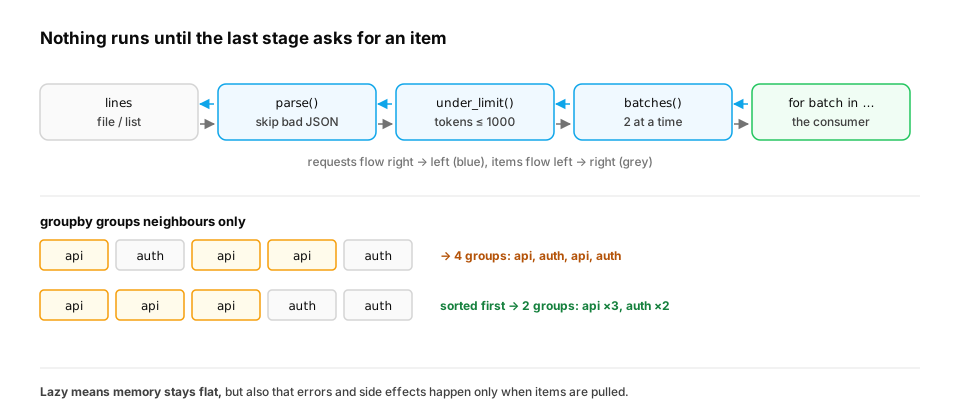
Two more lazy tools you'll meet constantly. itertools.groupby groups consecutive items with the same key. On unsorted data it silently splits one key into several groups. And streaming LLM output is a generator too: tokens arrive one at a time, and your code yields them onward as they come.
from itertools import groupby

events = [("api", 500), ("auth", 401), ("api", 503), ("api", 500), ("auth", 403)]

print({svc: len(list(g)) for svc, g in groupby(events, key=lambda e: e[0])})   # unsorted input

ordered = sorted(events, key=lambda e: e[0])
print({svc: len(list(g)) for svc, g in groupby(ordered, key=lambda e: e[0])})

def stream_tokens(text):
    for word in text.split():          # stands in for tokens arriving from a model API
        yield word + " "

shown = ""
for piece in stream_tokens("Attention mixes information across tokens"):
    shown += piece                     # a UI would render each piece as it arrives
print(repr(shown.strip()))
- On unsorted input, the result is
{'api': 2, 'auth': 1}, which is wrong twice over. groupby produced four groups (api, auth, api, auth), and the dict comprehension kept only the last group for each key. Sorted first, the counts are right:{'api': 3, 'auth': 2}. (For counting,Counterfrom Dicts and sets is simpler. groupby shines on data that's already sorted, such as log lines by timestamp or rows by user from a database.) - The token stream arrives piece by piece and is assembled into
'Attention mixes information across tokens'. A chat UI renders each piece as it arrives, so the first words appear long before the last one is generated.
In production. LLM SDKs expose streaming responses as iterators of events (async iterators in async code). Server frameworks pass a generator to a streaming HTTP response, so tokens reach the browser as they're produced. The cost of laziness is that errors are lazy too. A pipeline that fails on record 9 million fails 9 million records in, not at start-up. Validate inputs early, and log progress counts as items flow.
From production
records = parse(open('data.jsonl')) returns a generator. The code then calls count = sum(1 for _ in records) to log the total, and then upload(records).
What does upload() receive?
Show the answer
D. Nothing: counting consumed the generator — Generators are one-shot. Counting iterated all the way to the end, so upload() gets an exhausted generator and uploads nothing, silently. Count while uploading, or re-open the file for a second pass.
Check yourself
- Write a dict comprehension that maps each word in
wordsto its length. - What happens when you iterate an already-exhausted generator?
- What does
yielddo thatreturndoesn't? - Why does
for line in open(path)handle a 40 GB file butopen(path).readlines()doesn't? - Why do lambdas created in a comprehension all see the loop variable's last value, and how do you fix it?
- What does
groupbyreturn on data that isn't sorted by the key?
Answers
{w: len(w) for w in words}.- Nothing is produced: the loop body never runs (and
list()gives[]), with no error. - It hands out a value and pauses the function, keeping its local state, so it can resume and produce more values later.
- Iterating the file reads one line at a time;
readlines()loads every line into one list in memory. - They capture the variable, not its value, and look it up when called, after the loop finished. Bind the value at creation with a default argument (
m=m) orfunctools.partial. - One group per run of consecutive equal keys, so a key that appears in several places becomes several separate groups. Sort by the key first.
Exercise
Write a generator sessions(events, gap=30) that takes events sorted by time, as (user, timestamp_seconds), and yields each user's sessions: lists of consecutive timestamps where no two neighbours are more than gap seconds apart. It must work on a stream (never call list() on all events).
Solution
def sessions(events, gap=30):
    open_sessions = {}                       # user -> timestamps in the current session
    for user, ts in events:
        current = open_sessions.get(user)
        if current and ts - current[-1] > gap:
            yield user, current              # the gap is too big: close the old session
            current = None
        if current is None:
            current = open_sessions[user] = []
        current.append(ts)
    for user, current in open_sessions.items():
        yield user, current                  # flush sessions still open at the end

events = [("asha", 0), ("ravi", 5), ("asha", 20), ("asha", 100), ("ravi", 30), ("asha", 110)]
for user, times in sessions(iter(events)):
    print(user, times)
Only the currently open session per user is in memory. Passing iter(events) proves the function works on a one-shot stream. The output is asha [0, 20] first (closed by the 80-second gap), then the open sessions at the end: asha [100, 110] and ravi [5, 30].
This unlocks:
- Decorators and context managers —
with open(...)and the other half of resource-safe pipelines. - NumPy and pandas — when you do want the whole column in memory, done fast.
- Async Python — async generators stream results from APIs the same way.