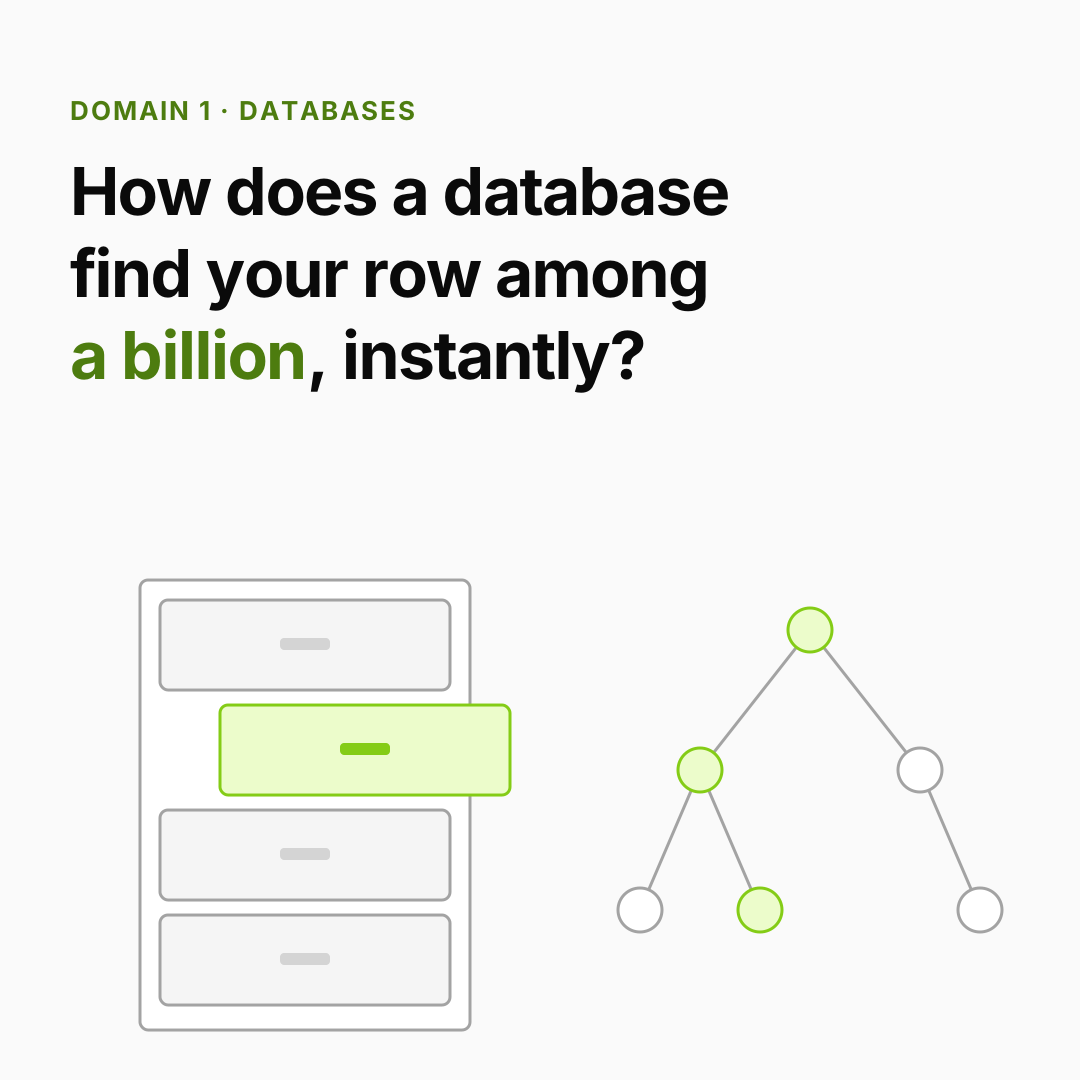
You already know: B-trees and hash maps (Data structures §2, §6), pages and files (Operating systems §3, §6), and requests arriving over the network (Networking §1).
Why this matters for Atlas. When a student finishes a lesson, closes the tab and returns next week, their progress must still be there — even if the server crashed in between, and even if two devices saved at the same moment. That's the database's job. (Unrolled itself runs on SQLite/Turso — the examples below use the same engine.)
1. Tables, keys and joins
The question. How do we store students, lessons and progress so any question about them is easy to answer?
Start from nothing. A relational database stores data in tables: rows are records, columns are fields. Each row has a primary key (a unique id). Instead of copying a student's name into every progress row, a progress row stores the student's id — a foreign key — and we combine tables on demand with a JOIN. Storing each fact once (normalization) means an update happens in one place.
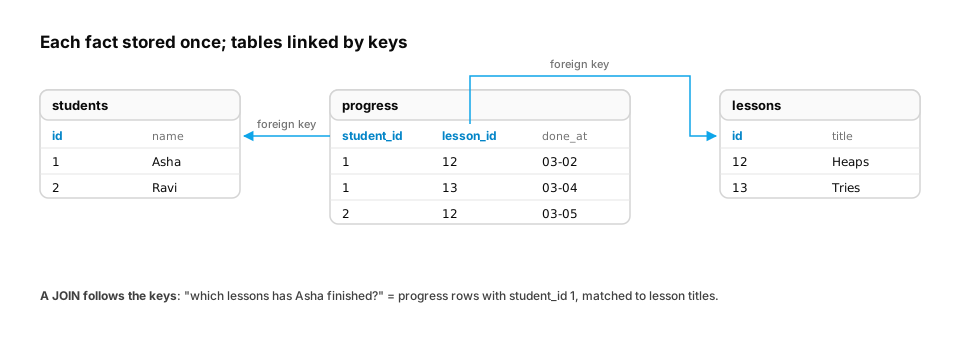
Real-life analogy. A school register: one list of pupils, one list of classes, and an attendance sheet that just writes pupil number + class number.
Worked example.
import sqlite3

db = sqlite3.connect(":memory:")
db.executescript("""
CREATE TABLE students (id INTEGER PRIMARY KEY, name TEXT NOT NULL);
CREATE TABLE lessons  (id INTEGER PRIMARY KEY, title TEXT NOT NULL);
CREATE TABLE progress (
  student_id INTEGER REFERENCES students(id),
  lesson_id  INTEGER REFERENCES lessons(id),
  done_at    TEXT,
  PRIMARY KEY (student_id, lesson_id)
);
INSERT INTO students VALUES (1, 'Asha'), (2, 'Ben');
INSERT INTO lessons  VALUES (1, 'Python internals'), (2, 'C++ memory'), (3, 'Data structures');
INSERT INTO progress VALUES (1, 1, '2026-11-01'), (1, 2, '2026-11-03'), (2, 1, '2026-11-02');
""")

query = """
SELECT s.name, COUNT(p.lesson_id) AS completed
FROM students s LEFT JOIN progress p ON p.student_id = s.id
GROUP BY s.id ORDER BY completed DESC;
"""
for row in db.execute(query):
    print(row)          # ('Asha', 2) then ('Ben', 1)
Common traps
- Building SQL by gluing strings with user input (
f"... WHERE name = '{name}'") → SQL injection. Always pass values as parameters (db.execute("... WHERE name = ?", (name,))). INNER JOINsilently drops students with no progress;LEFT JOINkeeps them with a count of 0.
From production
A progress table copies each student's name into every row 'to avoid joins'. A student changes their display name, and reports now show both names for the same student.
What design prevents this?
Show the answer
C. Normalise: store the name once in students and reference it by student_id (a foreign key), joining when you need the name — Storing a fact once means an update happens in one place. Duplicated copies drift apart. Denormalise deliberately only for measured read-performance needs, and then own the job of keeping the copies in sync.
2. Indexes: don't read the whole table
The question. Finding one student's progress among 50 million rows — why is it instant with an index and painfully slow without one?
Start from nothing. Without an index, the database must scan every row. An index is a separate, sorted structure — usually a B-tree (Data structures §6) — that maps column values to row locations. Lookups become O(log n) page reads, and range queries walk a sorted slice. The cost: every insert/update must also update the index, and it uses storage.
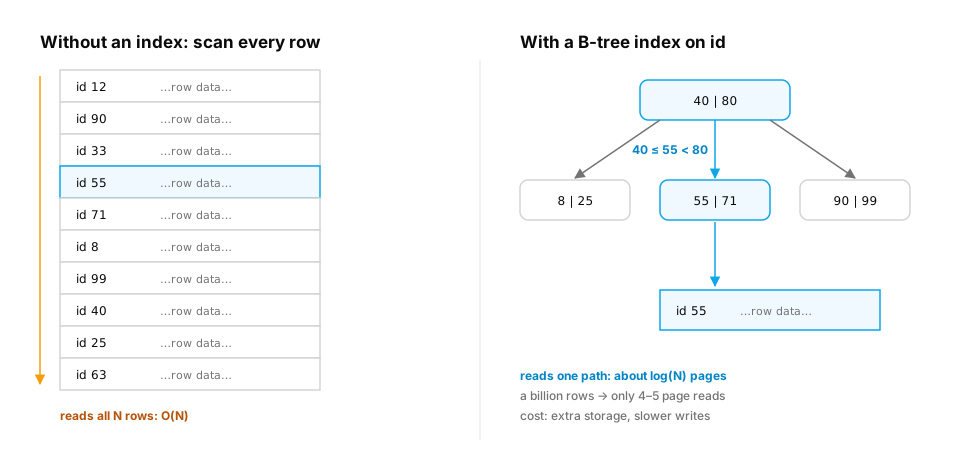
Real-life analogy. The index at the back of a textbook: look up "TCP", jump to page 214.
Worked example — ask the database how it will run a query:
import random
import sqlite3
import time

db = sqlite3.connect(":memory:")
db.execute("CREATE TABLE events (user_id INTEGER, lesson TEXT, ts INTEGER)")
random.seed(0)
db.executemany("INSERT INTO events VALUES (?, ?, ?)",
               ((random.randrange(100_000), "lesson", i) for i in range(500_000)))

def timed(sql, args):
    t = time.perf_counter()
    rows = db.execute(sql, args).fetchall()
    return len(rows), (time.perf_counter() - t) * 1000

sql = "SELECT * FROM events WHERE user_id = ?"
print("plan before:", db.execute("EXPLAIN QUERY PLAN " + sql, (42,)).fetchall()[0][-1])
print("rows, ms   :", timed(sql, (42,)))

db.execute("CREATE INDEX idx_events_user ON events(user_id)")
print("plan after :", db.execute("EXPLAIN QUERY PLAN " + sql, (42,)).fetchall()[0][-1])
print("rows, ms   :", timed(sql, (42,)))
You'll see SCAN events change to SEARCH events USING INDEX idx_events_user (user_id=?), and the time drop by orders of magnitude.
Common traps
- Indexing every column: writes get slower and the database may still not use them.
- Wrapping the column in a function (
WHERE lower(email) = ?) can stop a plain index being used — index the expression or store normalized values.
In production / interviews. "This endpoint got slow as we grew" is very often a missing index. Interview question: "How would you find and fix a slow query in production?" (Look at the query plan; check which index it uses; add a composite index matching the WHERE and ORDER BY.)
From production
A query filters WHERE status = 'active' on a 50-million-row table where 92% of rows are active, and an index on status exists. The planner ignores the index and scans.
Why is that reasonable?
Show the answer
D. The filter isn't selective: reading 92% of the table through millions of index lookups costs more than one sequential scan, so the planner correctly chooses the scan — Indexes pay off for selective predicates (few matching rows). For a value that matches most of the table, a sequential scan is cheaper. Here a partial index on the rare values (e.g. WHERE status = 'cancelled') would help the queries that need it.
3. Transactions and ACID: all or nothing
The question. A student pays for Pro: insert the payment and upgrade the plan. What if the server crashes between the two?
Start from nothing. A transaction groups several changes so they succeed or fail together. Databases promise ACID:
| Letter | Promise | In Atlas terms |
|---|---|---|
| Atomicity | All changes happen, or none | Never "paid but not upgraded" |
| Consistency | Rules (constraints) always hold | A progress row can't point at a missing lesson |
| Isolation | Concurrent transactions don't see each other's half-done work | Two devices saving progress don't corrupt it |
| Durability | Once committed, it survives crashes | Written to a log on disk before "OK" |
Durability usually comes from a write-ahead log (WAL): the change is appended to a log file first, so after a crash the database replays it.
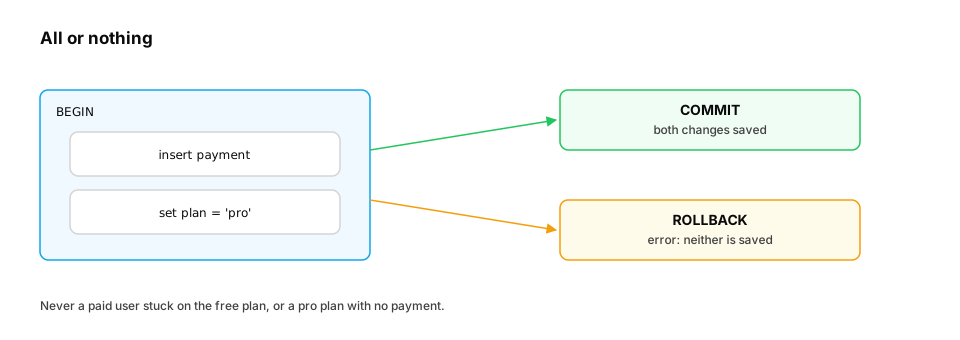
Real-life analogy. A bank transfer: money leaves one account and arrives in the other, or the whole transfer is cancelled — never only half.
Worked example.
import sqlite3

db = sqlite3.connect(":memory:")
db.executescript("""
CREATE TABLE subscriptions (user_id INTEGER PRIMARY KEY, plan TEXT NOT NULL);
CREATE TABLE payments (id TEXT PRIMARY KEY, user_id INTEGER, amount INTEGER CHECK (amount > 0));
INSERT INTO subscriptions VALUES (1, 'free');
""")

def upgrade(payment_id, amount):
    try:
        with db:                                   # one transaction: commit or roll back
            db.execute("UPDATE subscriptions SET plan = 'pro' WHERE user_id = 1")
            db.execute("INSERT INTO payments VALUES (?, 1, ?)", (payment_id, amount))
        return "committed"
    except sqlite3.IntegrityError as e:
        return f"rolled back ({e})"

print(upgrade("pay_1", 0))       # CHECK fails -> the plan change is undone too
print(db.execute("SELECT plan FROM subscriptions").fetchone())   # ('free',)
print(upgrade("pay_2", 49900))
print(db.execute("SELECT plan FROM subscriptions").fetchone())   # ('pro',)
print(upgrade("pay_2", 49900))   # same payment id again -> rejected (idempotency for free)
The last line shows a bonus: a PRIMARY KEY on the payment id makes a duplicated webhook harmless — the same trick Unrolled's payment code uses.
From production
A payment handler inserts a payment row, then calls an external email API, then sets the user's plan to 'pro', all inside one transaction. The email API sometimes hangs for 30 seconds.
What's the problem, and the better structure?
Show the answer
B. The transaction holds locks while waiting on the network, blocking other writers; do the two database writes in a short transaction and send the email after commit (ideally from a queue) — Atomicity is for the database changes that must happen together. Slow external calls inside a transaction hold locks and connections. Commit the payment and plan change together, then trigger side effects asynchronously.
4. Isolation levels: how much do concurrent transactions see?
The question. Two requests read a student's streak (5), each add 1, each write 6. The streak should be 7. What went wrong?
Start from nothing. Full isolation (serializable — as if transactions ran one after another) is safest but limits concurrency, so databases offer weaker levels. Each weaker level allows some anomalies:
| Level | Dirty read (see uncommitted data) | Non-repeatable read (value changes mid-transaction) | Lost update / write skew |
|---|---|---|---|
| Read uncommitted | possible | possible | possible |
| Read committed (PostgreSQL default) | prevented | possible | possible |
| Repeatable read / snapshot | prevented | prevented | some cases possible |
| Serializable | prevented | prevented | prevented |
Practical fixes for the streak bug: do the arithmetic in the database (UPDATE … SET streak = streak + 1), lock the row (SELECT … FOR UPDATE in PostgreSQL), or use serializable and retry on conflict.
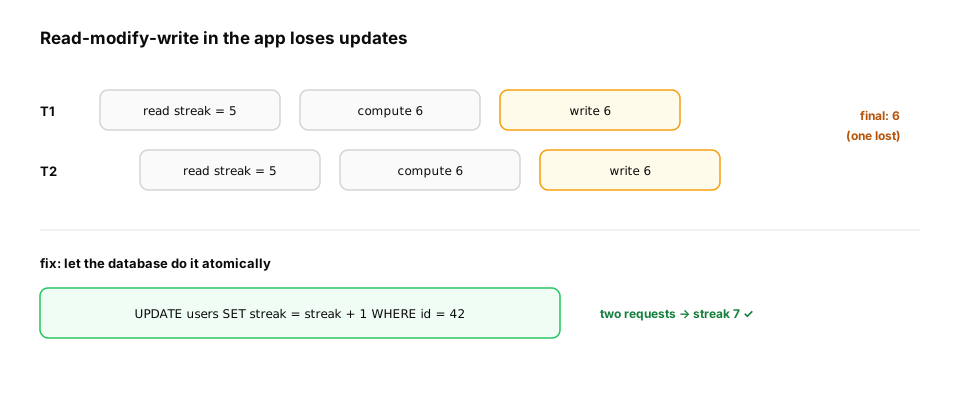
Worked example — the lost update, then the fix:
import sqlite3

db = sqlite3.connect(":memory:")
db.execute("CREATE TABLE streaks (user_id INTEGER PRIMARY KEY, days INTEGER)")
db.execute("INSERT INTO streaks VALUES (1, 5)")

# Two "requests" read first, then both write: the classic lost update
a = db.execute("SELECT days FROM streaks WHERE user_id = 1").fetchone()[0]
b = db.execute("SELECT days FROM streaks WHERE user_id = 1").fetchone()[0]
db.execute("UPDATE streaks SET days = ? WHERE user_id = 1", (a + 1,))
db.execute("UPDATE streaks SET days = ? WHERE user_id = 1", (b + 1,))
print("read-then-write:", db.execute("SELECT days FROM streaks").fetchone()[0])   # 6, wrong

db.execute("UPDATE streaks SET days = 5")
for _ in range(2):
    db.execute("UPDATE streaks SET days = days + 1 WHERE user_id = 1")           # atomic
print("atomic update  :", db.execute("SELECT days FROM streaks").fetchone()[0])   # 7
From production
Two concurrent requests each check 'does this user have fewer than 3 active API keys?' (both see 2) and both insert a new key, leaving the user with 4.
Which approach reliably enforces the limit?
Show the answer
A. Run the check and insert under SERIALIZABLE isolation and retry on serialization failure, or lock the user's row (SELECT … FOR UPDATE) before checking — Under read committed, both transactions see a consistent but stale count. Serializable isolation detects the conflict and aborts one (to be retried); a row lock makes the second request wait until the first commits.
5. Scaling: pools, replicas and partitions
The question. One database server is at 90% CPU. What are the options before rewriting everything?
Start from nothing.
- Connection pooling — opening a database connection is expensive (TCP, TLS, authentication, process setup). A pool keeps connections open and lends them out. Serverless apps especially need one (e.g. a pooler in front of PostgreSQL).
- Read replicas — copies that receive every change from the primary. Send reads to replicas, writes to the primary. Replicas usually lag slightly behind (replication lag), so "read your own write" may need the primary.
- Partitioning (sharding) — split one huge table across machines by a key (e.g.
user_id % 16). Each machine holds less data and less traffic; queries that span partitions get harder. - Caching — keep hot results in memory (Redis) with an expiry.
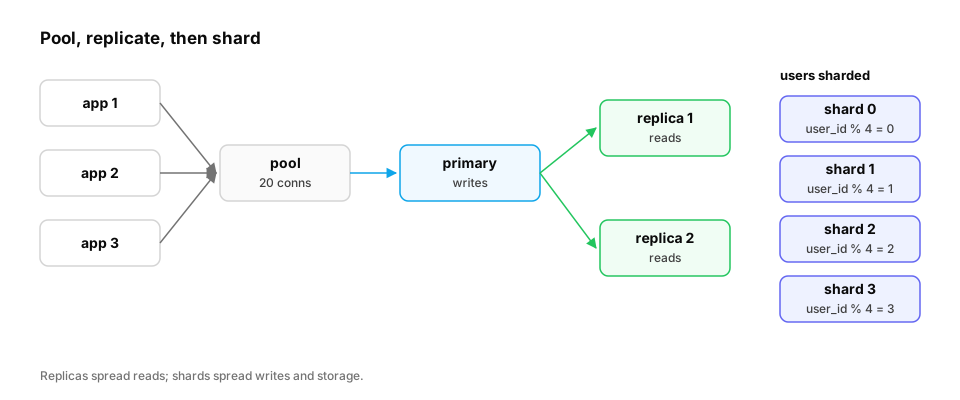
Real-life analogy. A popular library: photocopies of the reference books in each branch (replicas), and books split across buildings by author's surname (partitions).
Worked example — routing reads and writes, and picking a shard:
import hashlib

SHARDS = 4

def shard_for(user_id: str) -> int:
    digest = hashlib.sha256(user_id.encode()).digest()
    return int.from_bytes(digest[:4], "big") % SHARDS      # stable across machines

def route(sql: str) -> str:
    return "primary" if sql.lstrip().split()[0].upper() in {"INSERT", "UPDATE", "DELETE"} else "replica"

for uid in ["student-1", "student-2", "student-3", "student-4"]:
    print(uid, "-> shard", shard_for(uid))
print(route("SELECT * FROM progress"), route("UPDATE progress SET done = 1"))
Common trap. Using Python's built-in hash() for sharding: it's randomized per process, so different servers would disagree. Use a stable hash.
From production
After a user updates their profile, the next page load (served from a read replica) still shows the old profile for about a second.
What's happening, and a common fix?
Show the answer
C. Replication lag: the replica hasn't applied the write yet; route that user's reads to the primary for a short time after they write (read-your-writes), or read from the primary for that page — Replicas apply changes asynchronously, so they can be slightly behind. Read-your-writes routing (primary for a user's own recent changes) hides the lag where it matters, while other reads keep scaling out on replicas.
6. Choosing the right store for each job
The question. Should everything in an AI product go in one database?
Start from nothing. Different access patterns want different storage:
| Store | Good at | AI example |
|---|---|---|
| PostgreSQL / SQLite (row-oriented SQL) | Transactions, relations, correctness | Users, payments, progress, model registry metadata |
| Redis (in-memory key-value) | Microsecond lookups, counters, expiry | Sessions, rate-limit counters, response cache |
| Object storage (S3, GCS) | Huge files, cheap, durable | Model weights, datasets, checkpoints |
| Columnar (BigQuery, ClickHouse, Parquet files) | Scanning a few columns over billions of rows | Analytics, training-data exploration |
| Vector database (pgvector, Qdrant, …) | "Find items most similar to this embedding" | RAG retrieval (D8) |
| Data lake / warehouse | All raw + curated data in one place | Training pipelines (D16) |
A model registry ties these together: metadata (name, version, metrics, stage) in SQL, weights in object storage, referenced by URI.
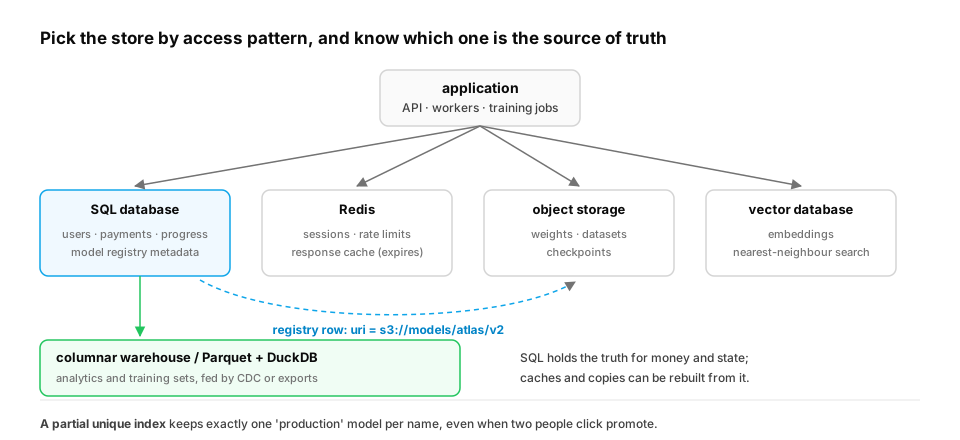
Worked example — a minimal model registry with a safe "promote" operation:
import sqlite3

db = sqlite3.connect(":memory:")
db.executescript("""
CREATE TABLE models (
  name TEXT, version INTEGER, uri TEXT NOT NULL, eval_score REAL,
  stage TEXT CHECK (stage IN ('staging', 'production', 'archived')) DEFAULT 'staging',
  PRIMARY KEY (name, version)
);
CREATE UNIQUE INDEX one_prod_per_model ON models(name) WHERE stage = 'production';
""")

def register(name, uri, score):
    version = db.execute("SELECT COALESCE(MAX(version), 0) + 1 FROM models WHERE name = ?", (name,)).fetchone()[0]
    db.execute("INSERT INTO models (name, version, uri, eval_score) VALUES (?, ?, ?, ?)", (name, version, uri, score))
    return version

def promote(name, version):
    with db:   # atomic swap: archive old production, promote the new one
        db.execute("UPDATE models SET stage = 'archived' WHERE name = ? AND stage = 'production'", (name,))
        db.execute("UPDATE models SET stage = 'production' WHERE name = ? AND version = ?", (name, version))

v1 = register("atlas-tutor", "s3://models/atlas/v1", 0.71)
v2 = register("atlas-tutor", "s3://models/atlas/v2", 0.78)
promote("atlas-tutor", v1)
promote("atlas-tutor", v2)
for row in db.execute("SELECT version, stage, eval_score FROM models ORDER BY version"):
    print(row)      # (1, 'archived', 0.71) (2, 'production', 0.78)
The partial unique index guarantees there's never more than one production model, even if two people click "promote" at once.
Quick check
Two requests read a student's credit balance (100), each subtract 10, and write back 90. What went wrong and what fixes it?
Show the answer
A. A lost update under concurrent read-modify-write; use an atomic UPDATE (credits = credits - 10), a row lock, or serializable isolation — Both transactions computed from the same stale read; atomic updates or locking serialize the changes so the result is 80.
Check yourself
- Recall: What does the "A" in ACID guarantee?
- Apply: Reads are 95% of your traffic and the database is overloaded. First move?
- Predict: In section 3, what does the third
upgrade("pay_2", …)call return?
Answers
- Atomicity — all of a transaction's changes happen, or none do.
- Add indexes for the hot queries and a cache/read replicas for reads (after checking query plans).
rolled back (UNIQUE constraint failed: payments.id)— the duplicate payment id is rejected and nothing changes.
Exercise
Extend the model registry with rollback(name) that re-promotes the most recent archived version, and a history(name) query that returns versions with stage and score, newest first. Make rollback atomic and make it raise an error if there's nothing to roll back to.
Solution
import sqlite3

db = sqlite3.connect(":memory:")
db.executescript("""
CREATE TABLE models (name TEXT, version INTEGER, uri TEXT, eval_score REAL,
  stage TEXT DEFAULT 'staging', PRIMARY KEY (name, version));
CREATE UNIQUE INDEX one_prod ON models(name) WHERE stage = 'production';
INSERT INTO models VALUES ('atlas', 1, 's3://v1', 0.71, 'archived'),
                          ('atlas', 2, 's3://v2', 0.78, 'production');
""")

def rollback(name):
    with db:
        prev = db.execute("""SELECT version FROM models WHERE name = ? AND stage = 'archived'
                             ORDER BY version DESC LIMIT 1""", (name,)).fetchone()
        if prev is None:
            raise ValueError("no archived version to roll back to")
        db.execute("UPDATE models SET stage = 'archived' WHERE name = ? AND stage = 'production'", (name,))
        db.execute("UPDATE models SET stage = 'production' WHERE name = ? AND version = ?", (name, prev[0]))

def history(name):
    return db.execute("SELECT version, stage, eval_score FROM models WHERE name = ? ORDER BY version DESC",
                      (name,)).fetchall()

rollback("atlas")
print(history("atlas"))   # [(2, 'archived', 0.78), (1, 'production', 0.71)]
This unlocks:
- D2 Linear algebra — how a database can store meaning: as vectors.
- D8 Vector databases — indexes built for similarity instead of equality.
- D11 ML platform tools — real model registries (MLflow) and feature stores.
- D14 Distributed storage — replication and partitioning in depth.
Sources: SQLite docs — "Query Planning", "EXPLAIN QUERY PLAN", "Write-Ahead Logging", "Partial Indexes"; PostgreSQL docs — "Transaction Isolation"; Kleppmann, Designing Data-Intensive Applications (ch. 3, 5–7).