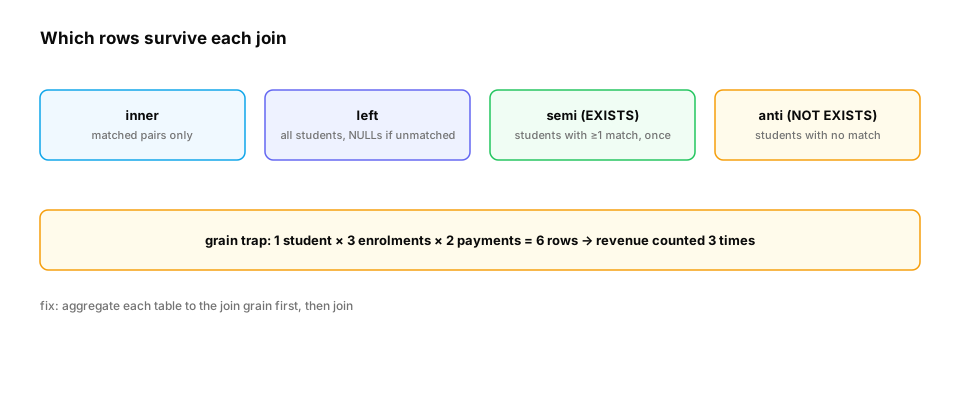
The incident. Revenue per country is computed by joining payments to enrolments to students. The total comes out more than twice as high as finance's number. Each payment matched every enrolment of the same student, so a student with three enrolments counted each payment three times. The join was correct SQL; the grain was wrong.
You already know: SELECT, WHERE and NULL (SQL basics); hash maps (Data structures).
1. Inner and left joins
The question. How do you combine rows from two tables?
Start from nothing. A join pairs rows from two tables that satisfy a condition (usually key equality). An inner join keeps only matched pairs. A left join keeps every row of the left table, filling the right side with NULLs when there's no match, which is how you keep "students with zero enrolments" in a report. A condition on the right table placed in WHERE turns a left join back into an inner join (NULLs fail the filter); put it in the ON clause instead.
import sqlite3

db = sqlite3.connect(":memory:")
db.executescript("""
CREATE TABLE students (id INTEGER PRIMARY KEY, name TEXT);
CREATE TABLE enrolments (student_id INT, course TEXT, status TEXT);
INSERT INTO students VALUES (1,'Asha'),(2,'Ben'),(3,'Chen'),(4,'Dana');
INSERT INTO enrolments VALUES (1,'ML101','active'),(1,'SQL1','done'),(2,'ML101','dropped'),(4,'LLM2','active');
""")
show = lambda q: print([tuple(r) for r in db.execute(q)])
show("SELECT s.name, e.course FROM students s JOIN enrolments e ON e.student_id = s.id ORDER BY s.id")
show("SELECT s.name, e.course FROM students s LEFT JOIN enrolments e ON e.student_id = s.id ORDER BY s.id")
show("""SELECT s.name, e.course FROM students s LEFT JOIN enrolments e ON e.student_id = s.id
        WHERE e.status = 'active' ORDER BY s.id""")
show("""SELECT s.name, e.course FROM students s LEFT JOIN enrolments e ON e.student_id = s.id AND e.status = 'active'
        ORDER BY s.id""")
The third query lost Ben and Chen: the WHERE filter on e.status rejected their NULL rows. Moving the condition into ON keeps every student and attaches only active enrolments.
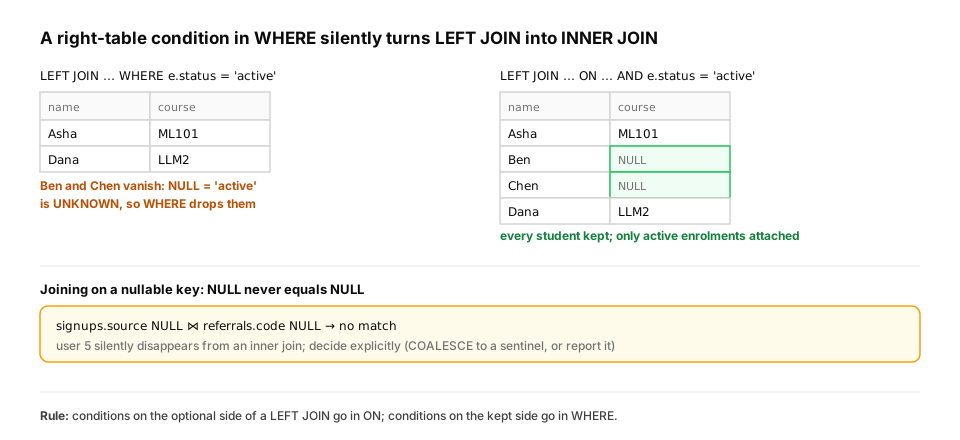
A real-world example: funnels and nullable join keys. Product analytics asks "who signed up but never did X?" all the time. That's a left join where the right side is missing. The other trap is joining on a column that can be NULL: NULL never equals anything, not even another NULL, so those rows silently fall out of the join.
import sqlite3

db = sqlite3.connect(":memory:")
db.executescript("""
CREATE TABLE signups (user_id INT, source TEXT);
CREATE TABLE api_calls (user_id INT, day TEXT);
CREATE TABLE referrals (code TEXT, owner TEXT);
INSERT INTO signups VALUES (1,'ads'),(2,'blog'),(3,'ads'),(4,'partner'),(5,NULL);
INSERT INTO api_calls VALUES (1,'2026-03-01'),(1,'2026-03-02'),(3,'2026-03-05');
INSERT INTO referrals VALUES ('ads','growth team'),(NULL,'unknown');
""")
never_called = db.execute("""
SELECT s.user_id, s.source FROM signups s
LEFT JOIN api_calls c ON c.user_id = s.user_id
WHERE c.user_id IS NULL                         -- anti join written as LEFT JOIN … IS NULL
ORDER BY s.user_id""").fetchall()
print("signed up, never called the API:", never_called)

matched = db.execute("SELECT s.user_id, r.owner FROM signups s JOIN referrals r ON r.code = s.source ORDER BY s.user_id").fetchall()
print("join on a nullable key:", matched)       # user 5 (source NULL) doesn't match the NULL code
- Users 2, 4 and 5 signed up but never called the API:
[(2, 'blog'), (4, 'partner'), (5, None)]. HereWHERE c.user_id IS NULLis correct on purpose: it keeps exactly the rows where the left join found no match. Test the right table's join key, not a nullable data column. - Joining signups to referrals returns only users 1 and 3. User 5 has a NULL source and the referrals table has a NULL code, but
NULL = NULLis UNKNOWN, so they don't match, and user 5 is simply gone. Decide what NULL should mean (COALESCE to an'unknown'sentinel on both sides, or report missing sources separately) instead of letting the join decide for you.
In production. Funnel queries (signed up → activated → paid), churn lists and "items with no embeddings yet" backfill jobs are all left-join-and-check-for-missing queries. Warehouses add explicit syntax for the semi and anti shapes. Spark SQL, for example, supports
LEFT SEMI JOINandLEFT ANTI JOIN. Whatever the spelling, the question is the same: keep the left rows, then ask about what's missing on the right.
From production
A dashboard lists 'customers and their open support tickets' with customers c LEFT JOIN tickets t ON t.customer_id = c.id WHERE t.status = 'open'. Customers with no open tickets disappear from the list.
What's the fix?
Show the answer
C. Move t.status = 'open' into the ON clause, so unmatched customers keep their row with NULL ticket columns — For customers without open tickets, the right side is NULL, and NULL = 'open' is UNKNOWN, so WHERE removes them. A condition in ON only limits which tickets attach; the left rows stay.
2. Semi and anti joins: "has any" and "has none"
The question. How do you find students who have at least one enrolment, or none?
Start from nothing. A semi join keeps left rows that have at least one match, each once; an anti join keeps left rows with no match. SQL expresses them with EXISTS and NOT EXISTS (or IN / NOT IN, with the NULL caveat from the last lesson). Writing a semi join as an inner join duplicates rows when there are several matches, which is the root of many inflated counts; DISTINCT hides the symptom but costs a sort and is easy to forget.
import sqlite3

db = sqlite3.connect(":memory:")
db.executescript("""
CREATE TABLE students (id INTEGER PRIMARY KEY, name TEXT);
CREATE TABLE enrolments (student_id INT, course TEXT, status TEXT);
INSERT INTO students VALUES (1,'Asha'),(2,'Ben'),(3,'Chen'),(4,'Dana');
INSERT INTO enrolments VALUES (1,'ML101','active'),(1,'SQL1','done'),(2,'ML101','dropped'),(4,'LLM2','active');
""")
q_inner = "SELECT s.name FROM students s JOIN enrolments e ON e.student_id = s.id"
q_semi = "SELECT s.name FROM students s WHERE EXISTS (SELECT 1 FROM enrolments e WHERE e.student_id = s.id)"
q_anti = "SELECT s.name FROM students s WHERE NOT EXISTS (SELECT 1 FROM enrolments e WHERE e.student_id = s.id)"
for label, q in [("inner join (duplicates!)", q_inner), ("semi join (EXISTS)", q_semi), ("anti join (NOT EXISTS)", q_anti)]:
    print(f"{label:<26}", [r[0] for r in db.execute(q)])
The inner join returns ['Asha', 'Asha', 'Ben', 'Dana'], with Asha once per enrolment. The semi join returns each enrolled student once, ['Asha', 'Ben', 'Dana'], and the anti join returns the only student with no enrolment, ['Chen'].
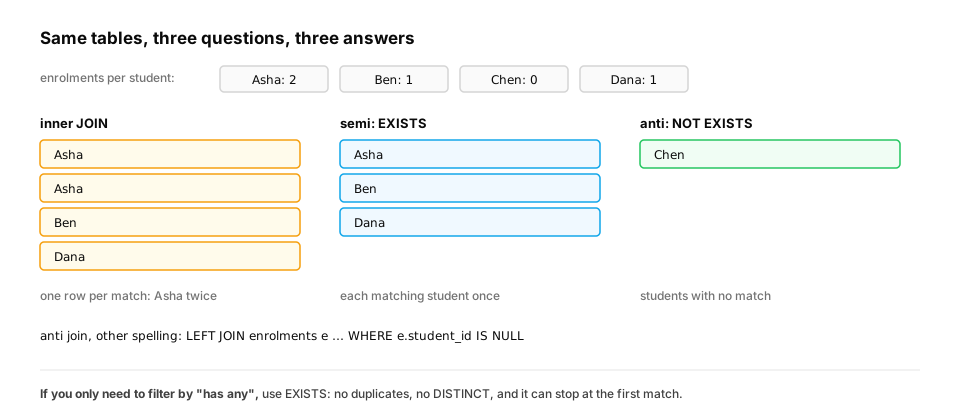
In production. EXISTS can also be cheaper: the database can stop at the first match per row instead of producing every match and then de-duplicating. Feature pipelines lean on this shape constantly, for example "users who opened at least one email in the last 7 days" as a binary feature, where an inner join would silently turn into a count and change the feature's meaning.
Quick check
You need 'students who completed at least one course'. Which query shape is correct and avoids duplicates?
Show the answer
D. SELECT s.* FROM students s WHERE EXISTS (SELECT 1 FROM enrolments e WHERE e.student_id = s.id AND e.status = 'done') — EXISTS is a semi join: each student appears once however many completed courses they have. The inner join returns one row per completed course.
3. Grain: why joins inflate totals
The question. Why did revenue come out more than twice too high?
Start from nothing. Every table has a grain: what one row represents (one payment, one enrolment). Joining two tables on a key that isn't unique on either side multiplies rows: each payment pairs with each enrolment of the same student. Summing a measure after such a join double-counts it. The fix is to aggregate each table to the join grain first (payments per student, then join), or to join on a key that's unique on one side. Before trusting any join, check the row count against the grain you expect.
import sqlite3

db = sqlite3.connect(":memory:")
db.executescript("""
CREATE TABLE students (id INTEGER PRIMARY KEY, name TEXT, country TEXT);
CREATE TABLE enrolments (student_id INT, course TEXT);
CREATE TABLE payments (student_id INT, amount REAL);
INSERT INTO students VALUES (1,'Asha','IN'),(2,'Ben','GB'),(3,'Chen','CN');
INSERT INTO enrolments VALUES (1,'ML101'),(1,'SQL1'),(1,'LLM2'),(2,'ML101'),(3,'SQL1'),(3,'ML101');
INSERT INTO payments VALUES (1,30),(1,30),(2,30),(3,30);
""")
true_total = db.execute("SELECT SUM(amount) FROM payments").fetchone()[0]
wrong = db.execute("""SELECT SUM(p.amount) FROM payments p
    JOIN enrolments e ON e.student_id = p.student_id JOIN students s ON s.id = p.student_id""").fetchone()[0]
right = db.execute("""SELECT SUM(per.total) FROM (SELECT student_id, SUM(amount) AS total FROM payments GROUP BY student_id) per
    JOIN students s ON s.id = per.student_id""").fetchone()[0]
print(f"true revenue {true_total}, after a join through enrolments {wrong} ({wrong / true_total:.1f}x), aggregate-then-join {right}")
The payments add up to 120.0. After the join through enrolments, the same payments sum to 270.0 (2.2x): Asha's two payments each pair with her three enrolments (six rows), and Chen's payment pairs with his two enrolments. Aggregating payments per student first and then joining gives 120.0 again.
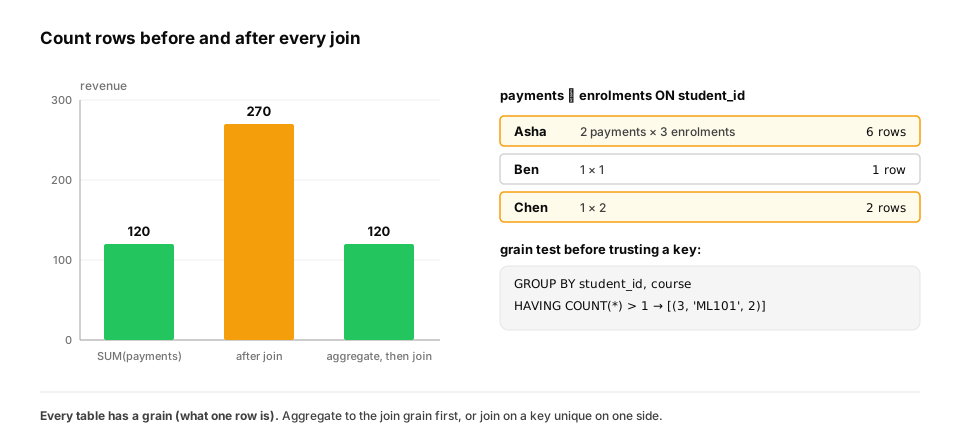
How teams catch fan-out before it reaches a dashboard: grain tests. Two cheap checks find almost every fan-out bug. Assert that the key you believe is unique really is. And compare row counts before and after each join:
import sqlite3

db = sqlite3.connect(":memory:")
db.executescript("""
CREATE TABLE enrolments (student_id INT, course TEXT);
INSERT INTO enrolments VALUES (1,'ML101'),(1,'SQL1'),(1,'LLM2'),(2,'ML101'),(3,'SQL1'),(3,'ML101'),(3,'ML101');
""")
# Grain test 1: is (student_id, course) really unique, as the report assumes?
dupes = db.execute("""SELECT student_id, course, COUNT(*) FROM enrolments
                      GROUP BY student_id, course HAVING COUNT(*) > 1""").fetchall()
print("duplicate keys:", dupes)

# Grain test 2: does a join keep the row count you expect?
before = db.execute("SELECT COUNT(*) FROM enrolments").fetchone()[0]
after = db.execute("""SELECT COUNT(*) FROM enrolments e
                      JOIN enrolments e2 ON e2.student_id = e.student_id""").fetchone()[0]
print(f"rows before join {before}, after joining on student_id {after}")
The first test finds a duplicate that "shouldn't exist": [(3, 'ML101', 2)], student 3 enrolled in ML101 twice (a double-submitted form, say). The second shows 7 rows turning into 19 after a join on a non-unique key. Any join whose output count you can't explain is a bug until proven otherwise.
In production. Analytics teams encode these checks as tests that run on every model build. dbt, a widely used SQL transformation tool, ships generic tests named
unique,not_nullandrelationshipsfor exactly this. Pipeline jobs often log row counts at each step, so a sudden 2× after a join shows up in monitoring before the numbers reach anyone else.
From production
A daily table of 'one row per user per day' starts showing about 3% more rows than active users. Revenue per user on the dashboard creeps up.
What's the best first diagnostic?
Show the answer
D. Run a grain test: GROUP BY user_id, day HAVING COUNT(*) > 1, then inspect which upstream join produced the duplicates — The symptom (more rows than the grain allows, inflated sums) is fan-out. Finding the duplicated keys shows which join multiplied rows. DISTINCT would hide the symptom without fixing the cause, and can't repair already-inflated sums.
4. Subqueries vs joins
The question. Should you write a subquery or a join?
Start from nothing. They often express the same thing, and modern planners frequently rewrite one into the other, so choose for clarity and correct grain first. Use joins when you need columns from both sides; EXISTS for filters ("has any"); a subquery in FROM (a derived table or CTE) to aggregate before joining; and correlated subqueries (re-evaluated per row) sparingly, checking the plan when tables are large (Query plans lesson).
Here is a common question, "each student's latest enrolment", written both ways:
import sqlite3

db = sqlite3.connect(":memory:")
db.executescript("""
CREATE TABLE enrolments (student_id INT, course TEXT, started TEXT);
INSERT INTO enrolments VALUES (1,'ML101','2026-01-05'),(1,'SQL1','2026-02-10'),(1,'LLM2','2026-03-02'),
                              (2,'ML101','2026-02-01'),(3,'SQL1','2026-01-20'),(3,'ML101','2026-03-09');
""")
correlated = """
SELECT e.student_id, e.course FROM enrolments e
WHERE e.started = (SELECT MAX(e2.started) FROM enrolments e2 WHERE e2.student_id = e.student_id)
ORDER BY e.student_id"""
aggregate_then_join = """
SELECT e.student_id, e.course FROM enrolments e
JOIN (SELECT student_id, MAX(started) AS last FROM enrolments GROUP BY student_id) m
  ON m.student_id = e.student_id AND m.last = e.started
ORDER BY e.student_id"""
a, b = db.execute(correlated).fetchall(), db.execute(aggregate_then_join).fetchall()
print(a)
print("same answer:", a == b)
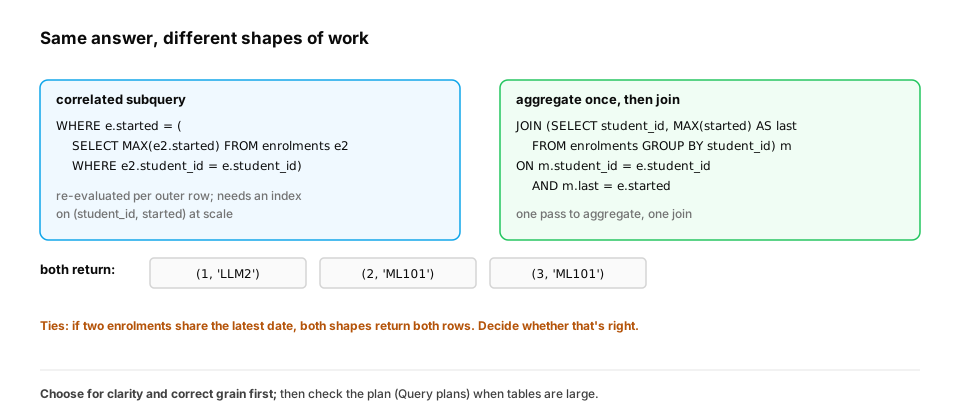
Both return [(1, 'LLM2'), (2, 'ML101'), (3, 'ML101')] (same answer: True). Notice what both versions do with ties: if a student had two enrolments on their latest date, both rows would come back. Sometimes that's right, and sometimes you need a tie-breaker. The Window functions lesson shows ROW_NUMBER(), the third and most common way to write "latest per group", which lets you pick exactly one row.
In production. "Latest record per entity" is everywhere: a user's current plan, the latest model version per name in a registry (Databases), the most recent embedding per document. When the correlated version is slow on a big table, the usual fixes are an index on
(student_id, started)or one of the set-based rewrites above. CheckEXPLAINinstead of guessing (Query plans).
Quick check
A correlated subquery WHERE e.started = (SELECT MAX(...) WHERE e2.student_id = e.student_id) is slow on a 200-million-row table. Which change most directly helps?
Show the answer
D. An index on (student_id, started), or a set-based rewrite (aggregate once and join, or a window function), then confirm with EXPLAIN — Without an index, each outer row may trigger a scan of the inner table. A composite index lets each MAX be found directly. A set-based rewrite computes all the maxima in one pass. EXPLAIN shows which one the planner actually uses.
Check yourself
- Why can a WHERE condition on the right table turn a left join into an inner join?
- What do semi and anti joins return, and how are they written in SQL?
- What is a table's grain, and how do joins inflate sums?
- When is a subquery in FROM the right choice?
- Why does a join on a nullable column silently drop rows?
- What two quick checks catch fan-out before it reaches a report?
Answers
- Unmatched rows have NULLs on the right side; the WHERE condition evaluates to UNKNOWN for them and removes them. Put the condition in ON instead.
- Semi: left rows with at least one match, once each (EXISTS). Anti: left rows with no match (NOT EXISTS).
- What one row represents. Joining on a non-unique key multiplies rows, so a measure summed afterwards is counted once per match.
- When you need to aggregate one table to the join grain before joining (or to keep a complex step readable).
- NULL compares as UNKNOWN to everything, including another NULL, so rows with NULL keys never match.
- Assert the key you rely on is unique (GROUP BY key HAVING COUNT(*) > 1), and compare row counts before and after each join.
Exercise
Using students, enrolments and payments from section 3, write one query that returns, for each country, the number of students, the number of enrolments and total revenue, all correct. Then show what a single three-way join with COUNT(*) and SUM(amount) would have reported instead.
Solution
import sqlite3

db = sqlite3.connect(":memory:")
db.executescript("""
CREATE TABLE students (id INTEGER PRIMARY KEY, name TEXT, country TEXT);
CREATE TABLE enrolments (student_id INT, course TEXT);
CREATE TABLE payments (student_id INT, amount REAL);
INSERT INTO students VALUES (1,'Asha','IN'),(2,'Ben','GB'),(3,'Chen','CN'),(4,'Dev','IN');
INSERT INTO enrolments VALUES (1,'ML101'),(1,'SQL1'),(1,'LLM2'),(2,'ML101'),(3,'SQL1'),(3,'ML101');
INSERT INTO payments VALUES (1,30),(1,30),(2,30),(3,30);
""")
correct = """
WITH e AS (SELECT student_id, COUNT(*) AS n_enrol FROM enrolments GROUP BY student_id),
     p AS (SELECT student_id, SUM(amount) AS revenue FROM payments GROUP BY student_id)
SELECT s.country, COUNT(*) AS students, COALESCE(SUM(e.n_enrol), 0) AS enrolments, COALESCE(SUM(p.revenue), 0) AS revenue
FROM students s LEFT JOIN e ON e.student_id = s.id LEFT JOIN p ON p.student_id = s.id
GROUP BY s.country ORDER BY s.country
"""
naive = """
SELECT s.country, COUNT(*) AS students, COUNT(e.course) AS enrolments, SUM(p.amount) AS revenue
FROM students s LEFT JOIN enrolments e ON e.student_id = s.id LEFT JOIN payments p ON p.student_id = s.id
GROUP BY s.country ORDER BY s.country
"""
print("correct:", db.execute(correct).fetchall())
print("naive:  ", db.execute(naive).fetchall())
Aggregating enrolments and payments to one row per student before joining keeps every measure at the student grain, so the country totals are right, and the left joins keep Dev, who has no enrolments or payments. The naive version multiplies India's rows (Asha's 3 enrolments × 2 payments), reporting 7 "students" and $180 of revenue where the truth is 2 students and $60.
This unlocks:
- Aggregation — GROUP BY and HAVING at the right grain.
- Window functions — per-row calculations over related rows without collapsing them.