Problem. Rotate an n × n matrix 90° clockwise, in place.
1 2 3        7 4 1
4 5 6   →    8 5 2
7 8 9        9 6 3
ML context. Images are matrices (or tensors with channels). Rotating them is standard data augmentation, and
understanding "rotation = transpose + flip" is exactly how NumPy and PyTorch implement rot90 with views that
don't copy pixels. It's also your first 2D index-mapping problem, which comes up again in convolutions and tiling.
1. Step 1: Clarify
| Question | Answer | Why it matters |
|---|---|---|
| Square? | Yes, n × n | In-place only works for squares |
| Clockwise? | Yes | Counter-clockwise flips the mirror step |
| In place? | Yes, O(1) extra | Rules out building a new matrix |
| n? | Up to 10³ | n² = 10⁶ cells: O(n²) is necessary and fine |
Every cell must move, so O(n²) time is a lower bound. The question is purely about memory and getting the indices right.
2. Step 2: Brute force: build a new matrix
First principles: where does each cell go? Rotating clockwise, row i becomes column n − 1 − i. So the value
at (i, j) moves to (j, n − 1 − i).
def rotate_copy(m):
    n = len(m)
    out = [[0] * n for _ in range(n)]
    for i in range(n):
        for j in range(n):
            out[j][n - 1 - i] = m[i][j]       # (i, j) → (j, n − 1 − i)
    m[:] = out                                # O(n²) extra memory


m = [[1, 2, 3], [4, 5, 6], [7, 8, 9]]
rotate_copy(m)
assert m == [[7, 4, 1], [8, 5, 2], [9, 6, 3]]
print("copy version works: O(n²) time, O(n²) extra space")
O(n²) time is optimal, but O(n²) extra space breaks the in-place constraint. For a 4096 × 4096 image of floats, that's 128 MB of extra memory per rotation.
3. Step 3: Optimise: decompose the rotation
Optimisation 1: transpose, then reverse each row
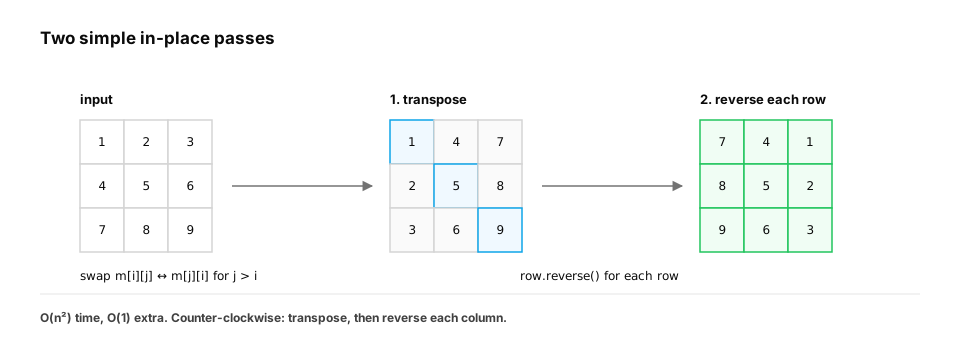
First principles. The mapping (i, j) → (j, n − 1 − i) is two simpler moves:
- Transpose:
(i, j) → (j, i): swap across the main diagonal. - Mirror left–right:
(j, i) → (j, n − 1 − i): reverse each row.
Both are easy in place: a transpose swaps pairs (i, j) and (j, i) with j > i; reversing a row swaps from both
ends.
import random


def rotate(m):
    n = len(m)
    for i in range(n):
        for j in range(i + 1, n):             # only above the diagonal, or we'd swap back
            m[i][j], m[j][i] = m[j][i], m[i][j]
    for row in m:
        row.reverse()


def rotate_reference(m):
    n = len(m)
    return [[m[n - 1 - j][i] for j in range(n)] for i in range(n)]


m = [[1, 2, 3], [4, 5, 6], [7, 8, 9]]
rotate(m)
assert m == [[7, 4, 1], [8, 5, 2], [9, 6, 3]]
rng = random.Random(24)
for _ in range(300):
    n = rng.randint(1, 7)
    case = [[rng.randint(0, 99) for _ in range(n)] for _ in range(n)]
    got = [row[:] for row in case]
    rotate(got)
    assert got == rotate_reference(case)
print("transpose + reverse rows: O(n²) time, O(1) extra")
- Time: O(n²). Extra space: O(1).
- The classic bug: looping
jover the whole row swaps each pair twice and undoes the transpose. Start ati + 1.
Quick check
Why must the transpose loop use j in range(i + 1, n) and not range(n)?
Show the answer
B. Looping over every j swaps each pair (i, j) and (j, i) twice, which undoes the transpose — Each off-diagonal pair should be swapped exactly once; the upper triangle visits each pair once.
Optimisation 2: four-way swaps, layer by layer
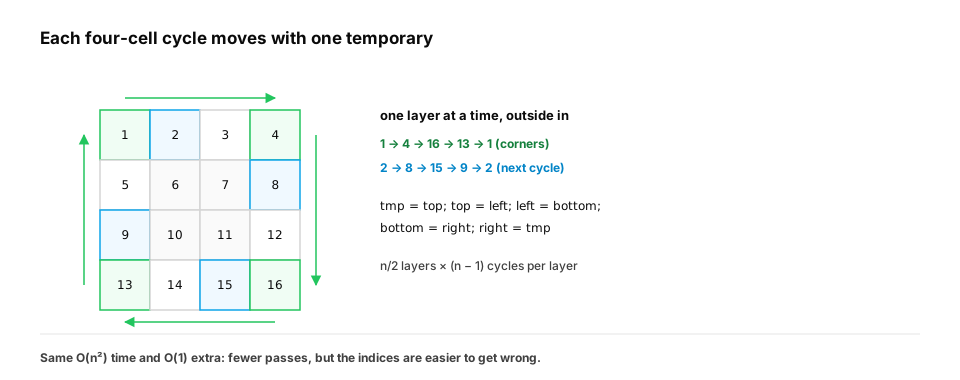
A clockwise rotation moves cells in cycles of four: in a 4 × 4 matrix, the corners 1 → 4 → 16 → 13 → 1. Rotate one cycle with one temporary variable. Do this for every cycle in the outer layer, then the next layer in.
import random


def rotate_layers(m):
    n = len(m)
    for layer in range(n // 2):
        first, last = layer, n - 1 - layer
        for k in range(first, last):
            offset = k - first
            top = m[first][k]
            m[first][k] = m[last - offset][first]          # left → top
            m[last - offset][first] = m[last][last - offset]   # bottom → left
            m[last][last - offset] = m[k][last]            # right → bottom
            m[k][last] = top                               # top → right


def rotate_reference(m):
    n = len(m)
    return [[m[n - 1 - j][i] for j in range(n)] for i in range(n)]


rng = random.Random(25)
for _ in range(300):
    n = rng.randint(1, 7)
    case = [[rng.randint(0, 99) for _ in range(n)] for _ in range(n)]
    got = [row[:] for row in case]
    rotate_layers(got)
    assert got == rotate_reference(case)
print("four-way swaps: O(n²) time, O(1) extra, each cell written once")
Same Big-O, but each cell is written once instead of about twice. The price is much trickier indices. In an interview, transpose-and-reverse is the safer default; mention the layer method as the "fewer writes" option.
4. When the constraints change
| If the constraint becomes… | Best approach | Time | Extra space |
|---|---|---|---|
| Classic, square, in place | Transpose + reverse rows | O(n²) | O(1) |
| Fewest writes | Four-way swaps per layer | O(n²), one write per cell | O(1) |
| Counter-clockwise | Transpose + reverse each column (or reverse rows first) | O(n²) | O(1) |
| 180° | Reverse the row order, then each row | O(n²) | O(1) |
| Rectangular m × n | New n × m matrix (in place is impossible) | O(m·n) | O(m·n) |
| Images / tensors | np.rot90 / torch.rot90 (views + copy on demand) |
O(1) view, O(m·n) to materialise | — |
| Only reads needed | Index map (i, j) → m[n − 1 − j][i] |
O(1) per read | O(1) |
Change A: the matrix is rectangular
An m × n matrix becomes n × m: the shape changes, so it can't be done in the same list of lists. Build a new one with
the index map. (zip(*m[::-1]) is the Python one-liner.)
def rotate_rect(m):
    return [list(row) for row in zip(*m[::-1])]     # reverse rows, then transpose


assert rotate_rect([[1, 2, 3], [4, 5, 6]]) == [[4, 1], [5, 2], [6, 3]]
print("rectangle: shape (2, 3) → (3, 2), needs a new matrix")
Change B: images in NumPy
np.rot90 doesn't move pixels: it returns a view, a new shape and strides over the same memory, exactly the
"transpose + flip" decomposition. Data moves only when you need a contiguous copy.
import numpy as np

img = np.arange(9).reshape(3, 3)
r = np.rot90(img, k=-1)                          # k = -1: clockwise
assert r.tolist() == [[6, 3, 0], [7, 4, 1], [8, 5, 2]]
assert np.shares_memory(r, img)                  # a view: no pixels copied
assert np.array_equal(r, img.T[:, ::-1])         # transpose, then mirror left–right

batch = np.zeros((32, 3, 64, 64))                # (batch, channels, height, width)
assert np.rot90(batch, k=-1, axes=(2, 3)).shape == (32, 3, 64, 64)   # rotate only H and W
print("np.rot90 is a strided view; pick the axes for image batches")
For a batch of images, pass axes=(2, 3) so you rotate the height and width, not the batch or channel axes. That's
a common augmentation bug.
Quick check
Why can't a 2 × 3 matrix be rotated 90° in place in the same list of lists?
Show the answer
A. Rotation turns an m × n shape into n × m, so the rows themselves change length and count; the result needs a new structure — In-place rotation depends on the shape staying the same, which only happens for squares.
5. Saying it out loud
"Every cell moves, so O(n²) is required; the question is memory. The cell at (i, j) goes to (j, n − 1 − i), which is a transpose followed by reversing each row, both in place: O(n²) time, O(1) extra. If writes were expensive I'd rotate four-cell cycles layer by layer. For rectangles you need a new matrix; for images, np.rot90 gives a view without copying."
Check yourself
- Where does cell (i, j) go in a clockwise rotation?
- Why is O(n²) time unavoidable?
- What two in-place steps make a clockwise rotation?
- What bug does a full
jloop in the transpose cause? - Why is in-place rotation impossible for rectangles?
- What does
np.rot90return, and which axes should you rotate for an image batch?
Answers
- To (j, n − 1 − i).
- Every one of the n² cells changes position (except possibly the centre), so each must be touched.
- Transpose (swap across the diagonal), then reverse each row.
- Each pair is swapped twice, undoing the transpose.
- The shape changes from m × n to n × m.
- A view over the same memory (new strides, no copy); rotate the height and width axes, e.g.
axes=(2, 3)for (batch, channels, height, width).